
Still Waiting for Windows 10 Upgrade?
Are you still waiting for free Windows 10 upgrade to download and install on your computer? Well Windows 10 is downloading in the background as part of Windows update. Since Windows 10 is a huge 2.7 GB upgrade, the downloading process can be slow.
Since most people are on slow internet connections, a few GB can take weeks to download and the software download does not want to choke bandwidth out of your internet connection also. It will remind the user that Windows 10 is ready for install only when the full software download has happened.
Also Windows 10 is rolling out slowly across the world, after all it is the largest software upgrade in the histoty of the web, and over a billion devices are expected to update. I hope you have got the Get Windows 10 app set up, as that will help to ping Microsoft that your computer is expecting a Windows 10 download. If you do not set up the app, you might be at the end of the queue.
Check Windows 10 is Downloading
Click the Windows Icon in you right lower bar (if you followed the Get Windows 10 app instructions, it should be there). This time the pop up windows will indicate that the Download is “In Progress” – yay! It means your computer is eligible and the process has started.

If you click on button below titled “View Download Progress”, then it will take you to the Windows Update screen, and will show how much of Windows 10 has downloaded. As you see here, only 1% of the 2712.6 MB has downloaded … so it going to take some time.

So when it is done, you will get a pop up like this
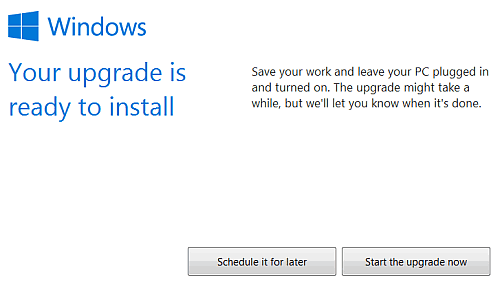
You can choose to schedule the installation later, or choose to upgrade now. If you click “Start the Upgade Now”, then the installation will start. It takes about an hour and the next time your computer restarts, it will have the brand new Windows 10.
Note: The first Windows 10 update failed and I read up some Windows 10 failed update articles. I removed a pen drive attached to the computer, and turned off my Norton internet Security software. The second time upgrade happened without a hitch, though it downloaded the entire 2.7 GB again!
Check now, if your download has started.
Stuck on a gift? Try our free Gift Idea GeneratorIdeas for anyone by age, job, interests and budget, with Amazon.com and Amazon.in linksFind gifts →Get our free weekly email: new tech guides and tools, no spam.
New and updated tech guides, a free tool worth bookmarking and one useful pick, once a week. No spam, unsubscribe anytime.
One email a week. Unsubscribe anytime. See our privacy policy.



Hi I installed windows 10. But in update settings where updates are automatically installing..Where can i find option to notify about updates ………….
Admin, Do send me working steps of downgrading to my old windows 8 from inbuilt windows 10 OS System ?. I really enjoyed my time with my windows 8 than windows 10.
Is there any way to downgrade to windows 7 from in built windows 10 OS in my new Lenovo System ?
Waiting for your reply !
Thanks.
Run the Windows 10 installer. Honestly, it’s pretty hard to screw this part up. Once you start the installer, Microsoft will hold your hand through the setup process. Make sure to choose the “Keep personal files and apps” option if you want to retain both while upgrading
It takes me three days to update to windows 10. Really its slow.
I think windows 10 is only available for Windows 8.1 not for windows 8. That means I need to upgrade twice.
I just installed windows 10 on my PC and this is really great.
i am facing some errors when i am going to update my windows 7 OS. need help
Yes. the updating system of windows 10 is very disgusting to me. It need a huge 2.7 GB update.
“The recommendation is to be patient.”
I think too.
How can I my update window. I use window 7 . can you please steps because my window 7 are not updated
Windows 10 has a really cool themes! Do upgrade.
I have update windows 10 its downloading process is slow but the experience of using windows 10 is awesome..
The recommendation is to be patient.
window 10 is a good change in technology field and easy to use.
my windows 7 are not update, plz help me