
How to Create a Google News Sitemap (2026 Guide + WordPress Plugins)
Want your articles to appear in Google News? A Google News sitemap tells Google about your newest articles quickly, so they can be found and shown in Google News and the Top Stories section of search. When we first wrote about it in 2009, Google News required every article URL to contain a three-digit number unless you had a news sitemap. Here’s how to create a Google News sitemap in 2026, with and without WordPress plugins.

Quick answer: A Google News sitemap is an XML sitemap that lists only articles published in the last two days (up to 1,000), with extra news: tags for your publication name, language, publication date and headline. On WordPress, a plugin can generate it automatically. Submit it in Google Search Console under Sitemaps.
Table of Contents
Do you still need to apply to Google News?
No. Google stopped taking applications for Google News in 2019. Sites are now considered automatically if they publish timely, original news and follow Google News policies. You can optionally use the Google Publisher Center to manage how your publication appears. The old three-digit URL rule is also long gone.
Google News sitemap rules
According to Google’s news sitemap documentation:
- Include only articles published in the last two days. Remove older ones or their news tags.
- Each news sitemap can contain up to 1,000 news URLs. Split into more sitemaps if needed.
- Required tags:
<news:publication>with<news:name>(matching your name in Google News) and<news:language>, plus<news:publication_date>and<news:title>. - Update the sitemap as soon as you publish new articles, rather than creating a new sitemap each time.
Google News sitemap example
<?xml version="1.0" encoding="UTF-8"?>
<urlset xmlns="http://www.sitemaps.org/schemas/sitemap/0.9"
        xmlns:news="http://www.google.com/schemas/sitemap-news/0.9">
  <url>
    <loc>https://www.example.com/2026/10/article-name/</loc>
    <news:news>
      <news:publication>
        <news:name>Example Times</news:name>
        <news:language>en</news:language>
      </news:publication>
      <news:publication_date>2026-10-06T09:30:00+05:30</news:publication_date>
      <news:title>Article headline here</news:title>
    </news:news>
  </url>
</urlset>
How to create a Google News sitemap in WordPress
Back in 2009 we used the Google News Sitemap Generator plugin, which has since been abandoned. Good options today are:
- XML Sitemap & Google News: a free plugin that creates both a regular XML sitemap and a news sitemap.
- Rank Math SEO: the News Sitemap module is included in Rank Math’s paid plans.
- Yoast News SEO: a paid add-on for Yoast SEO.
After activating, choose which post types and categories count as news, set your publication name, then open the sitemap URL to check it.
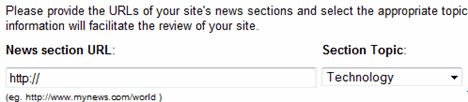
How to submit your news sitemap to Google
- Open Google Search Console for your verified site.
- Go to Indexing → Sitemaps.
- Enter the news sitemap URL (for example
news-sitemap.xml) and click Submit. - You can also add a
Sitemap:line for it in your robots.txt file.
Common Google News sitemap errors
- Old articles included: anything older than two days should drop out automatically.
- Wrong publication name: it must match the name Google News shows for your site.
- Bad date format: use full W3C dates with a time zone, as in the example above.
- Blocked URLs: make sure robots.txt or noindex tags don’t block the articles you list.
Do you need a news sitemap?
Only if you publish genuine news regularly. Blogs that post evergreen guides, like most of QOT, are better served by a normal XML sitemap and good permalinks. If you’re thinking of changing your URL structure for news, read about changing WordPress permalinks first.
Frequently asked questions
Does a news sitemap guarantee inclusion in Google News?
No. It helps Google find your articles faster, but Google decides what to show based on quality, relevance and its news policies.
How often should a news sitemap update?
Every time you publish. WordPress plugins update it automatically.
Can I use one sitemap for news and regular pages?
Yes, but it’s simpler to keep a separate news sitemap for the last two days of articles alongside your main sitemap.



This helped a lot, there is also a WordPress plug in for Google News Site Maps now.
Is there a way to use this plugin and not have 777 permissions?
This plugin generated a blank sitemap (xml header but no data) after editing and saving a post.
Simply activating the plugin may be not enough.You have to change the CHMOD of google-news-sitemap.xml to 777.
One question : Do we need to Add our sitemap to Google Webmaster tools also ?
The sitemap was generated for me by simply activating the plugin. I dont think there is a need to add it to the Webmaster tools because your main sitemap already has these urls listed.