
8 Website Design Tips to Save Time (2026)
Building a good site takes a lot of hours, but much of that time goes on repeated tasks. These website design tips to save time started as five tips from a 2010 guest post and have been updated for how designers and developers work in 2026: start from templates and components, work locally, reuse your code and let tools do the boring parts.
Quick answer: The biggest time savers are starting from a good template or design system, building a local development environment (Local or XAMPP), keeping a personal snippet library, using reusable headers, footers and components, and relying on browser DevTools, code editor extensions and automated checks instead of doing everything by hand.
Table of Contents
1. Start from templates and a design system
Templates are still the most common time saver. A good starting theme or layout gives you navigation, typography and responsive grids so you can focus on content and branding. The catch from the original post still applies: reusing one template for every client is easy to spot. Keep several starting points, and build your own small design system (colours, fonts, spacing, buttons) that you adapt for each project. Frameworks such as Bootstrap and Tailwind CSS speed this up a lot.
2. Set up a local web server

PHP, databases and WordPress can’t be tested by simply opening a file in your browser. Instead of uploading every change to a remote server, run a local server on your own computer:
- XAMPP: a free bundle of Apache, MariaDB, PHP and Perl for Windows, Linux and macOS.
- Local: a free desktop app that sets up WordPress sites locally in a few clicks, with SSL and PHP version switching.
Test locally, then push the finished work to staging or live hosting.
3. Keep a library of your favourite code
Every designer has chunks of code they use on almost every site: a navigation menu, a card layout, a contact form, a CSS reset. Store them in one place you can search, such as a private GitHub repository, GitHub Gists or your editor’s snippet feature. Share the library with your team so everyone builds faster and more consistently.
4. Use reusable headers, footers and components
Split shared parts of the site into separate files so one edit updates every page. In 2010 that meant PHP include files or Dreamweaver templates. Today the same idea shows up as WordPress template parts and block patterns, reusable components in React or Vue, and partials in static site generators. Edit once, publish everywhere.
5. Use browser developer tools
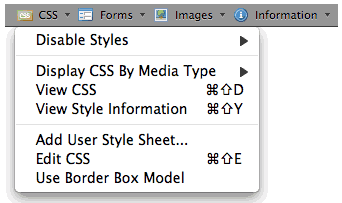
The built-in Chrome DevTools (and the equivalent tools in Firefox, Edge and Safari) let you edit CSS live, test mobile layouts, debug JavaScript and check page speed with Lighthouse. The Web Developer extension recommended in the original post is still around for Chrome, Firefox and Opera and adds handy one-click tools for disabling CSS, outlining elements and viewing image details.
6. Let your code editor do more work
A modern editor like Visual Studio Code with extensions for auto-formatting, Emmet abbreviations, live preview and linting removes a lot of manual typing and catches mistakes early. AI coding assistants can also draft boilerplate, but always review what they produce.
7. Automate checks and repetitive tasks
Run accessibility, broken link and speed checks with tools rather than by eye, compress images automatically, and use version control with Git so you can roll back mistakes in seconds instead of rebuilding pages.
8. Ask other designers what they use
As the original post put it, talking to experienced designers about their workflow is one of the fastest ways to discover tools you didn’t know about. Our list of web design tools and tips for beginners and the best Firefox add-ons for web designers are good places to start, and make sure every site covers the essential web design elements.
FAQ: website design tips to save time
What is the fastest way to design a website?
Start from a quality template or theme, customise it with your own design system, and reuse components rather than building every page from scratch.
Do I need a local server for web design?
For plain HTML and CSS, no. For PHP, databases or WordPress, a local server like XAMPP or Local saves time because you can test changes without uploading them.
Which tools save web designers the most time?
Browser DevTools, a good code editor with extensions, a snippet library, version control and automated testing tools save the most time day to day.
Is using a website template bad?
No. Templates are fine as a starting point. Just customise colours, fonts and layout so the site doesn’t look identical to others built on the same template.
Originally written by guest author Eric Gesinski, who worked for TulsaMarketingOnline.com. Updated for 2026 by QuickOnlineTips.
Get our free weekly email: new tech guides and tools, no spam.
New and updated tech guides, a free tool worth bookmarking and one useful pick, once a week. No spam, unsubscribe anytime.
One email a week. Unsubscribe anytime. See our privacy policy.



Good point about the footers – I always keep a link to the site map there as well, so you can always refer to it if you get stuck. This is especially helpful on larger sites. Nice points, keep up the good work, thanks.
I can’t say I have any favorite template sites – I like to go hit some of the big ones (like DreamTemplate or TemplateMonster
I’m happy with using templates as you describe, but are you sure it doesn’t show up as “duplicate content” for the search engines?
Super tips for saving time and therefore money whilst doing some website design! I cannot agree more.
I realise this thread is very old, but you know, the Internet is out there and posts are still found for various reasons (I found it no problems).
Although I agree with you on having a local server and a code library, I don’t think templates are the way forward. People want their own website, not one that someone else has had. You also cannot use the line that what the client doesn’t know won’t hurt them, because I don’t think that’s fair – the client is paying you for THEIR website, not some re-jig of another’s.
So be careful if you plan to use templates.
very detailed information and thanks for such a awesome tips regarding website design aspects….
Very helpful and useful article. Keep up your good web design ideas and articles.
Thanks for the list… I applied for a couple things too.
I usually rent from hosting company so I don’t need time to set up the server, but I hope someday can try to have my own hosting.
These are AWESOME tips, and I do all of them.
It’s so important to stay inspired, no matter how you do it. Web server is a big thing, as is taking many short little breaks. I get so much more done that way!
You can save time and resources by using “php” includes “. Create a unique banner for the header and footer to save you the time to be scheduling this as often as pages have. We use our own CMS generated in Dreamweaver to make easier the programming of the website.
Thanks, i really needed to source this info for a project i’m working on. You are a LEGEND! Thanks! :0) I will post a link on here again when i’m done so you can see it! I have a feeling you will like it from what i have read!
Thanks for sharing your reflection. I’m not 100% agree with you. If you want good and unique design means you should invest your own time and research otherwise you can’t
Web design and functionality are so important yet only a few spend time each month or year on improving it.
I know i need to split test more
This is a good piece of writing. I really like to read your post
This is very informative and useful to me.
keep up great writing.
thank you.
Gives Thanks for this article, I will add together this site to my bookmarks, my roomie just made mention to me about this last week. gracias again
This is a good piece of writing, I was wondering if I could use this piece of content on my website, I will link it back to your website though. If this is a problem please let me know and I will take it down right away.
Well we followed the same while creating our website and missed out few too but now will take care for the next time.
Thanks for sharing your reflection. I’m not 100% agree with you. If you want good and unique design means you should invest your own time and research otherwise you can’t
Chris, I actually agree with you. Personally, I don’t use templates too often and prefer to spend extra time to make custom design for sites. But in the case you have a lot of sites that need to be made and a limitation on time, that can help.
I couldn’t agree with you more. I strongly advocate all 5 of these things. I’ve come up with quite the collection of templates that I’ve designed along with way but I also use template sites as a place to go for design inspiration. A lot of the templates sites out there are junk but I have found a few good ones. Do you have any favorite templates sites?
I can’t say I have any favorite template sites – I like to go hit some of the big ones (like DreamTemplate or TemplateMonster), look through their designs, then pick out ones I like and make templates myself to imitate them to save for later. It’s a little investment in time to do it yourself, but then you have it ready to go for future projects.