
Bloglines Shuts Down: Export RSS Subscriptions Now
Bloglines users need to export RSS subscriptions now. Bloglines.com, the favorite RSS aggregator of a whole generation of early RSS adopters is shutting down.
Bloglines Closes Down
Ask.com has announced that Bloglines will officially shut down on October 1, 2010 as more people now use Twitter and Facebook to consume information and rely less on RSS feeds and their RSS readers.
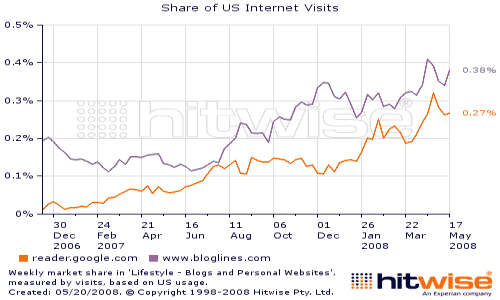
After its launch in 2005, Bloglines was clearly the leader among RSS readers and lot of RSS metrics and numbers were churned out using Bloglines subscriber statistics. But after the launch of Google Reader, and a large number of user friendly features, Google Reader was poised to overtake Bloglines in 2008, and never looked back. Bloglines underwent changes to keep up (remember Bloglines Image Wall), but Google Reader simply was too good for power users. Even we switched from Bloglines to Google Reader.
Will your feed subscribers count drop?
Looks likely as a lot of old time blogs still have large number of Bloglines subscribers. For example at one time nearly 10% of our RSS subscribers used Bloglines. If they fail to migrate their subscriptions to a new RSS reader, feed counts will drop. So encourage your Bloglines subscriber to migrate to any of these popular feed readers.
How to Export Bloglines Subscriptions?
- Login to Bloglines
- Click Feeds tab on top
- Click “Export Subscriptions” link (at bottom left pane)
- Save File to Folder
- Import file in your new RSS reader
It is very essential for all Bloglines users to export their RSS subscriptions to a good RSS reader like Google Reader today or other popular feed readers (and it will work with your Google / Gmail account login right now). The end of Bloglines is a notable milestone in history of RSS, and clearly shows how the web is evolving with social media.
Stuck on a gift? Try our free Gift Idea GeneratorIdeas for anyone by age, job, interests and budget, with Amazon.com and Amazon.in linksFind gifts →Get our free weekly email: new tech guides and tools, no spam.
New and updated tech guides, a free tool worth bookmarking and one useful pick, once a week. No spam, unsubscribe anytime.
One email a week. Unsubscribe anytime. See our privacy policy.



I’ve been searching for a way to save all my “keep new” items.
Although I haven’t found a way to import them into google reader, etc. one alternative is to import them into Microsoft One Notes ($).
Basically display your keep new items, Right click and save to One Note- and links even work!
another idea is to use Snagit
Ultimately, I’ll move them into a knowledge management system like SharePoint
I am an avid fan of wordpress but everytime I login to my site, I always see the RSS icon.I don’t know what really is the purpose of that thing.
Try this link.
Corry, try to sign in again into the website. I was having the same problem and when i went to bloglines.com (instead of the beta version) everything went alright.
I can’t export the feeds because the Bloglines site only shows the closing announcement.
that’s a bad news
i hope Bloglines team will get up again with other service such as Social Media…