
Norton Update: How to Get the Latest Norton Version Free (2026)
Most of us let Norton update its virus definitions automatically, but do you also have the latest version of the Norton program itself? This norton update guide shows how to check for and install the newest version of Norton AntiVirus, Norton 360 or other Norton device security for free with an active subscription.
Quick answer: Open your Norton product, go to Security, open the LiveUpdate tile and run an update until it says you are up to date. Then check the LiveUpdate settings so that automatic updates for both virus definitions and the Norton application are switched on. While your subscription is active, LiveUpdate delivers both definition and program updates, so you do not need to buy a new version.
Table of Contents
Why a Norton Update Matters
New versions of Norton are faster, add new features and fix bugs, and they include smarter detection for viruses, trojans and other malware. Virus definitions alone are not enough if the program running them is years old.
I usually bought a 5-PC pack of Norton 360 and was always happy with the automatic live updates of virus definitions. I realised late that the program itself did not upgrade on its own back then, and that a new version check every few months gave me free software upgrades. I did those free Norton upgrades for many years.
How it worked in older Norton versions
In older Norton versions you opened the program, clicked Support in the top right corner and chose New version check.

If a newer version was available, a browser window offered the product update for free.
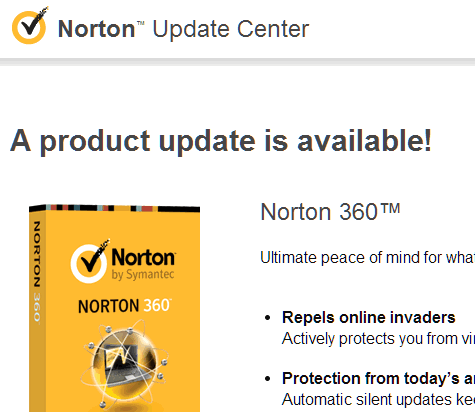
Continuing downloaded a small installer that ran the Norton Download Manager and fetched the files for the new version.

How to Run a Norton Update in 2026 (Windows)
Current Norton device security for Windows handles updates from the LiveUpdate tile. These steps follow Norton’s own support page:
- Open your Norton device security product.
- In the left pane, click Security.
- In the LiveUpdate tile, click Open.
- On the Check for Updates tab, look at the last updated date. If it is older than a day or two, click Update Now (or Check Now).
- Run it again until Norton reports that everything is up to date, and restart your computer if asked.
Turn on automatic updates
- Open LiveUpdate as above and click the Settings tab.
- Switch on Automatically update virus definitions and Norton application.
With this on, Norton keeps both its definitions and the program up to date for you. Running a manual check every few months is still a good habit, just as it was in my early days with Norton 360.
On a Mac, open Norton and run LiveUpdate from the app; see Norton Support (external site) for the current Mac steps.
If Norton Will Not Update
- Check your subscription: security updates are available only while your subscription is active. Sign in to your My Norton (external site) account to see its status.
- Check your internet connection and any firewall or proxy that might block downloads.
- Reinstall: download the latest installer from your My Norton account, which installs the newest version for your subscription.
Need Norton on a new PC? See our guide to the Norton antivirus free trial and free tools, and these tips to make your PC run faster.
FAQ
Is the Norton update free?
Yes. Updates are available at no extra cost as long as your Norton subscription is active.
How often does Norton update?
With automatic LiveUpdate on, Norton checks for updates regularly in the background. You can run LiveUpdate manually at any time.
Do I need to buy a new Norton version every year?
No. Norton is sold as a subscription, and while it is active LiveUpdate keeps the Norton application itself up to date.
What if my Norton subscription has expired?
Norton stops receiving security updates, so your PC may not be protected against new threats. Renew it or switch to another security product.
Stuck on a gift? Try our free Gift Idea GeneratorIdeas for anyone by age, job, interests and budget, with Amazon.com and Amazon.in linksFind gifts →Get our free weekly email: new tech guides and tools, no spam.
New and updated tech guides, a free tool worth bookmarking and one useful pick, once a week. No spam, unsubscribe anytime.
One email a week. Unsubscribe anytime. See our privacy policy.



Norton Antivirus is a amazing antivirus as I am using it, but in reply to mohsin I would let him know that your PC should be with good specifications.
how effective is the Norton compared to the Microsoft security essential?
Nice way to update Norton Antivirus but I think it’s little bit heavier than other security software’s.
AVG best anti spyware and good Business Security Software download free avg antivirus software for your computer. Best free virus and anti spyware protection.
Why not use !avast instead? I’m not promoting avast or anything, but it’s quite a nice, free antivirus, with free updates. And what I like about it is that it starts its scanning routine before windows starts, catching the malware designed to hide also before windows starts or before your typical antivirus starts. So far, I like it.
Any particular reason for using Norton Anti Virus.
Any particular reason for using Norton Anti Virus? I have been using MS security essentials and now with Win 8, it is integrated into the OS itself. It does the job very well, without hogging the system.
I use multiuser Norton and newer versions are very light on the computer system. I have many times found viruses which other security software could not remove. Will try security essentials.