
Onida PreCool AC: Turn On Your AC by SMS, and Smart ACs Today
Long before smart homes, Onida sold an air conditioner you could switch on with a text message. The Onida PreCool AC let you send an SMS from your phone so the room was already cool when you got home. This article explains how the PreCool system worked and how you can do the same thing today with a Wi-Fi smart AC or a smart remote.
Quick answer: The Onida PreCool AC, launched in India in February 2011, came with a small device holding a normal SIM card. Texting it a code switched the AC on or off from anywhere. Today the same idea works through Wi-Fi: Onida’s smart ACs use the Onida Smart Home app, and a smart IR remote can add phone control to most older ACs.
Table of Contents
What was the Onida PreCool AC?
Onida PreCool air conditioners used the tagline “SMS Gone, AC On” and Onida promoted them as the world’s first ACs you could operate from outside your home. The idea was simple: send an SMS to your AC before you leave the office, and walk into a home that is already cool in the peak of summer.
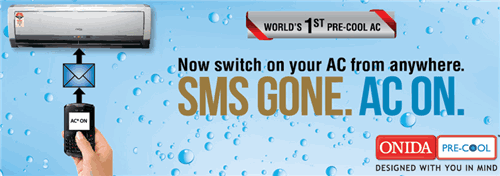
Onida’s parent company, MIRC Electronics, unveiled the range on 16 February 2011.
How the Onida PreCool AC worked
Each PreCool air conditioner came with a PreCool device, powered by a normal SIM card, which sat in the same room as the AC. You sent AC*ON or AC*OFF by SMS from your mobile phone to the number of that SIM, and the device switched the AC on or off. Here is Onida’s promo video (in Hindi):
It was a cool idea from Onida, and a thumbs up for precooled homes. It needed no internet connection, which mattered in 2011 when few Indian homes had Wi-Fi. The catch was that you needed an extra SIM card and had to keep it recharged.
How to turn on your AC from your phone today
SMS control has been replaced by app control over Wi-Fi. You have three options.
1. Buy a Wi-Fi smart AC
Most big AC brands in India now sell Wi-Fi models that you control from a phone app. Onida (external site) itself sells Wi-Fi enabled ACs that work with the Onida Smart Home app for Android and iPhone, and some models also work with Alexa. With a smart AC you can switch it on, set the temperature and set schedules from anywhere.
2. Add a smart IR remote to your existing AC
If your AC works with an ordinary infrared remote, a smart IR remote (a small Wi-Fi blaster) can copy its signals. You place it in the room facing the AC, connect it to your Wi-Fi and use its app or a voice assistant to switch the AC on before you get home. This is the cheapest way to get PreCool-style control on an older AC.
3. Use schedules and timers
If you come home at the same time each day, the built-in timer on your AC remote, or a schedule in a smart AC app, can start cooling 15 to 30 minutes before you arrive without any phone at all.
Tips for remote AC control
- Check your Wi-Fi. Many smart ACs and IR remotes only connect to a 2.4 GHz network, and a weak signal in the bedroom causes dropouts. Our tips on faster broadband at home can help.
- Set a sensible temperature. Pre-cooling to 24 to 26°C uses less power than running the AC at its lowest setting.
- Keep the remote in view. An IR blaster needs a clear line of sight to the AC.
FAQ
Can I still buy an Onida PreCool AC?
The SMS-based PreCool range was sold from 2011. Onida’s current smart ACs use Wi-Fi and the Onida Smart Home app instead of SMS.
How did the PreCool SMS work?
A device with a normal SIM card sat near the AC. Sending AC*ON or AC*OFF to that SIM’s number switched the AC on or off.
Can I make my old AC smart?
Yes. If it uses an infrared remote, a Wi-Fi smart IR remote can control it from a phone app.
Do smart ACs need internet?
Yes, for control from outside your home. The AC connects to your home Wi-Fi, and the app talks to it over the internet.
Disclosure: As an Amazon Associate, QuickOnlineTips earns from qualifying purchases.
Stuck on a gift? Try our free Gift Idea GeneratorIdeas for anyone by age, job, interests and budget, with Amazon.com and Amazon.in linksFind gifts →Get our free weekly email: new tech guides and tools, no spam.
New and updated tech guides, a free tool worth bookmarking and one useful pick, once a week. No spam, unsubscribe anytime.
One email a week. Unsubscribe anytime. See our privacy policy.



hai i had bought onida 3star ac they have given onida mobile i dont know how to operate the mobile for sms on and of
in which of the model such switch on and off may be donemis it available in market,i asked many dealer in Lucknow to buy it but all said till now no such model has come ,tell me dealer name & ph no, //// thanks
how to install games on that mobile…..it does not allow to install any……
Your site is very good. There are useful information and most importantly, for sharing great. Thank you.
This technology sounds to be cool but is it eco-friendly ??
Great, may be later they’ll come with an app using something like bluetooth..sms is more remote though.
Ondia always comes up with cool new ideas for the benefit of the customer….Really love the promo