
How to Get Free Dropbox Space: Up to 18 GB with Referrals (2026)
Running out of space on a free Dropbox account? You can get more free Dropbox space without paying, mainly by inviting friends. When we wrote about this in 2012, Dropbox had just doubled its referral bonus, and we had already referred over 70 people and maxed out our 16 GB bonus. The good news: the referral programme still works in 2026. Here’s how much you can get and how to claim it.
Quick answer: Dropbox Basic gives 2 GB free. Each friend who signs up through your referral link and installs the desktop app earns you 500 MB, up to 16 GB extra (18 GB in total). Paid Plus and Professional users get 1 GB per referral, up to 32 GB. Find your link at dropbox.com/referrals.
Table of Contents
How to get free Dropbox space
- Sign in at Dropbox.com.
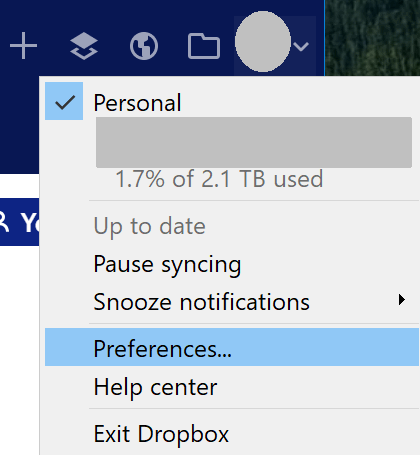
- Open your referral page (Settings > Plan, or go to dropbox.com/referrals).
- Copy your referral link or enter friends’ email addresses.
- Your friend creates an account through your link and installs the Dropbox desktop app.
- Both of you get bonus space once they finish setup.
According to Dropbox Help, Basic accounts earn 500 MB per referral up to 16 GB, and Plus, Family and Professional accounts earn 1 GB per referral up to 32 GB. Sharing a folder with someone doesn’t count as a referral.
Get 250 MB more by finishing the Get Started checklist
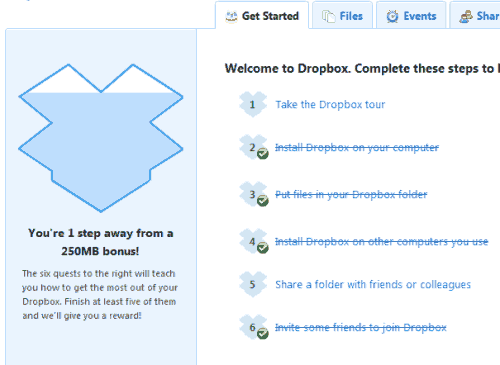
Dropbox has long offered a small one-time bonus without referrals: complete most of the steps on its Get Started checklist and you earn 250 MB extra. In 2010 the steps included taking the Dropbox tour, installing the desktop app, adding files, installing Dropbox on a second computer, sharing a folder and inviting friends. Not every account shows the checklist today, and the steps vary, but if you see a “Get Started” or setup prompt on dropbox.com, finish it. Users on the Dropbox forum report that if the desktop-install step doesn’t register, reinstalling the app can fix it.
Tips to make the most of free Dropbox
- Share your link where it helps: with colleagues, classmates or in a blog post about tools you use.
- Clean up big files: sort by size and delete or move old videos and backups.
- Use selective sync or online-only files so your computer doesn’t fill up either.
- Know the limits: Dropbox Basic can be linked to a limited number of devices, so check your linked devices if sync stops.
Free up Dropbox space you already have
- Empty deleted files: deleted files can still be restored for a while, but they no longer count once permanently removed.
- Find large files: on dropbox.com, sort folders by size and move old videos to an external drive.
- Turn off camera uploads if Google Photos or iCloud already backs up your phone pictures. iPhone owners can also copy their photos to a Windows PC instead, and keep a full copy of the phone by following our guide to backing up an iPhone.
- Leave shared folders you no longer need; shared folders count against your quota.
- Archive old projects as compressed ZIP files.
Free cloud storage compared
- Dropbox Basic: 2 GB, up to 18 GB with referrals.
- Google Drive: 15 GB shared with Gmail and Google Photos.
- Microsoft OneDrive: 5 GB.
- Apple iCloud: 5 GB.
Need more? Dropbox Plus offers 2 TB for a monthly fee, which is often cheaper than juggling several free accounts.
Why we still like Dropbox
Dropbox was one of the most useful tools on our computers for years, syncing files seamlessly between home, office, laptop and phone. Bloggers can extend it further with these Dropbox WordPress plugins for backups and file sharing.
FAQ
How can I get more Dropbox space for free?
Refer friends with your referral link. Each successful referral adds 500 MB on a free account, up to 16 GB.
Can I get free Dropbox space without referrals?
Only a little. Completing the Get Started checklist, where your account shows it, can add a one-time 250 MB. Referrals are the main way to earn more.
Does free Dropbox space expire?
Referral bonus space stays on your account as long as the account remains active and in good standing.
Why didn’t I get my referral bonus?
Your friend must sign up through your link with a new account and install the desktop app. Existing users don’t count.
Stuck on a gift? Try our free Gift Idea GeneratorIdeas for anyone by age, job, interests and budget, with Amazon.com and Amazon.in linksFind gifts →Get our free weekly email: new tech guides and tools, no spam.
New and updated tech guides, a free tool worth bookmarking and one useful pick, once a week. No spam, unsubscribe anytime.
One email a week. Unsubscribe anytime. See our privacy policy.


I don’t know about the rest of you but I find it nearly impossible to get the referral space. Pretty much every person I’m comfortable sending a referral email to already has dropbox!