
Genesis Beta Tester: How to Test Genesis Beta Updates (2026)
The free Genesis Beta Tester plugin lets you update the Genesis Framework to its latest release, including beta versions, with one click from the WordPress dashboard. We first used it in December 2012 to run Genesis 1.9 beta on QuickOnlineTips. This guide explains what the plugin does, how to install it, and how to test a Genesis beta safely today.
Quick answer: Install the free Genesis Beta Tester plugin from WordPress.org, activate it, and WordPress will offer the newest Genesis version, even if it is still in beta. Update from Dashboard, then Updates. Always test beta versions on a staging copy of your site, never straight on a live site.
Table of Contents
What is the Genesis Beta Tester plugin?
Genesis is the theme framework from StudioPress, now part of WP Engine. Normally WordPress only tells you about a new Genesis version when the final release is out. The Genesis Beta Tester (external site) plugin tells the Genesis update servers that you want beta releases too, so the next beta appears as an update in your dashboard.
It is useful for developers and child theme makers who want to check that their code works with the next Genesis version before their users get it.

How to install Genesis Beta Tester
- In WordPress, go to Plugins, then Add New, and search for “Genesis Beta Tester” (or download it from WordPress.org and upload the
genesis-beta-testerfolder to/wp-content/plugins/without renaming it). - Activate the plugin.
- An update notice for the newest Genesis version appears in the admin. If you don’t see it, open Dashboard, then Updates.
- Run the update. Your child theme stays untouched, because customisations live in the child theme, not in the framework.
This is how the update notice looked when we tested Genesis 1.9 beta:

The plugin then downloads and installs the new framework version:


How to test a Genesis beta safely
StudioPress has always warned that beta versions are still under development and should not be used on production sites. Back in 2012 we ran Genesis 1.9 beta on this blog and it worked fine, but that was a risk we chose to take. A safer routine:
- Use a staging site. Many hosts, including WP Engine, offer one-click staging copies. Test the beta there first.
- Back up first. Keep a full backup of files and database, plus a copy of the current Genesis version so you can roll back.
- Check your hooks. Custom code added through Genesis hooks or functions.php is what most often breaks after a framework update.
- Deactivate the plugin when done. If you leave it active on a live site, it will keep offering betas. Switch it off to get only stable releases.
If you want stable updates to install on their own instead, see our guide to auto-updating WordPress plugins and themes.
What Genesis 1.9 changed
At the time, most sites ran Genesis 1.8.2. The 1.9 release came with a rewritten Genesis sample child theme with a cleaner, modern design that also looked good on mobile screens. This is the sample theme demo we tested:
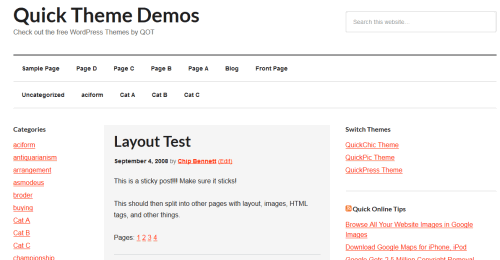
Updates were, and still are, free for existing Genesis users. For our full experience with the framework, and where it stands today against themes like Kadence, GeneratePress and Astra, read our Genesis framework review. QuickOnlineTips itself now runs on a Kadence child theme.
Is Genesis Beta Tester still available?
Yes. The plugin is still listed on WordPress.org and has been updated recently. You still need the Genesis Framework itself, which you get from StudioPress (external site). If you only want a free theme to try, a default WordPress theme such as Twenty Fourteen or a newer default theme is a simpler start.
FAQ
Does Genesis Beta Tester work without the Genesis Framework?
No. It only changes which Genesis updates your site is offered, so the Genesis Framework must already be installed.
Will a Genesis beta break my child theme?
Usually not, since child theme files are not replaced. But beta code can change hooks or styles, so test on a staging site first.
How do I go back to stable Genesis releases?
Deactivate the Genesis Beta Tester plugin. If a beta caused problems, reinstall the last stable Genesis version from your StudioPress account or your backup.
Does the plugin support nightly builds?
No. According to its WordPress.org page, it offers beta releases but not nightly builds.

$4.99Free when you subscribe
Get 100 tech terms explained in plain English
8-page PDF on AI, coding, slang and SEO + one tech email a week.
Sent by email. Unsubscribe anytime. See our privacy policy.





I love the Genesis parent theme. It is way easy to customize layouts.