
Collapsible AdSense Ads: The 2013 Test and What Exists Now
In July 2013 Google AdSense was testing collapsible AdSense ads, and I got a chance to see them on a live page. Here is what that ad unit looked like, how it behaved when you hovered over it, and what a publisher should know about collapsible ad formats in 2026.
Quick answer: The 2013 collapsible AdSense ad unit was a test format that showed four text ads in a 336×280 large rectangle, with only the top ad fully expanded and the other three collapsed until you hovered over them. It was an experiment, not a format you can choose today. In 2026 the collapsible format Google documents is the collapsible banner in AdMob for mobile apps, while on websites you control layout through responsive display ad units and Auto ads in your AdSense account.
Table of Contents
What the collapsible AdSense ads looked like in 2013
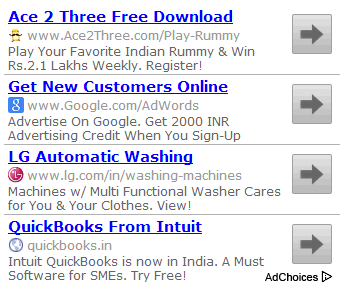
Normally the large rectangle (336×280 px) text ad unit showed four links with equal space. In this test, only the top ad was shown in full, with its title, description and URL. The other three ads were collapsed to just their titles.

When I hovered over one of the collapsed links (without clicking), the previous ad collapsed and the new one expanded to show its full content. The ad unit turned a gray background on hover, and the destination URL appeared when I hovered over the arrow.

I did not click the ads, but clicking would presumably have taken the reader to the advertiser’s site, as with any AdSense ad.
What I thought of the format then
I liked the large, prominent ad titles. They stood out on the page and looked likely to get a higher click-through rate than four cramped text links. The test also showed how much the ad title mattered: a strong headline was what made readers hover, expand and click.
Collapsible ads in 2026: what changed
That hover-to-expand text unit was one of many experiments Google ran on AdSense. Publishers could not switch it on, and it is not an option in AdSense today. The ad landscape has moved on in a few ways:
- Responsive display ad units adjust their size to the screen, so you rarely pick a fixed size like 336×280 any more.
- Auto ads let Google place ads and choose formats such as anchor ads, vignettes and side rails, which you can turn on or off per format in your account. See our guide to AdSense Auto ads and our look at AdSense side rail ads.
- Collapsible banners in apps: Google’s AdMob documents a collapsible banner ad for mobile apps. It first appears as a larger overlay and includes a button that collapses it back to the normal banner size.
Using collapsible AdSense ads ideas on your site today
- Keep ads easy to dismiss. Formats that expand or overlay content can annoy readers, so test them against your page experience.
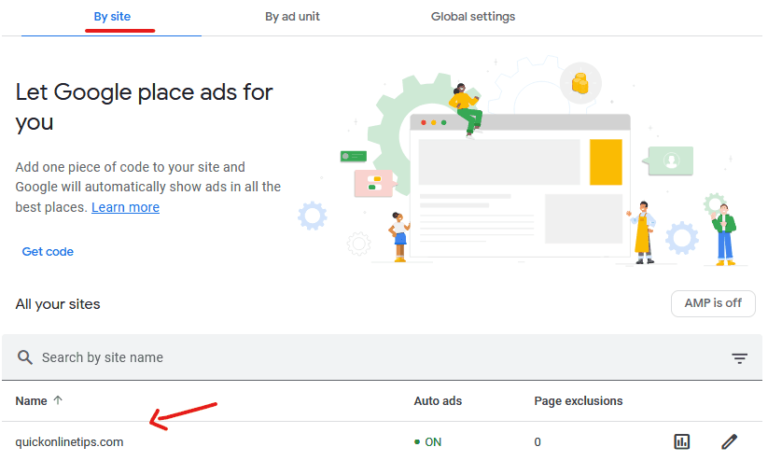
- Check format controls in your account. In AdSense you can review which Auto ads formats are allowed and turn off the ones that hurt your layout.
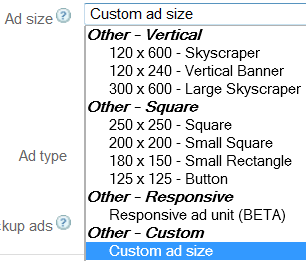
- Use standard sizes where you place ads manually. If you need a fixed slot, read how to create custom AdSense ad sizes within today’s rules.
FAQ
What were collapsible AdSense ads?
They were a 2013 AdSense test in which a large rectangle text ad unit showed one ad in full and collapsed the others to their titles, expanding each one when you hovered over it.
Can I turn on collapsible ads in AdSense?
No. The 2013 format was a Google test, not a setting. Today you manage ad formats through ad units and Auto ads settings in your AdSense account.
What is a collapsible banner ad?
It is an AdMob format for mobile apps that first shows as a larger overlay and includes a control to collapse it back to the regular banner size.
Did collapsible ads get more clicks?
Google did not publish results for the 2013 test, so there is no public answer. I expected the big ad titles to help click-through rates, but that was my opinion at the time.
Stuck on a gift? Try our free Gift Idea GeneratorIdeas for anyone by age, job, interests and budget, with Amazon.com and Amazon.in linksFind gifts →Get our free weekly email: new tech guides and tools, no spam.
New and updated tech guides, a free tool worth bookmarking and one useful pick, once a week. No spam, unsubscribe anytime.
One email a week. Unsubscribe anytime. See our privacy policy.


I am all for this sort of feature on Adsense. It could prevent more and more people from using adblock technologies on a website or blog. Thanks for sharing! It looks exiciting :)
This is the first place i’ve heard of them, i will implement it and wait for results. Thanks for sharing :)