Fastest Way to Index New Pages in Google Search (2026)
What is the fastest way to index new pages in Google search results? Many of us hope that submitting an updated sitemap with the new post will do the job. It will, but it takes time. The Google crawler reads your sitemap, finds the new post eventually and then indexes it. When I publish a new post and want Google to pick it up today, not next week, here is exactly what I do.
Quick answer: Open Google Search Console, paste the new page’s URL into the URL Inspection bar at the top, wait for the check to finish, then click Request indexing. Make sure the page is also in your XML sitemap and linked from your homepage or a related post. Google usually crawls a requested URL within hours to a few days, but it never guarantees indexing.
Table of Contents
Why new pages take time to get indexed
Every site has a crawl budget, and the Google crawler might not visit your sitemap every day. Even when it does, there is no guarantee that it will index the newest post in your latest sitemap straight away.
Modern sitemaps are also no longer a single XML file. SEO plugins like Rank Math and Yoast split them into multiple sub-sitemaps (posts, pages, categories), especially on sites with thousands of URLs. Google has to work through all of them. Google’s own documentation on asking Google to recrawl your URLs says crawling “can take anywhere from a few days to a few weeks”.
How to index new pages in Google with Search Console
This is the method I use for every new post on QuickOnlineTips.
- Log in to Google Search Console (previously known as Google Webmaster Tools) and select your website property.
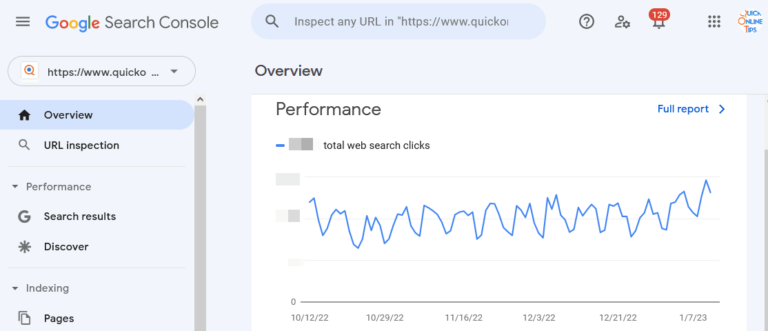
- At the top of the page you will find a search bar that says “Inspect any URL in” followed by your domain name. Paste the full URL of your new post there and press Enter.
- Google checks its index and, for a brand-new post, usually reports “URL is not on Google”.
- Click Request indexing. Google runs a quick live test of the page, which takes a minute or two, and then confirms that the URL was added to a priority crawl queue.
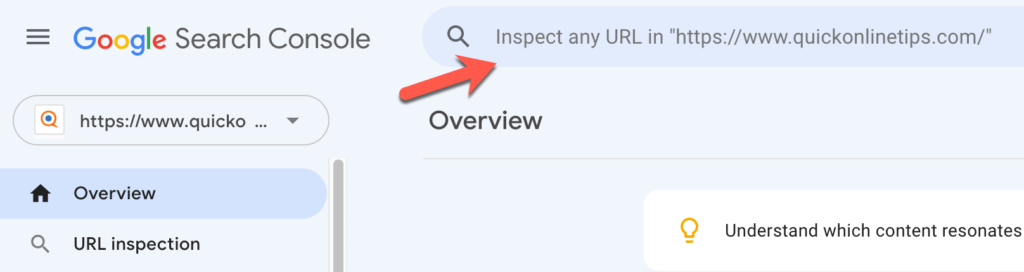
If you search for the new URL in Google straight away, it probably won’t be there yet. In my experience, a new post on an established site often appears within a few hours to a day. Newer sites can take longer.
If you have not set up a Search Console account yet, do it now. It is free, and it is useful not only to submit new links but also to track your website’s clicks, impressions and indexing problems. Our list of free Google SEO tools explains what else it can do.
Limits of Request indexing
- There is a daily quota. Google limits how many individual URLs you can submit per property each day. Use it for new and important updated pages, not for your whole archive.
- Repeating a request doesn’t help. Google says submitting the same URL again won’t get it crawled faster.
- Indexing isn’t guaranteed. Google still decides whether a page is useful enough to index. Thin or duplicate pages may stay under “Crawled – currently not indexed”.
Other ways to get new pages indexed faster
Request indexing is the fastest manual push, but these steps make Google find your new pages quickly on its own:
- Keep your sitemap clean and submitted. Submit your sitemap index in Search Console under Indexing → Sitemaps, and add the sitemap link to your robots.txt file so every crawler can find it. Make sure the sitemap shows an accurate last-modified date.
- Link to the new post from strong pages. Google discovers most URLs through links. Add the new post to your homepage, a category page and two or three related older posts that already get traffic.
- Use IndexNow for Bing and others. IndexNow instantly notifies Bing, Yandex, Naver, Seznam and Yep when you publish or update a page. Google does not use it, but it helps your pages appear in Bing (and the AI tools that use Bing) within minutes. Rank Math has IndexNow built in, as we explain in our post on blog pinging and IndexNow.
- Submit to Bing Webmaster Tools too. Bing Webmaster Tools has its own URL submission tool and can import your sites from Search Console.
- Share the post. Links from social media and newsletters bring visitors and sometimes crawlers, although Google doesn’t treat them as ranking signals.
What doesn’t work any more
- The Google sitemap ping URL. Google retired its sitemap “ping” endpoint in 2023, so pinging plugins no longer notify Google. Old WordPress ping lists have the same problem.
- The Google Indexing API for blog posts. Some plugins promise “instant indexing” through the API, but Google allows the Indexing API only for job postings and livestream video pages. Using it for normal posts breaks its terms.
- Paid indexing services. They can’t do more than Search Console does for free, and some rely on spammy backlinks.
So the fastest way to proactively get Google to index your new URLs is still the URL Inspection tool in Search Console, backed up by a clean sitemap and good internal links, instead of waiting for crawlers to find the post on their own.
Frequently asked questions
How long does Google take to index a new page?
After you request indexing in Search Console, many pages are crawled within hours to a few days. Without a request, it can take from a few days to a few weeks, depending on how often Google crawls your site.
How many URLs can I submit for indexing per day?
Google doesn’t publish the exact number, but the URL Inspection tool has a daily quota per Search Console property. Use it for new and important updated pages, and let your sitemap handle the rest.
Why is my page “Crawled – currently not indexed”?
Google crawled the page but decided not to index it yet, usually because it looks thin, duplicate or low value compared to other pages. Improve the content, add internal links and request indexing again after a meaningful update.
Does IndexNow work for Google?
No. IndexNow is supported by Bing, Yandex, Naver, Seznam and Yep. For Google, use Search Console and your XML sitemap.
Do I need to request indexing for updated posts?
Not usually. If the post is in your sitemap with an updated last-modified date, Google will recrawl it. Request indexing only for big updates you want reflected quickly.
Get our free weekly email: new tech guides and tools, no spam.
New and updated tech guides, a free tool worth bookmarking and one useful pick, once a week. No spam, unsubscribe anytime.
One email a week. Unsubscribe anytime. See our privacy policy.