
Load the AdSense Script Once for Multiple Ads (Faster Pages)
Do you load the AdSense script once per page, or does every ad unit load its own copy? When Google introduced the asynchronous AdSense code in 2013, Michael Kleber of Google’s ads latency team explained that the adsbygoogle.js script “only needs to appear once on your page, even if you have multiple ads”. Loading it repeatedly adds no benefit and slows the page. Here is how to set it up correctly in 2026.

Quick answer: Put the AdSense script <script async src="https://pagead2.googlesyndication.com/pagead/js/adsbygoogle.js?client=ca-pub-XXXX" crossorigin="anonymous"></script> once in your page head. Then, for every ad unit, paste only the <ins class="adsbygoogle"> tag and its push line, and delete the duplicate script line that comes with each unit’s code.
Table of Contents
Why load the AdSense script only once?
- Faster pages: the browser checks the same script again for each copy, adding work on every page view.
- Cleaner code: one script in the head is easier to manage, update and audit.
- Officially supported: Google’s own Auto ads code uses exactly this setup, a single head script for the whole page.
It also helps your Core Web Vitals and scores in our favourite web page speed tests.
How each AdSense unit’s code is built
Every display ad unit you copy from Google AdSense has three parts:
<!-- 1. The script (needed only once per page) -->
<script async src="https://pagead2.googlesyndication.com/pagead/js/adsbygoogle.js?client=ca-pub-1234567890" crossorigin="anonymous"></script>

<!-- 2. The ad slot -->
<ins class="adsbygoogle" style="display:block" data-ad-client="ca-pub-1234567890" data-ad-slot="4538312732" data-ad-format="auto" data-full-width-responsive="true"></ins>

<!-- 3. The push call (needed for every ad slot) -->
<script>(adsbygoogle = window.adsbygoogle || []).push({});</script>
How to load the AdSense script once
- Copy part 1, the
adsbygoogle.jsscript line, into your site’s<head>. In WordPress use your theme’s header scripts box, Site Kit by Google, or an ad plugin’s global code setting. - For each ad unit, paste only parts 2 and 3 where the ad should appear.
- Remove extra copies of the script line from widgets, theme hooks and ad plugins.
- Clear your cache and view the page source (Ctrl+U). Search for “adsbygoogle.js”; it should appear once.
Never edit the ad slot attributes beyond what AdSense allows. Avoid the other common AdSense mistakes too.
What if I use Auto ads and manual ads together?
Auto ads use the same head script, so you still need it only once. Your manual ad units then need just the ins tag and push line. See using AdSense Auto ads for how they combine.
Using WordPress ad plugins
Most good ad plugins, such as Advanced Ads and Ad Inserter, have a setting to add the AdSense script once globally and strip it from individual ads. Check that only one plugin, or your theme, adds it. Our guide to the best WordPress plugins for AdSense compares them.
Troubleshooting
- Ads not showing after removing duplicates: make sure the head script is still present and that each ad has its own push line.
- Script in the footer: it works, but placing it in the head lets ads start loading sooner without blocking the page, because it is async.
- Old HTTP code: replace any http:// script URLs with https://.
For the full background on async loading, read our guide to the AdSense asynchronous code.
How much faster is it?
On a page with three or four ad units, removing duplicate script tags will not transform your speed score by itself, but it removes needless work from every page view, and these small wins add up across a whole site. Combine it with reserving space for each ad, lazy loading images below the fold and trimming unused plugins, and pages feel noticeably snappier, especially on phones over mobile data.
FAQ
Can I really use one AdSense script for many ads?
Yes. One adsbygoogle.js script serves every ad unit on the page; each unit needs its own ins tag and push call.
Does loading the script twice cause problems?
Usually ads still show, but it wastes resources and can cause warnings in testing tools.
Where should the AdSense script go?
Google recommends the head section of every page where you show ads.
Stuck on a gift? Try our free Gift Idea GeneratorIdeas for anyone by age, job, interests and budget, with Amazon.com and Amazon.in linksFind gifts →Get our free weekly email: new tech guides and tools, no spam.
New and updated tech guides, a free tool worth bookmarking and one useful pick, once a week. No spam, unsubscribe anytime.
One email a week. Unsubscribe anytime. See our privacy policy.
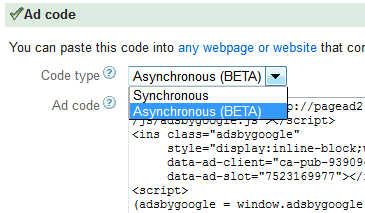



If you are planning to have multiple AdSense ad units on the same page, the same code will work except that you need to replace google-ads-1 with google-ads-2 in line # 1 and 6. The adsbygoogle.js script in line #40 only needs to included once in your web page. You may as well place it at the bottom on your page just before the the closing </body> tag.
Thanks Ms. Chandra for this post. I will recommend this to my friend so i don’t have to spend more time explaining about the same issue to my friend. This post helps me much. Cheers! :)
thanks for the valuable information. i am using adsense on almost all of my blogs hope these tips will definitely help me.
I have given a request with Google Adsense team, hope this can be done. It will surely be reducing loading time.
Nice and useful info…its definately worth trying out…hope it works for mee
This script is working for me.
Async is a beta version? Cause i read somewhere that its not 100% usefull. Do you enjoy using it? cause i feel a little bit scarry to edit a script from Google Adsense
We are using the async scripts. Please remove the extra script only after confirmation from Adsense.
I have raised a request for confirming the request with adsense team. Lets hear from them, if this could be done it will surely help with page loading time.
nice post by the way TFS!
Regads!
Please share with us what they replied.
So where should I add the adsbygoogle.js script code, in header.php ?
You can place in header php also. Confirm the script works.
Hi Chandra,
I just found the Note about contacting adsense team before altering code. My question is how I contact them? Any contact page for this?
Thanks.
They now have an Adsense help page for what code edits are allowed
https://support.google.com/adsense/answer/1354736?hl=en