
QuickCache to ZenCache: Fix WordPress Caching Errors
As you migrated from WordPress caching plugin QuickCache to ZenCache, did caching stop working. We have been using Quickcache as our default WordPress caching plugin for several years now. Now QuickCache has stopped updates and is migrating to ZenCache, so bloggers need to switch their WordPress caching plugin to continue getting updates.
QuickCache to ZenCache
While there is a pro version, we use the free plugin version which has great features which suffices for our blog. If you install Zencache, it will automatically detect and import all QuickCache settings and deactivate QuickCache. While I thought and as they claim, it should work well – but my files were not being cached. I realized this after a few days when the site seems slower.
How do I know? I always allow WordPress caching plugins to show the code in HTML, so a page in which caching is working correctly should display code like this at the bottom of the page.
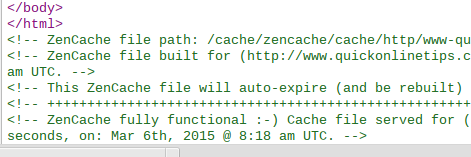
No WordPress Caching
Since the code was not displaying after I ‘view page source” the code in the browser, I realized that ZenCache was not working. While I tried all settings etc, I could not find a reason. Zencache was set to enable caching.

Then I logged into the server via FTP (I use Filezilla), and browsed to /wp-content/cache/zencache/ and it was empty! So the plugin was not storing cached files.
Then here is what I did … An important file which makes these plugins work is advanced-cache.php and it is located in /wp-content/. I checked its file size and it was now 0 kb. I downloaded it and it was empty with no content.
Then I disabled the ZenCache caching functions from the WordPress plugin settings. Deleted the advanced-cache.php file from the server via FTP. Reactivated the caching from ZenCache settings, and a new file was recreated automatically … it had content!
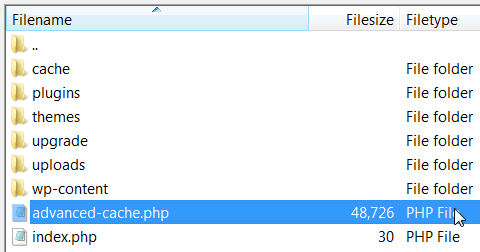
And Zencache started working…. the code was back in view page source.
So if you recently switched from QuickCache to ZenCache and found no caching, I suggest you try this and this is how I got it working.






Great Article Sir. But, Am Facing One Problem i have tried this plugin even with latest version but every time it crashes in my chrome browser.
my wordpress website is also really slow and i think it is due to cache !
thanks man your info worked!
Hey is there any plugin which can make our website to load fast.
These days blog’s loading time is another thing on which one should focus on rather than only SEO. Caching helps reducing blog’s loading time, and I am glad that you have just mentioned the simplest solution for fixing caching error issues in Zencache WP Plugin.
What more alternatives will you recommend for faster WP Caching ?
Regards
Hi P Chandra Sir,
It was really a headache before till I found this article about how to fix cache issues in Zencache plugin. I have moved on to WP Super Cache now, but will give this plugin a try back.
Thank you for this informative post.
sir, please help me i can’t use it in my google chrome
This website loads very fast in comparison with my blog. That’s why i love this website
Sir , i had tried this plugin even with latest version but every time it crashes my chrome browser
Yes.. Cache plays very important role for every site… But it a choice to choose which cache company suits your blog..
We have been using Quickcache as our default WordPress caching plugin for several years now. Now QuickCache has stopped updates and is migrating to ZenCache, so bloggers need to switch their WordPress caching plugin to continue getting updates.
Thank you for writing about this, Mr. Chandra! :-) I’m the ZenCache lead developer and I wanted to point out that we fixed this bug in the latest release of ZenCache (v150314), released a few days ago. Here’s the changelog entry for that bug:
– Bug Fix: Fixed a zero-byte advanced-cache.php bug related to migrating from Quick Cache. When you deleted/uninstalled Quick Cache after upgrading to ZenCache, the Quick Cache uninstallation process would empty the advanced-cache.php file, resulting in the site no longer being cached, despite ZenCache being active. ZenCache now continuously checks to make sure that advanced-cache.php is installed properly. See https://github.com/wpsharks/comet-cache/issues/432
Interesting plugin, thanks for the info. The faster the work site, the site visitors will be auspicious. And the happiness of visitors is very important to Google. Site which is faster – have a higher position in the search.
Thanks to share some useful tips to fix cache problem in wordpress blog. i have also face this type of problem in my wordpress blog.
Hi
Thanks for sharing with us.This post is very useful for every wp user.According to me every user should try Zencahe and see the difference
Thanks for Sharing This Usefull Article, Mr Chandra. But I recommend to Use the Wp Super Cache or W3 Total Cache Plugins
Thank your sharing. Can you say in % how much faster your WordPress would be after installing Zencahe?
Caching plugins are most essential for any WordPress blog. It will make your site much faster and will reduce server loads.
This post is an unique one. It’s always tough to find content like this which would help us when we are in trouble. Thanks for sharing this post.
Thanks chandra..!!! :) your blog is too fast thats the only reason i visit it everyday :) great
Well we put in lot of effort to make the blog load faster. Glad you appreciate it.
My wordpress site is already slow. will it make my site slow or not.