
How to Clear CloudFront Cache: Purge and Refresh Files (Invalidation Guide)
Updated a CSS file, logo or image in your S3 bucket, but your site still shows the old version? That’s Amazon CloudFront serving its cached copy. To clear CloudFront cache, you create an invalidation, which is AWS’s name for purging or flushing files from the CDN. Here’s how to clear CloudFront cache from the AWS console and the command line, what it costs, and how to avoid needing it.
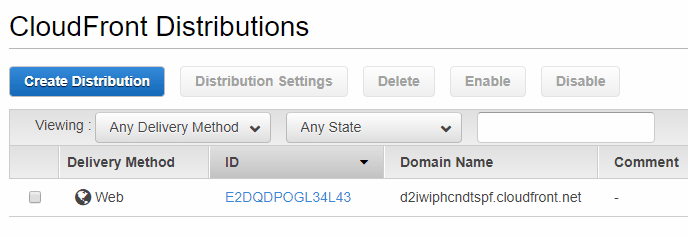
Quick answer: In the AWS console, open CloudFront → Distributions, select your distribution, go to the Invalidations tab and click Create invalidation. Enter the file paths to refresh (for example /css/style.css), or /* to clear the whole cache, and click Create invalidation.
Table of Contents
What is CloudFront caching?
Amazon CloudFront is the content delivery network (CDN) from Amazon Web Services. It stores copies of your files (images, CSS, JavaScript, videos and even whole pages) on edge servers around the world, so visitors download them from a nearby location instead of your origin server or S3 bucket. That makes sites much faster, but it also means CloudFront keeps serving the old copy until it expires or you clear it.
We used CloudFront with an S3 bucket to speed up QOT’s images and theme files around the world, and the first time we replaced a CSS file and nothing changed, it took a while to discover that “clear cache” in CloudFront is called invalidation. Like any CDN, it’s caching doing exactly what it should.
How to clear CloudFront cache in the AWS console
- Sign in to the AWS Management Console and open CloudFront.
- Click Distributions and choose the distribution that serves your site.
- Open the Invalidations tab and click Create invalidation.
- Enter one path per line, such as
/images/logo.png,/css/*or/*for everything. - Click Create invalidation. It usually completes within a minute or two, and the status changes from “In progress” to “Completed”.


CloudFront keeps a history of past invalidations. To purge the same files again, select an old invalidation and choose Copy to new.

Clear CloudFront cache with the AWS CLI
If you deploy often, the AWS CLI is quicker. Replace the distribution ID with your own:
aws cloudfront create-invalidation --distribution-id E1234567890ABC --paths "/*"To refresh only certain files:
aws cloudfront create-invalidation --distribution-id E1234567890ABC --paths "/css/style.css" "/images/*"You can add this command to your deployment script or CI/CD pipeline so the cache clears automatically after every upload.
How much does a CloudFront invalidation cost?
According to CloudFront pricing, the first 1,000 invalidation paths each month are free, and each extra path costs a small fee. A wildcard path like /* or /images/* counts as just one path, even if it clears thousands of files, so wildcards are the cheapest way to purge a lot at once.
Avoid cache problems: use versioned file names
AWS recommends versioning file names instead of invalidating all the time. For example, change style.css to style.v2.css, or add a version query string like style.css?ver=2 if your cache settings include query strings. Browsers and CloudFront see a new file and fetch it immediately, with no invalidation needed. WordPress does this automatically for many theme and plugin files using ?ver=.
You can also control how long CloudFront keeps files by setting the cache policy’s TTL (time to live), or by sending Cache-Control headers from your origin. Short TTLs for HTML and long TTLs for versioned images, CSS and JavaScript work well for most sites.
Still seeing the old file?
- Clear your browser cache or open the page in a private window. Your browser may have its own cached copy.
- Check the exact path. Paths are case-sensitive and must start with a slash.
- Clear other caches. If you also use a WordPress caching plugin or another CDN, purge those too.
- Wait for “Completed”. An invalidation in progress may not have reached every edge location yet.
Frequently asked questions
How long does a CloudFront invalidation take?
Most invalidations finish within a minute or two, though large ones can take longer.
Can I clear the entire CloudFront cache?
Yes. Create an invalidation with the path /*. It counts as a single path for billing.
Does invalidation delete files from S3?
No. It only removes the cached copies from CloudFront’s edge servers. Your original files in S3 or on your server aren’t touched.
Stuck on a gift? Try our free Gift Idea GeneratorIdeas for anyone by age, job, interests and budget, with Amazon.com and Amazon.in linksFind gifts →Get our free weekly email: new tech guides and tools, no spam.
New and updated tech guides, a free tool worth bookmarking and one useful pick, once a week. No spam, unsubscribe anytime.
One email a week. Unsubscribe anytime. See our privacy policy.





The cache purge files are very important, that’s why we should refresh them again and again. Thanks for sharing this with us.