
Become an Entrepreneur: Start Your Own Business for Less (2026)
Got a great business idea but think you need a big budget? You don’t. Thanks to online tools and virtual services, you can start your own business for less than ever, and still look professional. Guest author Curtis Stevens, who worked with a merchant account provider, listed low-cost tools in 2010, from $99 logos to executive office suites. Many of those services have changed, so here is an updated, budget-friendly toolkit for 2026.
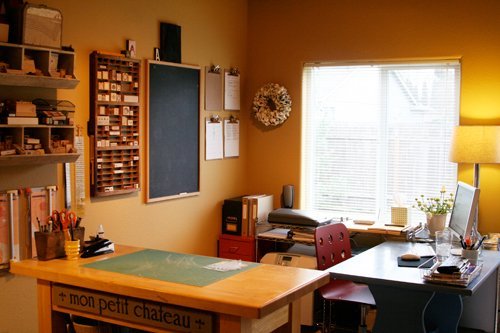
Quick answer: Start from home, register a simple business structure, design a logo with Canva, get a domain and website with a builder or WordPress, use a virtual phone number and free Google Workspace or Zoho alternatives, accept payments with Stripe, PayPal or UPI, and keep books with free or low-cost accounting apps. Spend only on what directly brings customers.
Table of Contents
A low-cost startup toolkit
1. Business name and identity
Check that your name is available as a domain and on social media. Design a logo yourself with Canva or hire a freelancer affordably. Print business cards through online printers such as Vistaprint, or skip them and use a digital card or QR code.
2. Website and email
Register a domain (see our tips to buy domain names) and build a site with WordPress, Shopify or a website builder. Use a professional email address on your domain through Google Workspace, Microsoft 365 or Zoho Mail.
3. Workspace
Start at home. When you need to meet clients, book a meeting room or day pass at a coworking space, or use a virtual office for a business address and mail handling.
4. Phone system
Virtual phone services give you a business number, voicemail and call forwarding to your mobile for a small monthly fee. WhatsApp Business is free and popular with customers in many countries.
5. Register your business
In the US, many founders form an LLC through their Secretary of State’s website for just the state fee, or use a filing service. In India, sole proprietors can register on the Udyam portal and get GST registration if required. Check your local rules or ask an accountant.
6. Payments
Accept cards and wallets with Stripe, PayPal or Square, and UPI in India through Razorpay or similar. No expensive merchant setup is needed.
7. Bookkeeping
Online accounting apps such as FreshBooks, Zoho Books, QuickBooks or Wave handle invoices and expenses. Keep business and personal money in separate accounts from day one.
8. Marketing on a budget
Use a Google Business Profile, social media, email newsletters and content marketing before paying for ads. See how to market your business to mobile users.
Where not to cut corners
- Legal registration and taxes.
- Backups and security for your website and data.
- The quality of your core product or service.
For the full plan, read how to start a small business online and differentiate your business from competitors.
FAQ
How much does it cost to start a business?
A home-based service or online business can start for a few hundred dollars or less: registration fees, a domain, hosting and basic tools.
Do I need an office?
Usually not at first. Work from home and use coworking spaces or virtual offices when needed.
Should I form an LLC?
It can protect personal assets, but rules and costs vary. Get local advice before choosing a structure.
Originally written by guest author Curtis Stevens of GotMerchant, a merchant account provider. Image by Ali Edwards under a CC licence. Updated for 2026 by QuickOnlineTips.
Get our free weekly email: new tech guides and tools, no spam.
New and updated tech guides, a free tool worth bookmarking and one useful pick, once a week. No spam, unsubscribe anytime.
One email a week. Unsubscribe anytime. See our privacy policy.



This is a great article. You have to have patience in economically hard times.
Regards/-
thanks for any tips dude, but can you tell me about how to make any design for my small office.?