
QuickChic WordPress Theme | Minimalist | Fast Loading
QuickChic is a very clean and simple 2-column, widget-ready, SEO-optimized, Adsense ready WordPress theme which is very useful for all types of bloggers. It’s for free use and with free limited support.
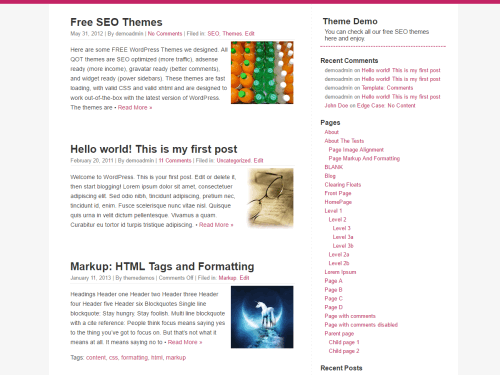
- Download QuickChic Theme (.zip file)
- Download QuickChic Child Theme (.zip file)
- Visit QuickChic Theme on the official WordPress Theme Directory.
Why use QuickChic WordPress Theme?
2-Columns – 2 column templates help to accommodate, fit, and blend content much better. The theme will also let you fit in advertisements, text links easily in any part of the sidebars.
Widget Ready – Widget ready sidebars are ready to be loaded with widgets. Simply go to Presentation>Widgets and load up your favorite widgets right into the sidebar. The current theme displays the Recent Articles RSS feed and Recent Comments widgets in 2 widget sidebars.
Fast Loading – Minimal clean code ensure the theme is fast loading as much as possible. Load up some default widgets, which are cached automatically and you still have a quick loading site.
SEO optimized – theme has been designed to make it as search engine friendly as possible to help you get more site traffic and higher search engine ranking for your articles.
Ad Ready – The template files have commented on areas where you can easily add your advertisements and easily customize the template.
Gravatar ready – Choose gravatar display options from WP Admin.
Valid XHTML and CSS – The theme has been thoroughly checked for XHTML and CSS validity and its ready to go with any browser and platform.
Spam Free – the template has been checked to be free of any hidden links and bug codes.
Plugin Compatible – Tested and retested to support most plugins.
Browser Compatible – Tested on latest versions with IE, Firefox, Opera, Safari for compatibility, and design issues.
Top navigation – Your own set of links, ads highlighted at the top of the page.
Free Limited Support – ask your queries and get them answered for free. We help you use and optimize QuickPress for as long as you use it.
FREE – like all WordPress goodness, released under a GPL License.
More WordPress Themes
- QuickStrap WordPress Theme – A lightweight 3-columns responsive Bootstrap starter theme, Font Awesome preloaded, footer widgets, SEO optimized.
- QuickPic WordPress Theme – A 1-column photoblogging theme, 3-column footer, SEO optimized and Ad ready. Fast loading and bold.
- QuickPress WordPress Theme – A free SEO wordpress theme for bloggers. 3-column, widget-ready, SEO-optimized, Ad-ready.
- QuickChic WordPress Theme – A clean, plain and simple. Easy to edit and customize. Fashionable and chic in pink, it is fast loading and SEO ready.