
Webmaster Tools Subscriber Stats Show Only 1 Subscriber!
Have you noticed that Google Webmaster Tools has redesigned and a new feature called Subscriber Stats has become available to help webmasters, particularly bloggers to see how many feed subscribers they have. While our feed count shows over 12500 subscribers, webmaster tools displays our feed has only 1 subscriber!
Visit the Subscriber Stats page today and check your stats… it mentions that the screen will display all feed users subscribed to iGoogle, Google Reader, and Orkut and because readers can use other sites and aggregators to subscribe to your content, total number of subscribers from all sources may be higher.
1 Subscriber – Is this a bug? No. We are using feedburner feeds as the default feed on this blog ever since it started (which was very useful when we migrated from Blogger to WordPress, retaining all feed subscribers easily). So almost all the subscribers are reading the feedburner feed. Hence the original QOT feed has hardly any subscribers. Had the single subscriber not been there, the count would have not even displayed.
Here is a break up of our Feedburner statistics today.
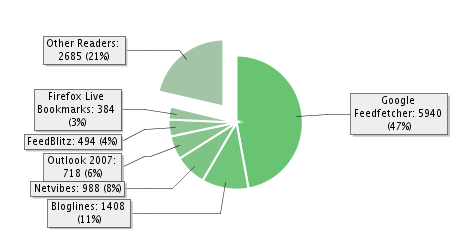
Google reader and iGoogle are used by a major 47% of our readers. Ever since Google started reporting subscribers, our feed count counter doubled overnight. As I setup Feedburner MyBrand now (which lets you host feeds on your own domain name), I hope some stats will change.
What are your Subscriber Stats displaying?
Subscribe to our weekly tech newsletter
New tech guides, free tools and 2-minute fixes, once a week.
🎁 100 Tech Terms ebook comes free with every subscription.
Unsubscribe anytime. See our privacy policy.



I noticed that too. I think mine showed 1. I knew it was inaccurate but I had to go and check Feedburner just in case heh.
Even when I checked, it was inaccurate. It was showing just 23.. FeedBurner reports more from Google Reader.