How to Add Songs to Saregama Carvaan: USB, Bluetooth and App
You can add your own songs to a Saregama Carvaan in three ways: plug in a USB pen drive with MP3 files, pair your phone over Bluetooth, or connect a phone with an AUX cable. On Carvaan 2.0 models you can also use Wi-Fi and the Carvaan app for extra songs. Here is how each one works.
Saregama Carvaan is a stand-alone music player for Hindi music and music in several Indian regional languages. It is popular because it is a portable player with a huge selection of classic retro songs, and it works without a phone.
Table of Contents
Saregama Carvaan
I have been using Saregama Carvaan for several years now and it is my favorite music gadget for listening to old Bollywood Hindi music from famous singers like Lata Mangeshkar, Kishore Kumar and other legendary artists.

Saregama has also introduced Carvaan devices in other Indian languages, including Tamil, Malayalam, Telugu and Bengali. It’s a premium portable music player.
The biggest advantage over streaming music players like Amazon Alexa is that it comes with 5,000 preloaded classic Hindi songs (on the Carvaan 2.0 Hindi model) and can play without the internet. So if you listen to Hindi music online, this one does not need it.
Can you add songs to the Carvaan’s built-in memory?
In the Saregama mode, the Carvaan plays its preloaded songs, and according to Saregama you cannot pick songs manually there: they play in random order, and you can skip a track or mark it as a favorite. Your own music is played in the other modes: USB/AUX IN or Bluetooth. So “adding songs” really means connecting your own music through one of the options below.
How to add songs to Saregama Carvaan with a USB pen drive
This is possibly the best way to play your own collection, because it needs no phone and no internet.
- Get your songs as MP3 files on your computer (see the legal download options below).
- Copy the MP3 files to a USB pen drive. Saregama says the Carvaan 2.0 Hindi supports USB 2.0 pen drives up to 64 GB, so a larger or newer drive may not work.
- Plug the pen drive into the USB port on the Carvaan.
- Press the mode button until the Carvaan is in USB/AUX IN mode, and the songs from the pen drive will play.
If the Carvaan does not recognise the drive, try a smaller or older pen drive. Details can differ between models, so check the manual for your model.
Where to download legal MP3 music for the Carvaan
So where can you download legal MP3 music for playing on Saregama Carvaan?
I never go searching for free music downloads on the internet, as there is a high chance that you land on a malicious website that downloads viruses along with the music. Even if you use YouTube songs, don’t use a YouTube downloader; download YouTube music legally.
Here is how I do it – I visit the Saregama music store.

I then download MP3 music for Rs 4 and HD high-quality audio music for Rs 15 from the official Saregama Carvaan website. (Those were the prices when I bought my songs; the store’s prices can change, so check the current price before buying.)
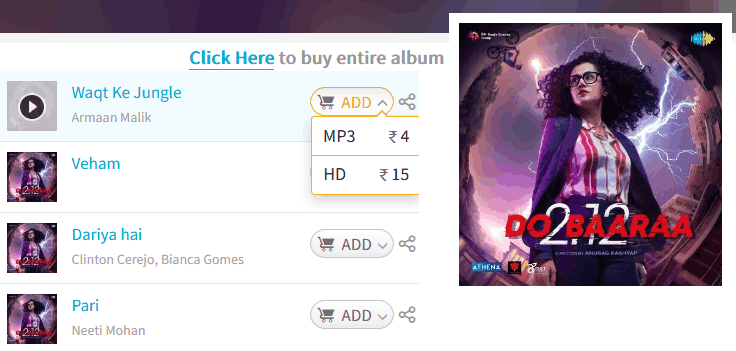
Is that not expensive, you might ask? I bought the Saregama Carvaan device for over Rs 6000, so why not spend Rs 400 to buy my 100 favorite bestselling Hindi songs that I really like?
Saregama Geetmala is very popular, with old Bollywood songs and classical music of bygone decades.
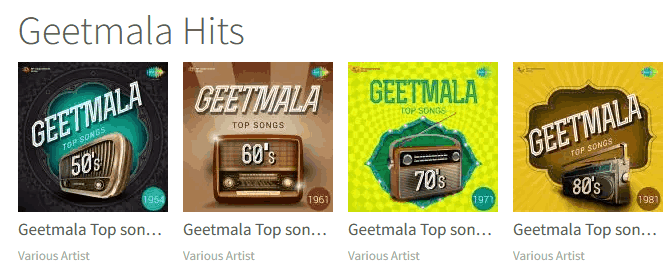
Other ways to play your own music
Bluetooth: switch the Carvaan to Bluetooth mode, pair your mobile phone or tablet with it, and play the songs stored on your phone through the Carvaan speakers.
AUX IN: connect your phone to the AUX IN port with an AUX cable and play music from your phone on the Carvaan. This uses the same USB/AUX IN mode as the pen drive.
Wi-Fi and the Carvaan app (Carvaan 2.0): according to Saregama, Carvaan 2.0 models can connect over Wi-Fi to the Carvaan app for an additional 20,000 Hindi songs and 300+ podcast stations.
If you want to stream from your phone often, it is recommended to buy one of the premium Carvaan devices that support Bluetooth and feature Harman Kardon speakers, like the Saregama Carvaan Gold.
Frequently asked questions
How do I add songs to Saregama Carvaan?
Copy MP3 files to a USB pen drive, plug it into the Carvaan and switch to USB/AUX IN mode. You can also play songs from your phone by Bluetooth or an AUX cable.
What size USB pen drive works with Carvaan?
For the Carvaan 2.0 Hindi, Saregama lists USB 2.0 pen drives up to 64 GB. Other models may differ, so check your manual.
Can I play my own songs in Saregama mode?
No. Saregama mode plays the preloaded songs. Play your own music in USB/AUX IN or Bluetooth mode.
Does the Carvaan need the internet?
No. The preloaded songs, the USB pen drive and Bluetooth all work without internet. Wi-Fi is only needed for the extra songs on Carvaan 2.0.
Get our free weekly email: new tech guides and tools, no spam.
New and updated tech guides, a free tool worth bookmarking and one useful pick, once a week. No spam, unsubscribe anytime.
We will email you a link to confirm your subscription. See our privacy policy.