
QuickChic WordPress Theme: Free, Fast and Clean Blog Theme
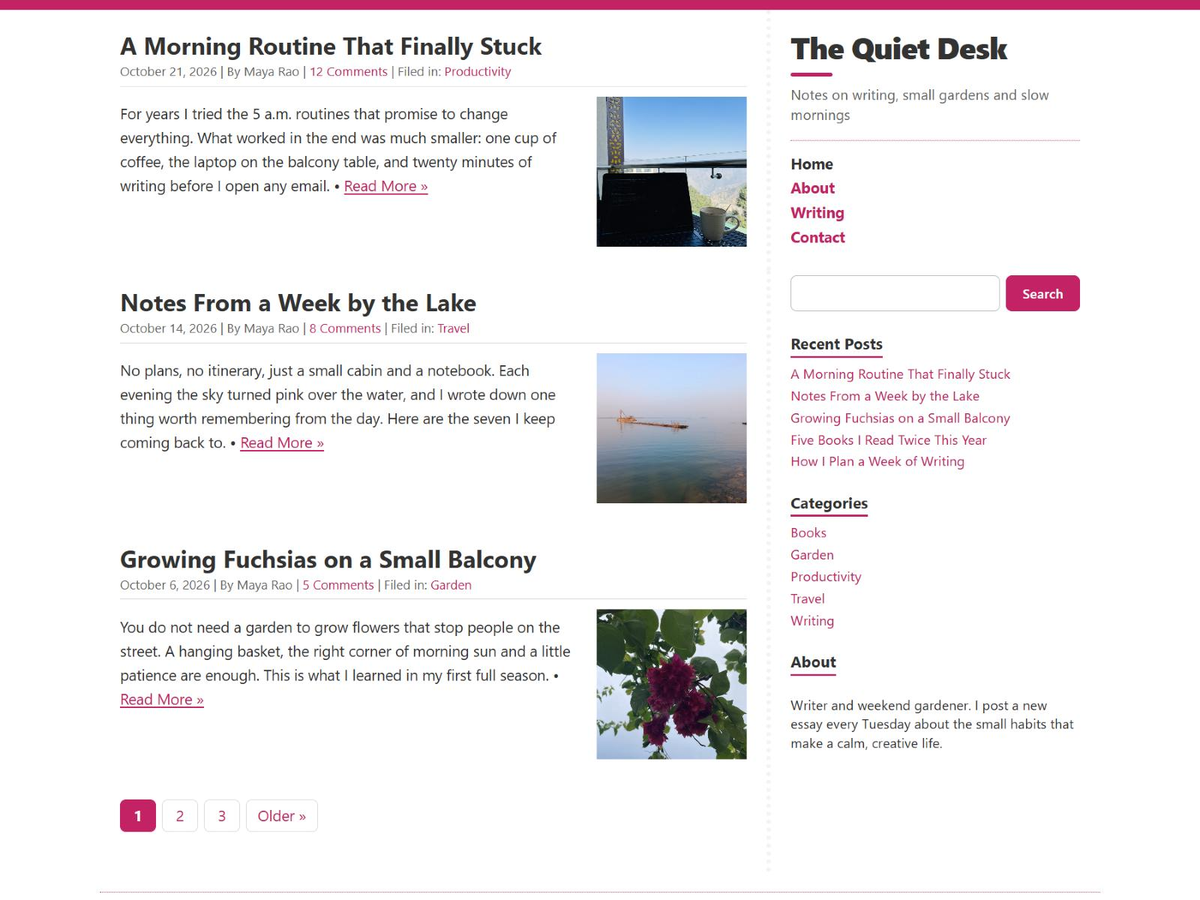
QuickChic is a free, fast and clean WordPress theme for writers and bloggers who want their words to come first. There is no page builder to learn and nothing to set up: activate it and start writing. Your readers get a calm, clutter-free page that loads in a blink, on any phone or computer.
- Download QuickChic free from the official WordPress Theme Directory, or install it straight from your dashboard (see below).
- Source code: QuickChic on GitHub, every change open to read.
- Want to customise the code? Download the QuickChic child theme (.zip), so your changes survive updates.
Who is QuickChic for?
QuickChic is made for personal blogs, writers, journals, small business news pages and anyone who wants a site that simply works. If you would rather spend your time writing than tweaking settings, and you want visitors to read your posts instead of waiting for a heavy page to load, QuickChic is for you.
Why you will like it
Ultra light and fast. The whole design is one small stylesheet of about 6 KB once compressed. No JavaScript, no web fonts, no frameworks, so your pages load almost instantly and your readers on slow mobile connections are never kept waiting.
Plug and play. Activate it and your site already looks finished. The sidebar fills itself with search, recent posts and categories until you add your own widgets.
Easy on the eyes. A clean two-column layout: posts on the left; site title, menu and widgets on the right. On phones it becomes one tidy column, with the title and menu first.
Dark mode, automatically. When a reader’s phone or computer is set to dark, your site turns dark too. You can switch this off in one click.
Your colour. Pink is the signature, but you can pick any accent colour for links, buttons and borders in Appearance > Customize > Colours.
Familiar and simple. Set up widgets and menus in the usual Appearance > Widgets and Menus screens. Posts written in the block editor look just right, and the editor shows them the way readers will see them.
Room to grow. Five widget areas (sidebar, below each post, and three footer columns), a full width template for pages without a sidebar, featured images, a main menu and a footer menu, a custom logo and numbered pages.
Social icons, no plugin. Add links to X, Facebook, Instagram, LinkedIn, YouTube, GitHub and more to the Footer Menu, and they show as neat icons.
Thoughtful details. An “Updated” date on edited posts, clean printouts of any article, comfortable spacing for comments, and accessible markup with a Skip to content link and clear keyboard focus.
Free forever. Released under the GPL, like WordPress itself, with free help when you need it.
How to install QuickChic
- In your WordPress dashboard, go to Appearance > Themes > Add New Theme.
- Search for QuickChic.
- Click Install, then Activate. That’s it.
To make it yours, open Appearance > Customize: choose your accent colour under Colours, and choose short excerpts or full posts (and the excerpt length) under Post Lists.
What’s new in QuickChic 1.7
- A fresh 2026 design: a bolder site title, cleaner buttons, search box and page numbers
- Automatic dark mode and an accent colour picker
- Footer widgets in three columns and a Below Posts widget area
- Social icons in the Footer Menu
- Full width template for posts and pages
- Works with the block widget editor out of the box
- One small stylesheet, still with no JavaScript
More free WordPress themes
- QuickPic WordPress Theme: a bold one-column theme for photo blogs, fast loading.
- QuickPress WordPress Theme: a three-column blog theme with plenty of widget space.
- QuickStrap WordPress Theme: a free Bootstrap 5 WordPress starter theme with no JavaScript and no build step.