
How to Track Google Algorithm Updates: 8 Free Tools (2026)
Has your search traffic suddenly dropped or jumped? Before you change anything on your site, check whether a Google algorithm update is rolling out. Free tools track Google algorithm changes by watching rankings for thousands of keywords every day, and they show “storms” when results move a lot. Here are the best free ways to track Google algorithm updates in 2026, from Google’s own dashboard to SERP volatility trackers.

Quick answer: Start with the official Google Search Status Dashboard, which lists confirmed core, spam and other ranking updates. Then check a volatility tracker such as Semrush Sensor, MozCast or Algoroo to see how strongly rankings are moving today.
Table of Contents
Official sources for Google algorithm updates
1. Google Search Status Dashboard
Google’s Search Status Dashboard is the most reliable place to confirm an update. It lists ranking updates (like core updates and spam updates) with start and end dates, plus crawling, indexing and serving incidents. If your traffic changes while an update is listed as “ongoing”, that’s very likely the cause.
2. Google Search Central and Search Liaison
Google announces major updates on the Google Search Central blog and through its Search Liaison account on X, often with advice on what the update targets.
Free tools to track Google algorithm changes daily
Google makes many smaller changes it never announces. These trackers measure how much search results move each day, so you can spot unconfirmed updates too.
3. MozCast
MozCast shows daily Google ranking turbulence as a weather report. It tracks a fixed set of keywords and compares today’s top results with yesterday’s. A normal day is around 70°F; hotter and stormier days mean bigger changes in Google results.

4. Semrush Sensor
Semrush Sensor gives a daily volatility score from 0 to 10, for desktop and mobile, with breakdowns by country and industry. It’s useful to see whether an update is hitting your niche (for example health, finance or tech) more than others.
5. Algoroo
Algoroo tracks ranking movement across thousands of keywords and shows it as daily bars. Tall red bars mean heavy turbulence and a likely Google algorithm change.
6. AccuRanker Grump
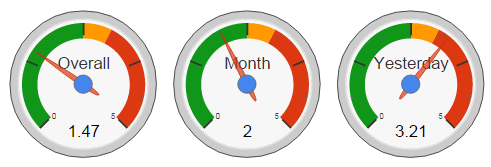
AccuRanker Grump rates how “grumpy” Google is each day, from chilled to furious, based on ranking changes for a large keyword set. It has history going back years, so you can compare today with past updates.
7. Advanced Web Ranking Google Algorithm Changes
Advanced Web Ranking tracks hundreds of thousands of desktop and mobile keywords and charts volatility by country, device and industry.
8. Similarweb SERP Seismometer
Similarweb monitors daily ranking changes across many domains and keywords and shows which industries are most affected.
Trackers come and go. In our 2014 version of this list, the SERPs.com Volatility Index and SERPmetrics flux charts were favourites, but the tools above are the ones to watch today.
What to do when a Google update hits your site
- Confirm the timing. Compare your traffic drop or gain with the dates on the Search Status Dashboard and the volatility trackers.
- Check Search Console. In Google Search Console, compare clicks and positions before and after the update to see which pages and queries changed.
- Rule out technical problems. A drop caused by a broken page, noindex tag or server error isn’t an algorithm update.
- Wait for the rollout to finish. Core updates take up to a few weeks, and rankings often bounce around until they settle.
- Improve, don’t panic. Google’s advice after core updates is to focus on helpful, reliable, people-first content. Refresh outdated posts, remove thin pages and fix poor user experience.
A free Ahrefs Webmaster Tools account also shows your site’s rankings and traffic estimates over time. See our guide to the Ahrefs free account.
Frequently asked questions
How often does Google update its algorithm?
Google makes thousands of small changes every year. Big “core updates” happen a few times a year and are announced on the Search Status Dashboard.
How do I know if a Google algorithm update affected my site?
If your traffic changed sharply on the same dates as a confirmed update, and volatility trackers show high turbulence, the update is the most likely cause. Check Search Console to see which pages were affected.
Are Google algorithm trackers accurate?
They’re good at showing that something is happening, but each tracks a different keyword set, so their scores won’t always agree. Use two or three together with Google’s official dashboard.
Disclosure: Some links in this post are affiliate links. QuickOnlineTips may earn a commission if you buy through them, at no extra cost to you.
Get our free weekly email: new tech guides and tools, no spam.
New and updated tech guides, a free tool worth bookmarking and one useful pick, once a week. No spam, unsubscribe anytime.
One email a week. Unsubscribe anytime. See our privacy policy.


Google releases many update but unfortunately there is no official refrence from Google to get track of it.
Although sources are available. you can follow search engine land, for such update news. This is valuable source to get track of Google update.