
Dvorak vs QWERTY: Is the Dvorak Keyboard Really Faster? (2026)
Dvorak vs QWERTY: is the Dvorak keyboard really faster? Almost everyone types on QWERTY, a layout designed for typewriters in the 1870s. The Dvorak Simplified Keyboard, patented in 1936, puts the most common letters on the home row so your fingers move less. Fans say it’s faster and more comfortable. Here’s how Dvorak and QWERTY compare in 2026, what the research actually says, and how to try Dvorak on your computer or phone for free.
Quick answer: Dvorak reduces finger movement and many users find it more comfortable, but studies haven’t shown a big speed advantage for experienced typists. If you already type well on QWERTY, switching takes weeks and gives modest gains. If you type a lot or have hand strain, Dvorak (or Colemak) is worth trying, and every major operating system supports it for free.
Table of Contents
What is a QWERTY keyboard?
QWERTY is named after the first six letters on the top-left row. It was developed by Christopher Latham Sholes for the Sholes and Glidden typewriter in the 1870s, and was arranged partly to reduce jams in mechanical typebars. It became the standard and has stayed that way for 150 years, mostly because everyone already knows it.
What is the Dvorak keyboard?
The Dvorak layout was created by Dr August Dvorak and his brother-in-law William Dealey, who studied letter frequencies and hand movement. Its key ideas:
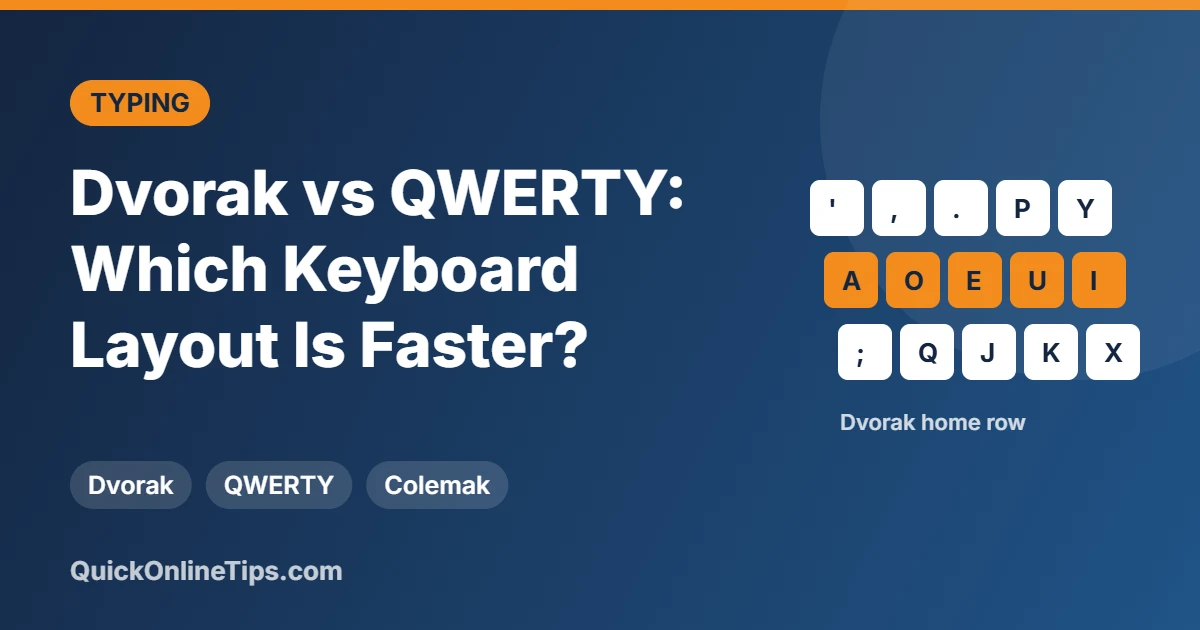
- Vowels on the left home row (A, O, E, U, I) and the most common consonants (D, H, T, N, S) on the right.
- More typing on the home row: about 70% of keystrokes, compared with around 30% on QWERTY.
- Alternating hands more often, which creates a natural typing rhythm.
- Rare letters on the bottom row, where reaching is hardest.
Barbara Blackburn, long listed by Guinness as the world’s fastest English typist, reached over 200 words per minute on a Dvorak keyboard.
Dvorak vs QWERTY: is Dvorak faster?
Early studies, some run by Dvorak himself, reported big gains. A 1956 US government study found little benefit from retraining QWERTY typists, and economists later argued in “The Fable of the Keys” that Dvorak’s advantage had been exaggerated. Modern analysis suggests Dvorak cuts finger travel significantly, which can mean more comfort and slightly higher speed, but the typist’s skill matters far more than the layout. In short: Dvorak is more efficient, but not dramatically faster for most people.
Other alternative keyboard layouts
- Colemak (external site, opens in new tab) (2006): keeps common shortcuts like Ctrl+Z, X, C and V in place and changes only 17 keys, so it’s easier to learn than Dvorak.
- Colemak-DH: a variant that moves D and H to reduce awkward reaches.
- Workman: designed to reduce sideways finger movement.
How to switch to Dvorak
- Windows 11: go to Settings → Time & language → Language & region, click ⋯ → Language options next to English, choose Add a keyboard and select United States-Dvorak. Switch layouts with Windows + Space.
- Mac: open System Settings → Keyboard → Text Input → Edit, click +, and add Dvorak (or Dvorak – QWERTY ⌘, which keeps shortcuts in QWERTY).
- Android: in Gboard (external site, opens in new tab), go to Settings → Languages → English and choose the Dvorak or Colemak layout.
- Linux: most desktops offer English (Dvorak) under keyboard settings.
You don’t need a new keyboard. Keycaps won’t match, so learn by touch typing, or buy Dvorak stickers (external site, opens in new tab). Free practice sites like Keybr (external site, opens in new tab) and Monkeytype (external site, opens in new tab) support Dvorak and Colemak.
Tips for learning Dvorak
- Practise 15–30 minutes a day. Most people get back to their old speed in a few weeks to a couple of months.
- Don’t switch back and forth too often at first, as it slows learning.
- Remap or disable distracting keys if needed, for example to disable the power key on your keyboard.
Frequently asked questions
Is Dvorak better for preventing RSI?
Many users report less strain because fingers travel less, but there’s no strong medical evidence. A good posture, breaks and an ergonomic keyboard (external site, opens in new tab) matter too.
Why didn’t Dvorak replace QWERTY?
QWERTY was already the standard on typewriters, in schools and offices, and the benefits of switching weren’t big enough to retrain everyone.
Can I use Dvorak at work on a shared computer?
Yes. Add Dvorak as a second layout and switch with a shortcut. Others can keep using QWERTY.
Disclosure: As an Amazon Associate, QuickOnlineTips earns from qualifying purchases.
Subscribe to our weekly tech newsletter
🎁 Free 100 Tech Terms ebook when you subscribe. Unsubscribe anytime. Privacy





I learned to touch-type using QWERTY during my freshman year in high school, and I used to use QWERTY for years. Now, when I heard about Dvorak, I started learning it during my junior year in college. It took me like 6 weeks to get to type about 50 wpm on it. When I compared between QWERTY (we traditionally use) to Dvorak (easier, more efficient, and faster), my fingers get to stay in the home row most of the time and reach the bottom roll less. I even feel like better alternating between hands using Dvorak. If I’m gonna be an elementary school teacher, I’m gonna teach the kids how to type using Dvorak keyboard only.
I ripped up my keyboard to use it its kinda cool
The keyboard shortcut issue was a problem for me at first, but I eventually learned to type most shortcuts two-handed. Of course, this isn’t ideal, since you have to take your right hand off the mouse to do so, but I eventually adjusted. Recently I found this handy utility, which allows you to type Dvorak but reverts to QWERTY when the CTRL key is pressed. That means most of your keyboard shortcuts will stay the same, which is very useful. And if you’re on a Mac, you don’t need a utility – just use the Dvorak-QWERTY layout and you’re set.
I’ve seen these before, and I’m convinced that they’d completely throw me. I type anywhere from 80-90wpm, and I am very used to the standard keyboard.
One thing I wonder about the Dvorak keyboard the most is whether it is all that intuitive for shortcut users. Having letters like the “i” toward the center of the keyboard seriously hinders shortcuts such as CTRL-I (for italics in things like word processors).
In terms of writing markup coding, I think it wouldn’t be all that different, considering things like the greater-than/less-than signs (can never remember the proper term for those things, haha) are in the same place, just on the opposite sides of things.
I think the key here is that Dvorak may, indeed, be a useful tool for writers and typists, but not for others, such as designers or coders or any number of other users.
And, yes, there are many communities in favor of Dvorak. Where I see this most is in my ventures into the publishing and writing realms.
Just a thought or two.