PHP Vulnerability (October 2026): What WordPress Site Owners Should Do Now
The critical PHP vulnerability disclosed in October 2026, nicknamed PHP2Shell, is a pair of security holes in PHP itself, the programming language that runs WordPress on your web server. They let an attacker run their own code on an unpatched server without logging in, and attacks started before the fix was even out. If you run a WordPress site, this is the week to check your PHP version, confirm your host has patched it, and tighten a few habits so the next big flaw doesn’t catch you off guard.

Quick answer: PHP2Shell (CVE-2026-109618 and CVE-2026-109619) is fixed in PHP 8.5.12, 8.4.27, 8.3.36 and 8.2.35, released on 21 October 2026. Updating WordPress or plugins does not fix it; only a PHP update does. Check your PHP version under Tools → Site Health → Info → Server, confirm with your host that the 21 October PHP security release is applied (on shared and managed hosting the host does this), and if you run your own VPS, update PHP and restart it today. If you are on PHP 8.1 or older, plan a move to PHP 8.2 or newer now.
Table of Contents
What is the PHP vulnerability (PHP2Shell)?
PHP2Shell is the name security researchers gave to a pair of flaws in the core PHP engine. The PHP project rated both 9.2 out of 10 (CVSS v4.0), which puts them in the critical band. Both can allow unauthenticated remote code execution: someone on the internet can send specially crafted requests to your server and end up running code on it, with no password needed.
- CVE-2026-109618 (out-of-memory corruption): if a request hits PHP’s memory limit at exactly the wrong moment, PHP can leave half-built internal data behind and later treat it as valid. That corrupts memory, and corrupted memory can be turned into code execution. According to the PHP Foundation, on Apache with mod_php this can be triggered before any application code runs at all.
- CVE-2026-109619 (stale global state): a fatal error at the wrong point can leave PHP holding a pointer to memory that belonged to a previous request. The next request handled by the same PHP worker can then use that freed memory, which again can be turned into code execution.
Wiz Research, one of the teams that reported the bugs, says it also showed that attackers could read chunks of a PHP worker’s memory, which may hold passwords, login tokens and API keys from other visitors’ requests, even without taking over the server.
Which PHP versions and websites are affected?
Practically every PHP site that hasn’t been patched. Wiz says every PHP version back to 5.4 is hit by at least one of the issues, and Patchstack lists every common way of running PHP as exposed: PHP-FPM, Apache with mod_php, php-cgi, FrankenPHP and LiteSpeed. Servers running Apache with mod_php are at the highest risk.
| PHP branch | Fixed version | Status |
|---|---|---|
| PHP 8.5 | 8.5.12 | Supported |
| PHP 8.4 | 8.4.27 | Supported |
| PHP 8.3 | 8.3.36 | Supported (security fixes) |
| PHP 8.2 | 8.2.35 | Supported (security fixes until 31 Dec 2026) |
| PHP 8.1, 8.0, 7.4 | No official release | End of life; only minimal source patches, host or vendor builds |
| PHP 7.3 and older | No official fix | End of life; upgrade |
WordPress, WooCommerce, Drupal, Joomla, Magento, Laravel apps and custom PHP scripts are all exposed if the PHP underneath is vulnerable. Researchers demonstrated working attacks against the latest WordPress, Drupal and Joomla, and Wiz notes that even a one-line “Hello World” PHP page on a vulnerable version could be attacked.
Why PHP2Shell is different from the usual WordPress hack
Most WordPress security news is about one plugin or one theme with a bug. You update that plugin and you’re done. PHP2Shell is a different kind of problem:
- It sits below WordPress. The bug is in the language engine, not in WordPress, a plugin or your theme. A perfectly coded, fully updated WordPress site is still exposed if its PHP is old.
- No login needed. Many plugin bugs need the attacker to have at least a subscriber account. These don’t.
- It’s everywhere. PHP powers a huge share of the web, so a single flaw in the engine touches millions of sites at once. Wiz compares it to past internet-wide events such as Heartbleed (2014) and Log4Shell (2021).
- It was hiding for years. The underlying code had been in PHP for more than a decade.
- Your WordPress dashboard can’t fix it. There’s no plugin update button for this. The fix comes from whoever runs your server.
How was it found?
The problem was found by security researchers working with the PHP team, with AI tools playing a big part. Security firm Wiz, Calif and OpenAI reported the flaws privately in August 2026, and the PHP Foundation built fixes for every supported version. Details became public a day early, so PHP released the fix on 21 October 2026, and security companies such as Cloudflare soon reported attack attempts. That is why agencies like CISA urged everyone to patch right away.
What is PHP doing to fix it?
PHP released 8.5.12, 8.4.27, 8.3.36 and 8.2.35 on 21 October 2026. The release notes are blunt: there are no complete workarounds, and updating is the only safe choice. For the retired 7.4, 8.0 and 8.1 branches, PHP published minimal source patches only, for people who build PHP themselves; everyone else on those versions depends on their host, Linux distribution or a long-term support vendor.
Looking ahead, the PHP Foundation says it is changing how its security team makes decisions so hard fixes don’t stall again, has added staff for security triage and hardening, set up an Ecosystem Security Team in May 2026, and is asking the companies, hosts and governments that rely on PHP to fund that work.
What is WordPress doing? Is there a new WordPress release?
No. WordPress.org says these flaws are not specific to WordPress and that no WordPress update is required or planned for them. Instead, WordPress asks every site owner to update PHP immediately, and adds a strong warning for anyone who manages their own server on a PHP version older than 8.2: consider taking the site offline until you can upgrade, advice it shares with the UK’s National Cyber Security Centre.
Keep WordPress, themes and plugins updated anyway, but don’t confuse those updates with the PHP fix.
What are hosting companies doing?
For most WordPress owners, the fix is in the host’s hands, and the hosting industry moved quickly. Here’s what the major players are doing (check your own host’s status page or emails for the latest on your site):
- Shared and managed WordPress hosts: most large hosts have said they are rolling out the patched PHP across their servers, and many added temporary firewall or server-level protections while doing so. On these plans you usually don’t need to change anything yourself, but it’s worth confirming with your host.
- Hosting control panels: cPanel and Plesk released updated PHP packages, so hosts and server owners who use those panels can install the fix.
- Linux distributions: major distributions shipped updated PHP packages, often keeping the same version number but with the fix included.
- Cloudflare: turned on firewall rules against these attacks for every plan with its web application firewall, including the free plan. That’s a helpful extra layer, not a replacement for patching.
- VPS and cloud servers: if you rent a server and manage PHP yourself, your provider will not patch PHP for you. You need to update it (see the steps below).
What should WordPress owners do right now?
- Check your PHP version. In WordPress, go to Tools → Site Health → Info and open the Server section. Your hosting panel shows it too. Our guide on how to upgrade PHP version in WordPress walks through this with screenshots.
- Don’t trust the version number alone. Many hosts and Linux distributions apply the fix without changing the number you see. Look for a PHP build date of 21 October 2026 or later, or ask your host directly: “Have you applied the 21 October 2026 PHP security release (CVE-2026-109618 and CVE-2026-109619) to my site?”
- On shared or managed hosting: read your host’s status page or email. If you haven’t heard anything, open a support ticket today.
- On a VPS or your own server: nobody will patch it for you. Install the updated PHP packages from your distribution or PHP package source, then restart PHP-FPM or Apache so every worker runs the fixed version. If your package source hasn’t shipped the update yet, apply the temporary settings below and keep checking.
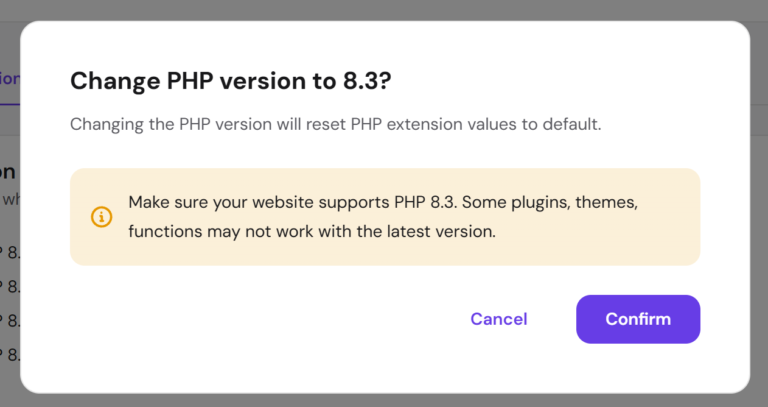
- On PHP 8.1 or older: move to PHP 8.2 or newer. Back up first, test on a staging copy if you can, and update old plugins and themes before switching.
- Turn on a web application firewall. Cloudflare’s free plan, or your host’s firewall, can block known attack patterns while you patch.
If you can’t update today: temporary settings
PHP lists a few settings that close specific attack paths but do not make a server safe. They are for server administrators; on shared hosting, ask your host instead of editing server files.
session.upload_progress.enabled = 0blocks one demonstrated attack path. WordPress doesn’t rely on this feature, so it rarely affects a normal site.fatal_error_backtraces = Offon PHP 8.5 removes another path used by CVE-2026-109619.- Removing per-request INI overrides that are invalid or deprecated (for example old
php_valuelines in.htaccess) narrows another route.
Treat these as stopgaps until the real update is installed.
After patching: check your site wasn’t hit
Because attacks started before the fix, it’s worth a quick check, especially if your server was unpatched on 20-22 October:
- Look for unknown administrator accounts under Users.
- Look for unexpected PHP files, especially in
wp-content/uploads, and recently changed core files. A security plugin’s file scan helps here; see our list of WordPress security plugins. - Ask your host about server log signs Wiz flagged: unusual multipart upload requests followed by memory-limit errors or bursts of 500 errors, and oddly large
PHPSESSIDcookies. - Since process memory could leak secrets, consider changing your WordPress admin passwords and rotating API keys stored on the server if you were exposed while attacks were circulating.
- If you find signs of compromise, restore from a clean backup taken before 17 October, then patch before bringing the site back. WordPress.org’s hacked site FAQ is a good starting point.
The role of AI: why we’ll see more flaws like this
PHP2Shell may be remembered as the moment AI changed web security. The flawed code sat in PHP for more than a decade because turning it into a working attack was extremely hard: it meant chaining several bugs and adapting to each server’s memory layout. Wiz says frontier AI models made that practical, letting a single researcher do in about a week what would once have taken a top team months.
That cuts both ways:
- For defenders: AI is helping find and fix old bugs that slipped past years of human review. The PHP Foundation says it now uses several AI tools to scan code and validate incoming reports, alongside human reviewers who make every call.
- For attackers: the same tools lower the skill needed to build exploits, so the gap between “bug disclosed” and “bug attacked” keeps shrinking. Here, attacks began before the fix shipped.
- For everyone else: expect more critical disclosures, more often. The PHP Foundation says its security team has handled a flood of reports in recent months, many of them AI-assisted. Speed of patching now matters more than ever.
8 habits that keep your site safe when the next big flaw lands
- Keep automatic, off-site backups. Daily backups stored away from your server, and a restore you’ve actually tested. Compare options in our guide to WordPress backup services.
- Stay on a supported PHP version. Check PHP’s supported versions page once or twice a year. PHP 8.2 security support ends on 31 December 2026, so 8.3 or newer is the safer target.
- Turn on auto-updates for WordPress core, plugins and themes, so routine fixes land without you. Here’s how to auto-update WordPress plugins and themes.
- Choose a host that patches fast and publishes a status page, and bookmark that page.
- Put a firewall in front of your site, such as Cloudflare or your host’s web application firewall.
- Follow a few trusted news sources: WordPress.org security news, php.net, your host’s status page and CISA advisories.
- Trim plugins and accounts. Delete plugins and themes you don’t use, remove old admin users, and use two-factor login for admins.
- Harden the basics. Our step-by-step guide on how to increase WordPress security covers file permissions, login protection and more.
Frequently asked questions
What is the PHP vulnerability in simple terms?
A bug in the PHP engine lets attackers send crafted web requests that make an unpatched server run their code. It affects almost any website built on PHP, including WordPress, until the host installs the 21 October 2026 PHP update.
Is the PHP vulnerability fixed yet?
Yes. PHP released fixed versions on 21 October 2026. Your site is only safe once your host or server admin has installed them.
Does updating WordPress fix PHP2Shell?
No. The flaws are in PHP, not WordPress. WordPress.org says no WordPress update is needed or planned. Only a PHP update from your host or server admin fixes it.
Which PHP version fixes PHP2Shell?
PHP 8.5.12, 8.4.27, 8.3.36 or 8.2.35, or a host or distribution build of your version that includes the 21 October 2026 security fix.
My PHP version number didn’t change. Am I still vulnerable?
Not necessarily. Some hosts patch PHP without changing the version number. Check the PHP build date (21 October 2026 or later) in your hosting panel’s PHP info page, or ask your host.
Is my site safe if I use Cloudflare?
Cloudflare’s firewall rules block known attack patterns, which helps, but Cloudflare itself says you should still update PHP. Attackers can sometimes reach a server directly and skip the firewall.
I’m on PHP 7.4. What should I do?
Upgrade to PHP 8.2 or newer as soon as you can. PHP 7.4 no longer gets official releases. Back up, update your plugins and theme, test, then switch the PHP version in your hosting panel.
Was PHP2Shell found by AI?
Partly. Human audits spotted the root problem in 2024, and in 2026 Calif, OpenAI and Wiz each reported attack paths. Wiz says AI models were central to finding the bugs and building working exploits quickly.
Photo by FlyD on Unsplash
Get our free weekly email: new tech guides and tools, no spam.
New and updated tech guides, a free tool worth bookmarking and one useful pick, once a week. No spam, unsubscribe anytime.
One email a week. Unsubscribe anytime. See our privacy policy.