
Google Public DNS vs OpenDNS: Which Is Better and How to Switch (2026)
Should you use Google Public DNS or OpenDNS? In 2009 I was using OpenDNS to browse faster and fix DNS errors, then switched to Google Public DNS the week it launched, because 8.8.8.8 was so easy to remember and it felt lightning fast. Both services are still free and widely used in 2026, and Cloudflare’s 1.1.1.1 has joined them. Here is how they compare and how to set Google Public DNS on any device.
Quick answer: Google Public DNS uses 8.8.8.8 and 8.8.4.4 (IPv6: 2001:4860:4860::8888 and ::8844). Choose Google or Cloudflare (1.1.1.1) for speed and reliability, and OpenDNS (208.67.222.222 and 208.67.220.220) if you want free web filtering for your family. Change DNS in your router to cover every device at home.
Table of Contents
Google Public DNS vs OpenDNS vs Cloudflare
| Google Public DNS | OpenDNS (Cisco) | Cloudflare | |
|---|---|---|---|
| IPv4 addresses | 8.8.8.8, 8.8.4.4 | 208.67.222.222, 208.67.220.220 | 1.1.1.1, 1.0.0.1 |
| Family filtering | No | Yes (FamilyShield, Home) | Yes (1.1.1.3) |
| Malware blocking | No | Yes, some | Yes (1.1.1.2) |
| Encrypted DNS (DoH/DoT) | Yes | Yes (DoH) | Yes |
| Account needed | No | Only for custom filtering | No |
Speed depends on where you live and your ISP; all three are fast. Want filtering for kids? See our guide to filter home internet free with OpenDNS.
How to set Google Public DNS
On your router (whole home)
Sign in to your router’s admin page (often 192.168.1.1 or 192.168.0.1), find the DNS or WAN settings, and replace the automatic DNS with 8.8.8.8 and 8.8.4.4. Every device on your Wi-Fi then uses it.
On Windows 11 and 10
- Open Settings > Network & internet and choose Wi-Fi or Ethernet.
- Click your connection, then DNS server assignment > Edit.
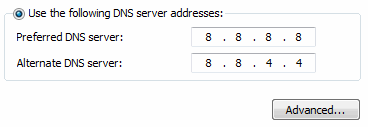
- Choose Manual, turn on IPv4, and enter 8.8.8.8 and 8.8.4.4. Optionally set DNS over HTTPS to On.
- Save. In 2009 we did this through Control Panel’s network adapter TCP/IPv4 properties in Windows Vista, which still works.
On Mac
System Settings, then Network, select your connection, Details, then DNS. Click + and add 8.8.8.8 and 8.8.4.4.
On Android
Settings, then Network & internet, then Private DNS. Choose “Private DNS provider hostname” and enter dns.google. This encrypts DNS on mobile data and Wi-Fi.
On iPhone
Settings, then Wi-Fi, tap the (i) next to your network, Configure DNS, Manual, and add 8.8.8.8 and 8.8.4.4.
Why change your DNS?
- Reliability: ISP DNS servers sometimes fail or are slow, causing “server not found” errors.
- Speed: a fast resolver can shave time off loading new sites.
- Privacy and security: encrypted DNS (DoH or DoT) stops others on the network seeing which sites you look up.
Check your connection with our guide to the fastest internet speeds, and if Wi-Fi is the bottleneck, here is how to increase Wi-Fi range at home.
How to check which DNS you are using
After changing settings, confirm the switch worked. Visit a DNS leak test site, or on Windows open Command Prompt and run nslookup google.com; the “Server” line shows the resolver your PC is using. On a Mac, run scutil --dns in Terminal. If you still see your ISP’s server, restart the device or router, and check that a VPN or security app is not overriding your DNS. You may also need to flush the old cache with ipconfig /flushdns on Windows.
Troubleshooting after switching DNS
- Some sites stop loading: a few office or college networks block outside DNS; switch back to automatic DNS on those networks.
- Slower than before: try Cloudflare or your ISP’s DNS and compare; the nearest server wins.
- Captive Wi-Fi login pages not appearing: hotels and airports sometimes need automatic DNS until you log in.
- Private DNS errors on Android: check you typed dns.google exactly, or set it to Automatic.
FAQ
Is Google Public DNS free?
Yes, with no account needed. Read the details on Google Public DNS.
Does Google Public DNS block websites?
No. It does not filter content. Use OpenDNS FamilyShield or Cloudflare 1.1.1.3 for filtering.
Which is faster, 8.8.8.8 or 1.1.1.1?
Both are among the fastest; results vary by location. Test each with a DNS benchmark tool and keep the faster one.






Although I have been using OpenDNS mostly for a year now, this option too is an alternative just in case OpenDNS has any issues.
Fantastic Performance. Not only DNS , within few days Google will change DNA of the web
I tried Google Public DNS and its fast
My report shows almost 50% less latency but when I changed name server for one of domain
it took time to reflect that changes on my local PC and as soon as I changed it to Open DNS
I can see name server change
Beautiful number! 8.8.8.8 :)
Thanks for sharing this. Usually I use OpenDNS, but I’m gonna try this.
I switched from my ISP to OPEN DNS a while ago – don’t really see any difference, so I don’t know what difference this will make.