
Create One Click Shutdown Button for Windows 11 & 10
Want a one click shutdown button on your computer? In the Windows XP days, shutting down took three clicks: Start > Turn Off Computer > Turn Off. Windows 11 and Windows 10 aren’t much quicker. You can replace all of that with a desktop shortcut icon that shuts down your PC in a single click – no software or expert skills needed. This trick still works perfectly in 2026, and the same method gives you restart, sleep and lock buttons too.

shutdown /s /t 0, click Next, name it “Shut Down” and click Finish. Double-click the icon to shut down instantly. Change its icon from Properties > Change Icon, and pin it to the taskbar or Start for a true one-click button.Table of Contents
How to create a one click shutdown button in Windows 11 and 10
Step 1: Create a new shortcut
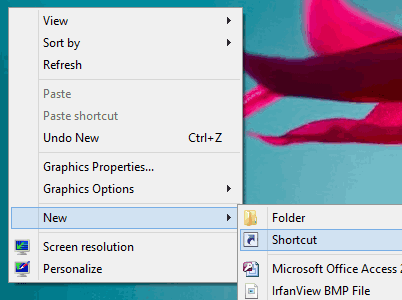
Right-click an empty area of the desktop and choose New > Shortcut.

Step 2: Enter the shutdown command
In the location box, type (or copy and paste) exactly:
shutdown /s /t 0/s means shut down and /t 0 means wait zero seconds. (The older form shutdown -s -t 0 from our original XP guide also still works.) Click Next, name the shortcut “Shut Down” and click Finish.
Step 3: Give it a power button icon
Right-click the new shortcut and choose Properties. On the Shortcut tab, click Change Icon. If Windows says the file has no icons, click OK and it will show icons from C:\Windows\System32\shell32.dll, which include a red power button.

Step 4: Make it truly one click
Desktop icons need a double-click. For a single click, right-click the shortcut and choose Pin to taskbar or Pin to Start (on Windows 11, you may need Show more options first). Now one click on the taskbar icon shuts down your PC.
Step 5 (optional): Add a keyboard shortcut
In the shortcut’s Properties, click the Shortcut key box and press a combination such as Ctrl+Alt+S. Pressing it will shut down the computer from anywhere.
More one-click power buttons
Use the same steps with these commands to make other buttons. They’re built into Windows; see Microsoft’s shutdown command reference for all the options.
| Button | Command |
|---|---|
| Shut down | shutdown /s /t 0 |
| Restart | shutdown /r /t 0 |
| Sign out | shutdown /l |
| Hibernate | shutdown /h (hibernate must be enabled) |
| Restart to advanced startup options | shutdown /r /o /t 0 |
| Lock | rundll32.exe user32.dll,LockWorkStation |
Tip: use /t 60 instead of /t 0 to get a 60-second delay, and run shutdown /a to cancel a pending shutdown.
Other fast ways to shut down Windows
- Keyboard: press Win+X, then U, then U again.
- Alt+F4 on the desktop: press Win+D to show the desktop, then Alt+F4 and Enter.
- Power button: set your PC’s physical power key to shut down in Control Panel > Power Options > Choose what the power buttons do.
- On Windows 8, see our guide to the Windows 8 shutdown shortcut.
Be careful
- A shutdown shortcut closes everything immediately. Save your work first, because apps may not get a chance to ask.
- Keep the icon away from icons you click often, or use the taskbar pin, to avoid accidental shutdowns.
And for some fun while your PC restarts, try finding the “any” key.
FAQ
What is the command for a shutdown shortcut in Windows 11?
shutdown /s /t 0. Use it as the location when creating a new desktop shortcut.
How do I make the shutdown button work with one click?
Pin the shortcut to the taskbar or Start. Taskbar icons open with a single click, while desktop icons need a double-click.
Does the one click shutdown button still work in Windows 10?
Yes. The same shortcut works in Windows 11, 10, 8 and 7, and it worked in Windows XP too.
How do I cancel a shutdown started by the shortcut?
Only if you used a delay (for example /t 60). Open Run with Win+R and type shutdown /a before the timer ends.
Get our free weekly email: new tech guides and tools, no spam.
New and updated tech guides, a free tool worth bookmarking and one useful pick, once a week. No spam, unsubscribe anytime.
One email a week. Unsubscribe anytime. See our privacy policy.



shutdown -s -t 0