
Google “We’re Sorry” Error: How to Fix “Unusual Traffic” and Automated Queries
The Google We’re Sorry error page appears when Google thinks your network is sending automated searches. In most cases you can fix it by solving the CAPTCHA, and if it keeps coming back, by turning off your VPN, scanning for malware or switching to another network. This guide explains why it happens and walks through each fix. Updated October 2026.
I first ran into this on a college friend’s computer. Google labelled the traffic as automated, blocked the IP, and only after I answered the CAPTCHA correctly twice did normal search come back… temporarily. If you have ever been interrupted by a “We’re sorry…” page while searching on Google, you know how annoying it is: one moment you are browsing normally, and the next Google blocks you with a CAPTCHA or a warning.
Table of Contents
Quick fixes
- Solve the CAPTCHA. This is usually enough.
- Turn off your VPN or proxy and search again.
- Try another network, such as your phone’s mobile data, to see whether the problem is your Wi-Fi or IP address.
- Scan for malware and disable unneeded browser extensions.
- Clear Google cookies in your browser.
Google We’re Sorry Error Page
Here is what the complete error message looks like
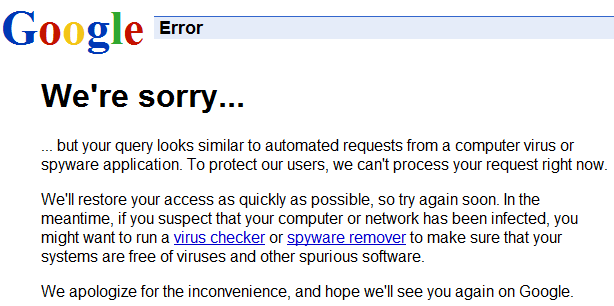
We’re Sorry … but your query looks similar to automated requests from a computer virus or spyware application.
Another similar message is
We’re Sorry … but your computer or network may be sending automated queries. To protect our users, we can’t process your request right now.
Newer versions of the page say that Google’s systems have detected unusual traffic from your computer network. All of these mean the same thing: Google suspects automated searches coming from your IP address.
The older advice on this page was to run antivirus or spyware removal software and, if the error persists, delete Google cookies. That still helps in some cases, but it is not the whole story. After a few searches my Google search was blocked again, I was tested with the captcha twice, and the cycle continued for as long as I was online. On an iPhone, our guide on how to clear cache on iPhone shows how to delete Safari and Chrome cookies.
Remembering how Google search had marked the entire web as malware earlier, I first thought it was a new bug affecting Google search. But the We’re Sorry error page is a well-known spam-blocking technique from Google Search.
Why Google shows the automated queries and IP block
This message appears when Google detects unusual traffic from your network, in the form of automated queries from an IP address, which causes a quick traffic spike on google.com and temporarily blocks access. Google explains the possible causes and ways to fix it. It says the message can appear if a network you use, including a VPN, seems to be sending automated traffic to Google Search.
Automated traffic includes robots, computer programs, automated services and search scrapers, as well as software that checks how a website ranks on Google. If a computer on your network runs such software, it breaks Google’s Terms of Service and can get the whole IP address flagged.
Why This Error Still Happens in 2026
Google’s systems are sensitive, and even normal users can trigger this error under certain conditions. Common reasons include:
- Too many searches in a short time
- Using a VPN or a shared network
- Automated tools or browser extensions making requests, including rank checkers and SEO tools
- Malware or unwanted software generating traffic
- Shared office, college or public IP addresses
In many cases the issue is not caused by you directly. It may be someone else on the same network or the same VPN.
How to fix the Google “We’re sorry” error
1. Complete the CAPTCHA (solve reCAPTCHA)
Most of the time Google will show you a reCAPTCHA to prove that you are a human and not a robot. It usually shows a grid of images and asks you to pick the ones with a certain object. Don’t worry if you get it wrong, because the CAPTCHA can be difficult to solve sometimes. That is how it is meant to be, to tell bots from humans. If you fail, it will give you a new test. Solving it usually restores access straight away, and it is the quickest fix.
2. Turn off your VPN or proxy
VPNs often share IP addresses between many people, and if any of them sends automated searches, Google may flag the whole address. Google’s own help page notes that some VPNs and tunnel services can cause all traffic to be blocked. Turn your VPN off, try searching again, and if the VPN is the cause, contact the provider or switch to another one.
3. Try a different network
Connect through your phone’s mobile data or a different Wi-Fi network. If the error disappears, the problem is your original network or its IP address, not your computer.
4. Restart your router
Many home internet connections hand out a new IP address when the router restarts, so this may get you a clean address if your current one was flagged. It does not work if your provider gives you a fixed IP.
5. Check for suspicious extensions
Some browser extensions send automated requests in the background. Go through your extensions and disable anything unnecessary, especially SEO tools, rank checkers and scraping plugins.
6. Scan your system for malware
Google says some malware can cause this message. Use a trusted tool like Malwarebytes or your antivirus to run a full system scan and remove spyware and malware that could be sending automated queries to Google.
7. Delete Google cookies
Sometimes the easiest way of fixing the error is to delete cookies from your web browser.
- Chrome and Edge: press Ctrl + Shift + Delete, choose Cookies and other site data, and clear them.
- Firefox: Settings, then Privacy and Security, then Cookies and Site Data, then Clear Data.
When I tried this on Firefox the errors were gone and the issue was fixed for me.
8. Contact your network administrator or ISP
If you are on a college, office or public network, or the error keeps returning on your home internet, other users on the same network or the same provider may be sending automated searches. Google suggests contacting your network administrator or your internet provider in that case.
Frequently asked questions
Does the Google “We’re sorry” page mean I have a virus?
Not always. It means Google saw automated-looking traffic from your IP address, which can come from malware but also from a VPN, a shared network or a browser extension. Scanning for malware is still a good step.
Why does it only happen on Google?
Google checks search traffic closely for automated queries, so you may see the CAPTCHA there while other websites load normally.
Will the error go away on its own?
Solving the CAPTCHA usually clears it right away. If the cause is still there, such as a shared or flagged IP address, it can come back, so use the fixes above.
Get our free weekly email: new tech guides and tools, no spam.
New and updated tech guides, a free tool worth bookmarking and one useful pick, once a week. No spam, unsubscribe anytime.
One email a week. Unsubscribe anytime. See our privacy policy.




This error only apply for me when my VPN is turned on. Once it’s off, I don’t get any errors.
I used firefox but my search engine was google.. And I got this google error “We’re sorry”
what I did was this step.
Google says…
“We’re sorry” fix it with this steps
FOR FIREFOX USER AND GOOGLE SEARCH ENGINE.
1. Go to “tools”
2. choose “options”
3. Under “Privacy”
4. uncheck “Use Tracking Protection in Private WIndows”
5. Restart
I’ve meet this problem several times, and wrote this after 1st time when I’ve meet this problem ON FRESHLY INSTALLED PC. So – fresh Windows 7 simply CAN’T contain automated query sending software, didn’t You agree? Why I’ve got this annoying message? I make decision: My Internet provider use wide range of clients under shared IP adress. Approximately several hundreds of thousands PC, when are connected to Internet through mobile connections can made situation, when each second Google get hundreds of queries. It’s possible?
I solve this problem with one method: change default search provider in all browsers. Simply change Google to Bing or one of others. It work’s, but Google search lose their clients. Stupid situation.
By the way, all other suggested methods there (deleting cookies, anti-malware, and, especially, Google feedbacks) won’t work. Google feedback simply ignore Your feedbacks, new computers DON’T HAVE bad cookies and malware.
Commonly it happens when you try to search something by typing the word or phrase onto the url/addess bar of browser. First try to open the https://www.google.com/?gws_rd=ssl and enter your keyword in the search box there, not on the web address box. Hope this is relevant and helps. Thanks!
Just uninstall any suspicious Addons from either chrome or firefox
i hope, thats can make fixed, thanks
HELP ME TO ACCESS MY GOOGLE GMAIL AND COOKIES AND ATHERS.PLEASE FIX EVERYTHING
i have same problem with mozilla firefox v 20, i was delete my cookies, cache and history but when i search something still like that..
How to fix it in mozilla firefox 20???
Thanks before..
For a single computer its fine to clear cookies and clearing cache.
But in a work-group of 35-40 Computers How can i solve this problem ??
In this Group browse are using with page rank, Web rank, seo tool-bars, alexa traffic, moz-bar plugins and extensions are using they are unable to work with out this toolbars.
How can i Fix Google Search “We’re Sorry” Error Pages
We had to restart our Terminal-Server in Order to get this fixed. We have a static IP on it though. Don’t really know why this solution worked and how long this will last but now the google search works again
Ok. i fixed it i tried the 3 steps and nothing work and here is the solution:
1- (firefox) Go to options then click “Advanced”
2- click in Network Tab
3- click in Settings (in Connection the first option)
4- And select the option “No proxy”
Is how i fixed it :D
That’s it ! it worked.
Thanks !
We followed the steps: How to remove google Search We’re sorry errors, but when we went to Firefox and went to tools>options>Private Data. (well that’s where we had to stop because it didn’t have private data, it had privacy. Can someone help us with this problem. We are no computer wiz. Help
The above problem only stops you from accessing the Google.com(i.e.
First, make the Google your default-page or home-page (through browser settings,) if you are using Mozilla-Firefox or Google-Chrome then type text to search i.e. “Barrons GRE,” where you type the URL (url textbox at the top of your browser window) you will then be redirected to the normal Google page with search results.
I guess this should help ease your life if you are having this problem and can’t seem to figure out how to fix it :)
I got tired of dealing with this and moved my feeds to NewsGator’s FeedDemon. I actually had to export the opml to a file, import it into bloglines and then imported it into FeedDemon because Google kept refusing to even talk to FeedDemon.
No matter what you do, you are going to get this occaisionally or all the time, sooner or later, use it as springboard to another search engine like STARTPAGE.COM that do not use gestapo tactics.
I’m done with google!
Thnx It works
How do i delete the cookies?
IT doesnt let me get in the google page! that error message keeps appearing! so how do i delete the cookies?
I had been receiving this error for several days. I was unable to set up a gmail account, or even check out through Google’s shopping cart at another site. The problem was actually created by my use of alternate DNS servers ( like OpenDNS ). I changed my DNS servers back to my original ISP’s ( handed out by their DHCP servers ) and the problem immediately disappeared.
I experienced this probs for the first time today, and initially it got fixed on itself :)
But then it came again and I cleared the cookies and now things are fine.. :)
Thanks for sharing
Arun Basil Lal