
Best Firefox Add-ons for Web Designers (2026)
Firefox is still a favourite browser for web designers, thanks to excellent built-in developer tools and a solid add-on library. Our 2010 list of Firefox add-ons for web designers featured Firebug, IE Tab, YSlow and GridFox, all of which have since been retired or built into the browser. Here’s the updated toolkit for 2026.
Quick answer: Start with Firefox’s built-in DevTools (Inspector, CSS Grid and Flexbox inspectors, Responsive Design Mode, eyedropper and screenshots), then add Web Developer, ColorZilla, Fonts Ninja, Wappalyzer and axe DevTools. Together they cover layout, colours, fonts, technology checks and accessibility.
Table of Contents
Built-in Firefox tools that replaced old add-ons
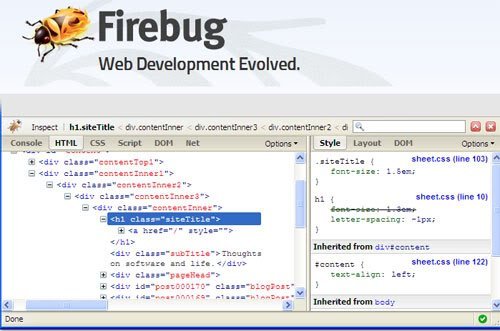
- Firefox DevTools (press F12) replaced Firebug, which was discontinued. Inspect and edit HTML and CSS live, and debug JavaScript.
- Storage Inspector replaced Firecookie for viewing and editing cookies and local storage.
- CSS Grid and Flexbox inspectors overlay your layout grid, replacing GridFox.
- Responsive Design Mode (Ctrl+Shift+M) previews your design at phone and tablet sizes.
- Eyedropper picks any colour on the page.
- Screenshots: right-click a page and choose Take Screenshot to capture an element or the full page.
- Font panel in the Inspector shows which fonts an element uses.
Best Firefox add-ons for web designers
1. Web Developer
Web Developer by Chris Pederick adds a toolbar to disable CSS, outline elements, show image sizes, view alt text and much more. A classic that’s still maintained.
2. ColorZilla
ColorZilla is an advanced colour picker with a palette history and a CSS gradient generator.
3. Fonts Ninja
Fonts Ninja identifies fonts on any website with one click, showing size, weight and line height.
4. Wappalyzer
Wappalyzer shows the CMS, frameworks, analytics and other technologies a site uses. Handy when a client says “make it like this site”.
5. axe DevTools
axe DevTools adds accessibility checks to Firefox DevTools, flagging contrast, missing labels and other issues.
What happened to the 2010 picks?
- IE Tab: Internet Explorer is retired. Test in real Chrome, Safari and Edge, or use a cross-browser testing service.
- YSlow: use Google PageSpeed Insights and Firefox’s Performance panel instead.
- Aardvark and Palette Grabber: no longer available; DevTools and ColorZilla cover most of their features.
Tips for using design add-ons
- Install only what you use; too many add-ons slow the browser.
- Check permissions, since design add-ons can read every page you visit.
- Create a separate Firefox profile for design work to keep your main browser clean.
- Try Firefox Developer Edition for early access to new DevTools features.
Originally written by guest author Sonia Mansfield, content editor for PsPrint.com. Updated for 2026 by QuickOnlineTips.
FAQ
Is Firebug still available?
No. Firebug was discontinued, and its features are built into Firefox DevTools.
What is the best Firefox add-on for web designers?
Web Developer is the most versatile, with ColorZilla for colours and Fonts Ninja for fonts.
Do Firefox add-ons work in Firefox Developer Edition?
Yes, Developer Edition supports the same add-ons as regular Firefox.
Stuck on a gift? Try our free Gift Idea GeneratorIdeas for anyone by age, job, interests and budget, with Amazon.com and Amazon.in linksFind gifts →Get our free weekly email: new tech guides and tools, no spam.
New and updated tech guides, a free tool worth bookmarking and one useful pick, once a week. No spam, unsubscribe anytime.
One email a week. Unsubscribe anytime. See our privacy policy.




It’s highly customizable application when using addons. I prefer using firefox
It is amazing that more people aren’t using FireFox in comparison to IE. It has rich feature.
I always use Firebug to design my blog. It is really a great and worthy add-on.
nice for the IE tab
it is a troubleshooting for IE Compatibility issues
It’s amazing that more people aren’t using FireFox in comparison to IE. Its’ more feature rich, and maybe it’s just me, but seems to be 10 times more stable as well. SearchStatus and Firebug have become 2 add-ons I can’t live without.
Thanks For this Post.
One thing i want add that Color Picker is also great tools for web developer , also web designer.
Fire fox, but I work well.thanks.
I would add AlertSite’s DejaClick add-on to the list. It’s the only free, inside-the-browser tool for evaluating user experience.