How to Download All Your Facebook Data
Did you know you can download Facebook data with your Facebook albums, photos, videos, wall posts and messages and save on your computer. All these years, Facebook has saved your Facebook activity and will allow you to save and download all your Facebook activity for free.
Download Facebook Archives
After logging in to Facebook, go to the top right corner Setting wheel icon > Go to Account Settings and click the link “Download a copy of your Facebook data”.

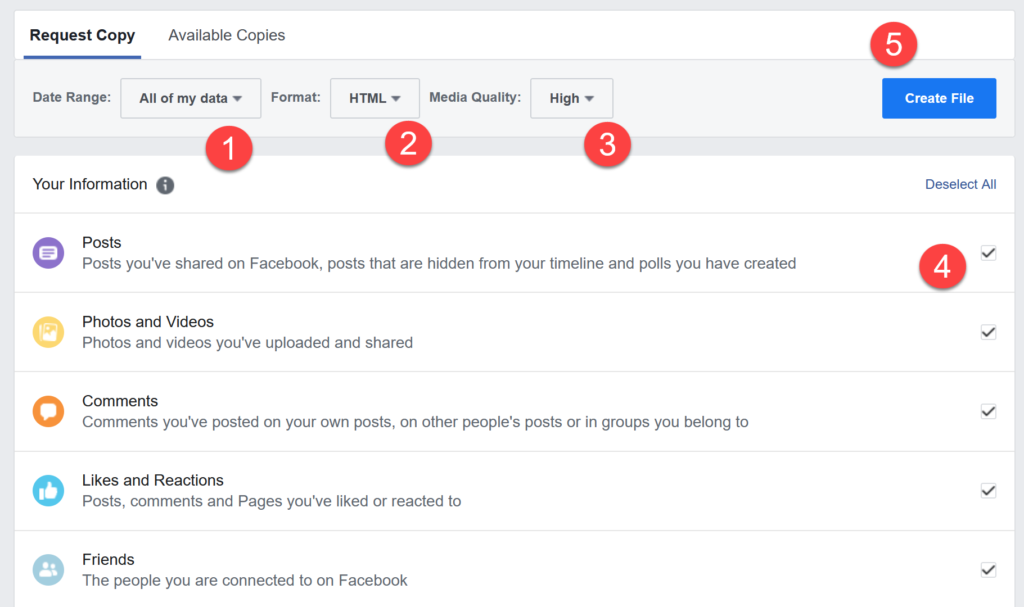
After you click that link, you can start to download Facebook Archives.

After you click that button, an alert informs your download will take time as Facebook compiles all your photos, wall post messages etc. for download.

This will of course depend on how much information you have to download. Large profiles, huge Facebook albums and active long time accounts will take a longer time to download Facebook data. Facebook will send you an email when your archive is ready for download.
What will this archive download contain? It will contain all your Facebook photos and videos your shared, your Facebook posts, messages and even chat conversations! It will also grab your Friends names and email addresses (if they have allowed it). However, it will not download your friends photos and their personal information. It will also not download comments you made on your friends walls.
Download Facebook Expanded Archives - This option also allows you to download detailed account information like logins, cookies and more. Facebook advises you keep both these files safe as it contains all your private data and information about all your posts, comments and photos.
Go ahead and download all your Facebook information today and keep a backup of your Facebook timeline.

Thanks for sharing! i was just unable to do so from past some days!but thanks to you
Did you know you can download Facebook data with your Facebook albums, photos, videos, wall posts and messages and save on your computer. All these years, Facebook has saved your Facebook activity and will allow you to save and download all your Facebook activity for free.
I don’t know it’s possible I download all data superb article I ill try and I’m saving my all data Thanks
Last time I tried to download my FB data and I waited for about twenty minutes. I was frustrated, closed that page and forgot about that thing. :P
Now they will send you an email when it is done.
I recently decided to convert a profile page of one of my clients into a business page..Its really important to download Facebook data before any one implements such a change because once the conversion is done, the timeline data and other crucial data cannot be retrieved..Thanks for discussing this topic.
wow, I didn’t even know that this was possible. thanks for the tipp… probably one reason more to leave facebook if you ask me..
Its a awesome article. Facebook is now one of our daily life. If we can save our profile data it will be great.Thanks.
Thanks for sharing i was just unable to do so from past some days!but thanks to you
I dont like this facebook policy, to make copy of chat, and messages. This is not so good. :S
Very good post, congratulations! I did not know anything at all about that. That is great. I read somewhere once that once you post something on Facebook that is in reality Facebook’s property. It is good to know there is a way to get your stuff back on your computer.
Cheers
Face book is one of the best site for connecting people any where in world as well as to share the thoughts.
this post is really nice.I download all my face book data.
thanks for sharing such a useful information
This will come in handy one of these days, I can feel it. I am one of those people who also didn’t know this so I am glad that I ran across this post. I wonder what else I don’t know about Facebook.
Hello brother, I will definitely download all the data of my facebook account. Thanks for sharing this tricks with us.
Many thanks to your superb tutorial now i’m find a way download my Fb information.
Thanks for sharing , i download my information
Good news for those who was worried about facebook data. I really got happy after seeing this post. Liked it a lot. Huge Thanks to the Author.
The quality and content is great, I learned a lot.Now i am download all the Facebook data.Thanks for sharing.
The content is great, and it is very quick and easy to follow along. I really look forward to seeing more post like this.Thanks for sharing.
It’s a great post.Now i download. many many thanks
Any idea if Page archives can also be downloaded?
This is very useful post.Thanks for it.
Really i’m searching for last month that how we can download all Facebook data and now i find it on your blog. Thanks for sharing this informative post.
Very informative article. Facebook is now one of our daily life. If we can save our profile data it will be great.Thanks for sharing it.
Nice Post…That’s really a good information and i am totally new to this.
Thanks for a great post…..
This is very much nice as it helped me to download all the data from my facebook account, its like back up my FB account!
it is a great article thanks for sharing i like it very much because it is very helpful for anyone.
thanks for sharing guy keep it up.
Thank you so much for this post i was worried for this issue from last week now i got the solution
but how to delete it from fb servers?
I don’t like this facebook policy, to make copy of messages. This is not so good. but little bit interesting!
You can take any type Facebook help contact Facebook Customer Care. it’s toll free
That was really helpful, thanks for the article.
I did that last year. I will do it again now. Thanks for recall.
That was really helpful, thanks for the article.
Great Post …Thanx For Sharing It…Keep Up The Good Work….
Thanks For ur post .I didn’t know about this before. I will Try this………..
yes it is really a good post, i am sharing with my friends.
Nice post, i get useful information after reading this article. I get lots of things and i feel good, when i share with my friends. Thanks for providing such a good informative post.
This is one of the best options by Facebook. Thank You for this great tutorial.
Wow, now that’s like super interesting. I recently created a Facebook page and put some good content for testing, but decided to delete it later one. I hope the archive covers Facebook pages as well.
Share a interesting information which people always want but do not aware about this type of information :D
From,
Technology Magazine