
10 Best Google Gadgets For Your Blog
Here are Google Gadgets to add to your website for increased functionality. Google Gadgets are mini tools that offer cool and dynamic content that can be placed on any page on the web. Though you can Google gadgets to your iGoogle page, Google Desktop, Blogger, and Page Creator, its even cooler to show off Google gadgets on your own site. There are some very cool gadgets out there, and here are some of my top picks in random order.
10 Best Google Gadgets
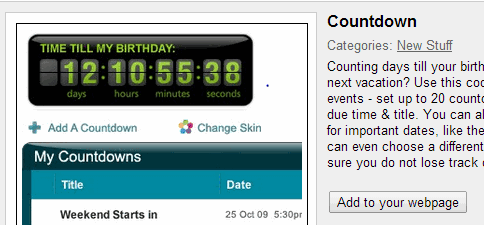
1. Countdown – Counts down to a user specified date. Customize it to countdown to any blog event, contest closing date, poll closing date, blog anniversary etc. Here is another one with text only display. Keep reminding your visitors and never miss a deadline.
2. Google Translate My Page – Gives you a quick dropdown menu to allow non-english readers to select their native language and translate the page using Google translation services. You can also get more gadgets with language flags. This is a good way to make your blog multilingual and get read by a wide international audience.
3. Digg Top 10 – Discover the best news, images and videos as voted on by the Digg community. You can customize your Digg gadget by topic, and view more story information, such as comments and a friend’s activity feed. Share interesting content rocking the web right now. You can also add Google News or BBC News.
4. Slim RSS Reader – Lets you add a custom RSS feed to display on your blog. Enter the RSS feed, number of items, title and you are done. Customize more with Simple rss reader or support multiple feeds with CustomRSS. Display feeds from your favorite blogs or topical categories in your sidebar.
5. YouTube Gadget – Display the top YouTube videos on your site, and let visitors browse around the Youtube site as well as play the videos without leaving your site. If sharing videos is your style, you need this now. Also try Google Videos.
6. Google talk – Everyone has a google account mostly via gmail and if your visitors are logged in, this gadgets lets them see your contacts online right now and send them instant messages. You can publicize your gtalk id and chat with your readers.
7. Photo of the Minute– Grabs a new latest photo from Flickr. Remove the photo info to optimize the size better. There are lots of gadgets that can rotate an interesting photo, graffiti, captions or cartoons. Try the National Geographic daily photo, Photos from Flickr etc.
8. Google Calendar – If you mark your blogging events on a Google calendar and share your public calendar, then why not add it to your blog and publicize the events you track. Grab this official widget and never miss a event.
9. Dilbert widget – Dilbert cartoon strip is a daily read that will bring a smile on your visitors face. Grab the official widget, resize it and load the daily Dilbert color comic strips and ranking. Or opt for a random Dilbert strip.
10. Date & Time – Some people like to place a widget displaying the date, time and calendar. Add a clock to your page. Click edit to change it to the color of your choice. Narrow the width to remove the calendar.
How to add a Google Gadgets?
Select the gadget you like, click the “Add to your webpage” button, edit the Display settings, Click to “Preview changes” and the click “Get the code” button to generate the HTML. Copy and paste the HTML into your webpage’s source code and behold and surprise your visitors. Remember that most gadgets can be easily resized by dragging the window from the bottom right corner, before you decide the final size.
Got more time? here are all the Google Gadgets For Your Webpage. Let me know of other gadgets that deserve to be listed here and I will add them.
Get our free weekly email: new tech guides and tools, no spam.
New and updated tech guides, a free tool worth bookmarking and one useful pick, once a week. No spam, unsubscribe anytime.
One email a week. Unsubscribe anytime. See our privacy policy.


Link for Slim RSS Reader is not working Could you please update this.
Lovable!
photo a minute is quite attractive and i would say its worth trying
Can you please leave your opinion about our new “romantic love quotes” gadget? It’s a large collection of famous, beautiful, inspirational love quotes and sayings written by famous authors. You comments will help us improve the gadget. Thanks,
I NEED “Google Translate My Page ‘ MOST
Thanks for sharing !!
I think game gadgets are gooooooooooooooood!
The Google Website Translator Gadget was the best among all.
Thanx so much for the gadget
Keep adding new gadgets.
I have REQUEST:
Can you please add a gadget by which my online readers can email me any suggestions or messages instantly.
I found Google Translate very useful. Thanks for the list.
As you want Gadget for your Blog. It is necessary a beautiful blogger template for your blog, which you can only download from “bloggerpress.blogspot.com”
Thank you for sharing the google widgets on your site. I’ve have just seen them from this site and these are very useful. Thank you!
I followed your blog for three days and I must say that I begin to love your message. How do I subscribe to your blog now?
You’re right that the Google Translator is one of the most important widget to have in your blog. So, I made a friendly tutorial about on how to install Google translator for your blogs or website, anyways I thought it would help and drop here to share it, you may go to this link: How to add Google Translate Button on your Blog
add them to a blog is difficult
This is a great blog. I have over 30 Google blogs. From travel, movies, ebay tips, emergency car equipment, etc. I will be adding more gadgets after reading this. Thanks for the help. All the best.
Why not one that tells you how many people have viewed your site?
As an experienced web designer, I encourage you to incorperate some of these 10 Best Google Gadgets For Your Blog or website, especially GOOGLE TALK and the SLIM RSS READER.
Your customers and chat,talk or interact with you via camera and at the same time you can always keep them updated with what is going on with your website without them visitng your site.
– Daniel Chege .
As an experienced web designer, I encourage you to incorperate some of these 10 Best Google Gadgets For Your Blog or website, especially GOOGLE TALK and the SLIM RSS READER.
Your customers and chat,talk or interact with you via camera and at the same time you can always keep them updated with what is going on with your website without them visitng your site.
– Daniel Chege .
I like the Digg 2.0, gadget.
It’s simple yet informative & educative article for aspiring bloggers like me. Thank you!
Can you take a look at our gadgets? I think we do some of the best photo gadgets in the Google directory and would like to spread the word.
https://www.google.com/
Thanks,
Dan
I like the first one. Countdown and Dilbert is also matched for my blog..lol.
Nice info ,I am wondering which gadget to add to my blog after your post I have got idea,but adding more widgets does slow down the loading of pages please reply
no not at all it will slow it down only a bit maybe for a second not more than that don’t bother about it
Simple yet very informative article for aspiring bloggers like me. Thank you!
I think Photo of the minute is cool.
Thanks for sharing the gadgets. BTW, your site is vote for Top 25 Blogs About Blogging.
Google Translate My Page is the most useful of the above, IMHO.