
How to Change Bing SafeSearch Settings: Turn It Off or Set Strict
To change Bing Safe Search settings, open bing.com/account/general, choose Strict, Moderate or Off under SafeSearch, and save. Strict filters out explicit text, images and videos, Moderate filters explicit images and videos but not text, and Off does not filter explicit content. Updated October 2026.
Bing is Microsoft’s search engine, and its filters can sometimes block valid content you need to see. Or you may want the opposite: stricter filters so that children cannot run into adult results. Either way the setting is the same, and this guide shows where to find it.
Table of Contents
What each Bing SafeSearch level does
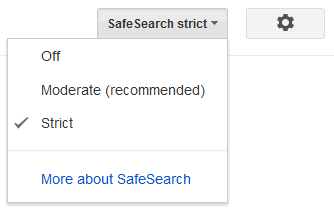
- Strict: filters out explicit text, images and videos from your search results. Use this for children.
- Moderate: filters explicit images and videos but not text.
- Off: does not filter explicit content from your search results.
Edit Bing Settings
To edit the Bing SafeSearch preference, go to bing.com/account/general, or open Bing and use the menu with 3 bars in the top right corner, then Settings and More. The SafeSearch options are at the top of the page.

If you do not see the SafeSearch option in the drop-down menu, go to Settings > More. Then you will see the SafeSearch options on top of the screen. Choose the Off setting to stop filtering adult content from your search results.

Bing settings are stored in your browser, and Bing notes that you will need to make these changes again if you clear your cookies. If you use more than one browser or device, set it on each one.
Change Bing Safe Search Settings Off
If you click ‘Off’ and save, Bing may show a pop-up box asking you to confirm that you are an adult.

When this appears, click Agree to turn off safe search. By clicking the button you are saying you are over 18 years of age. Bing does not ask for any further proof of age.
If you turn SafeSearch off and still see inappropriate content, you can report a concern to the Bing team and they will look into it.
Block All Adult Content on Bing Search Results
Alternatively, you might want to block adult content in search results completely and safeguard kids or children browsing the web. In that case, choose the Strict option, and explicit text, images and videos will all be filtered from search results.
SafeSearch is a browser setting, so a child who knows where it is can change it back. On a child’s device, combine it with the device’s own parental controls. See also how to block YouTube adult videos and block adult content on Netflix.
Bing SafeSearch by country
Years ago, Bing hid the SafeSearch option in some countries and used Strict filtering there, so many people switched their country to the United States to get the choice back. On the current Bing settings page with India selected, the Strict, Moderate and Off options are all shown, so you should not need to change your country any more. If you do not see the SafeSearch options on your settings page, it may mean that Strict filtering is on by default in your region.
Here is what typically happens when you search for blocked terms on Strict.

If you check the Google Safe search settings, they have a similar choice of filtering levels. You can read how to change Google safe search settings as well.

In the older Bing menus, the settings were under Extras > Preferences, and on Moderate they filtered bad images and videos but not text. If you are on Moderate and children are surfing the web, change the filter to Strict to stop all types of explicit content in one go. Bing also lets you report websites with adult content if they appear in your search results under Strict.

Why Different Regional Safe Filters?
Microsoft has said that SafeSearch filters are on by default and that if you want to turn them off, you need to confirm you are over 18 years of age.
Older tip: Microsoft once advised that you can add adlt=strict to the end of a Bing search URL to get results as if SafeSearch were set to Strict for that search. This tip is not confirmed for current Bing, so use the Settings page above for a reliable change.
Frequently asked questions
How do I turn off SafeSearch on Bing?
Go to bing.com/account/general, choose Off under SafeSearch and save. You may be asked to confirm you are over 18.
Why did Bing SafeSearch turn back on?
Bing stores the setting in your browser, so clearing cookies resets it, and you need to set it again. It also has to be set separately on each browser or device.
What is the difference between Strict and Moderate?
Strict filters explicit text, images and videos. Moderate filters explicit images and videos but not text.
Related – Learn how to block YouTube Adult Videos, or block Netflix and change Google safe search settings


can someone help me on msp
Folks, it is obvious that Microsoft does not read these forums since I see unanswered questions from 2009! Even now in 2014 the questions are still unanswered as if they don’t care so I say we just load up on Google. I have yet to receive answers from posts made in the Microsoft communities forums on this subject.
I don’t believe anyone is so naive that they need to use something so dramatic as the Strict safesearch setting! 60% of the relevant search is blocked!
Link exchange is nothing else except it is only placing the other person’s website link on your page at appropriate place and other person will also do same for you.
Thank you. I have been trying to find something to block explicit images from my computer!!!
I have tried over and over to get rid of “SafeSearch” And it won’t let me. Is there A reason why?
Go to the Preferences wheel icon on top right > Choose language as English. Hope that helps.
It does not. Settings immediately revert back to strict.
Bing requires you to allow cookies in order to remember the choice you’ve made. If cookies aren’t allowed it will revert back to moderate or strict whichever it is originally set to by default.
i like to turn off my safe search but no preferences
how do i turn off safe search on my xbox
I want to turn off safe search but I don’t see preferences anywhere on the page. How do I proceed?
Thx
Click Preferences {top right corner) then mark what do you like. click save (bottom left last}. click accept.
i would like to change my settings to off,but it keeps going to moderate again and again on my kindle. can you email me on how to pemently change it and change whenever i want¿
turn off my safe search.
HOW DO I TURN OFF STRICT in safesearch
Hi,
It’s good that Microsoft is being too strict in content filtering. It may be because MS has a goodwill with governments across the globe. And with inappropriate content they don’t want to enrage the governments. May be they learnt it from what happened with Google China.