
How to Track and Organize Coupons Online: 8 Smart Ways (2026)
Coupons only save money if you remember to use them before they expire. When you’re disorganized, you end up using codes just because they’re there and forgetting the useful ones. In 2010 guest author Jessy shared some geeky ways to track and organize coupons with Twitter lists, RSS readers, email alerts and to-do apps. Several of those tools (Seesmic, Google Reader, GifTag) no longer exist, but the ideas still work. Here is the 2026 version in two steps: tracking deals, then organizing them.

Quick answer: Track coupons by following deal sites in an RSS reader, setting Google Alerts for brands you buy, using a browser coupon extension at checkout and subscribing to store newsletters with a separate email address. Organize them with Gmail filters or labels, a to-do app with expiry reminders, your phone’s wallet for digital passes and a simple shopping list. Clip digital coupons in store apps so they apply automatically.
Table of Contents
Step one: track coupons and deals
1. Follow deal sites in an RSS reader
Many coupon and deal blogs still publish RSS feeds. Instead of visiting each site, add them to a reader like Inoreader (external site, opens in new tab) and scan new deals in one place. Google Reader, which many of us used in 2010, shut down in 2013. Create a folder just for deals so they don’t mix with your other reading.
2. Set Google Alerts for brands and stores
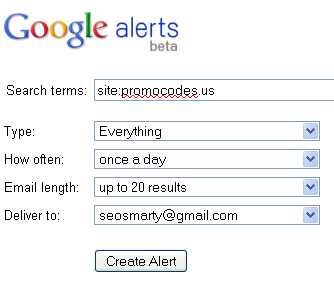
Google Alerts (external site, opens in new tab) still emails you when new pages match a search. Create alerts like “Nike promo code” or limit results to one coupon site with the site: operator, for example promo code site:example.com. Choose a daily digest to avoid inbox overload.
3. Use a coupon browser extension
Extensions such as Honey (external site, opens in new tab) search for codes when you reach a checkout page and test them for you. They save time, but check the extension’s permissions and privacy policy, and compare its result with the store’s own offers page.
4. Use a separate email address for newsletters
Stores often send welcome discounts and members-only codes to subscribers. Sign up with a dedicated email address or an alias so promotions don’t bury your important mail. Social media still helps too: follow brands on X, Instagram or Telegram channels for flash sales, ideally in a separate list or feed.
Step two: organize your coupons
5. Filter coupon emails automatically
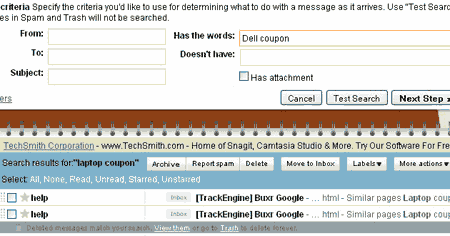
Jessy recommended sending deal emails to their own folder so they don’t get deleted in a busy moment. In Gmail, create a filter (external site, opens in new tab) by searching for words like “coupon”, “promo code” or the store’s address, then choose Create filter and apply a label such as Deals (and skip the inbox if you like). Outlook offers similar rules.
6. Add expiry reminders in a to-do app
The two to-do apps Jessy used are still around. In Todoist (external site, opens in new tab) or Remember The Milk (external site, opens in new tab), add a task such as “Use 20% off shoes code” with a due date a few days before the coupon expires. Paste the code into the task so it’s handy at checkout.
7. Store digital coupons in your phone wallet and store apps
Many retailers let you clip digital coupons in their app so the discount applies when you scan your loyalty card. Passes and loyalty cards can often be saved to Apple Wallet or Google Wallet. Screenshot one-off codes into a dedicated photo album or note.
8. Keep a shopping list and wish list
Coupons save the most when they match things you already planned to buy. Keep a shared shopping list (in a notes app or your store’s app) and a wish list, then match coupons to it rather than buying something just because it’s discounted.
Tips to avoid coupon traps
- Check expiry dates and exclusions before you shop.
- Compare the final price after shipping and fees, not just the discount.
- Avoid sites that ask for payment or personal details to “unlock” codes.
- Unsubscribe from newsletters that never send useful offers.
Need more codes? See how to find coupons for anything online, check a sale price with our discount calculator, and read our tips to get the best deals in online shopping festivals.
FAQ
What is the best way to organize digital coupons?
Combine email filters for coupon emails, a to-do app with expiry reminders and your store apps or phone wallet for digital coupons.
Are coupon browser extensions safe?
Popular ones are widely used, but they can see the pages you visit. Review permissions and privacy policies, and install only what you need.
How do I remember coupon expiry dates?
Add each coupon as a dated task in a to-do app, or a calendar reminder a few days before it expires.
Can Google Alerts find promo codes?
Yes. Alerts for “brand + promo code” email you new matching pages, though results vary and you should verify codes on the store’s site.
Originally written by guest author Jessy, who loved web tools and DIY gadgets. Updated for 2026 by QuickOnlineTips.
Subscribe to our weekly tech newsletter
🎁 Free 100 Tech Terms ebook when you subscribe. Unsubscribe anytime. Privacy



This is not geeky. This is the way that my wife does it. She is on top of all of the coupons, on and off the internet. She saves us alot of money all the time.
This is not a crazy way to do coupons. This is great. I like what you have to say. I need to save as much money as I can. I can not wait to try this system.
This is some great news. I have recently started using coupons because of the economy. I have been getting a few coupons from ‘mom central coupons”, they have been good for the working mom. I can use all the help I can get.