
Facebook Hacked? How to Recover and Secure Your Account (2026)
Has your Facebook been hacked? Every day someone posts “my Facebook got hacked, ignore the messages”. Facebook itself is rarely breached; most accounts are taken over through a weak or reused password, a phishing link, or a shady app or quiz you allowed. If other accounts are acting up too, also check whether your phone has been hacked. If your Facebook hacked account is sending spam or you can’t log in, here is how to recover it and make sure it doesn’t happen again.
Quick answer: Go to facebook.com/hacked (or tap “Forgot password” and “Find your account”) to secure the account, change your password, log out of every session you don’t recognise, remove suspicious apps, and turn on two-factor authentication and login alerts in Meta Accounts Center.
Table of Contents
How Facebook accounts really get hacked
- Phishing: a fake login page, a “your page will be disabled” message or a fake Meta support chat steals your password.
- Reused passwords: your email and password leaked from another site and bots tried them on Facebook.
- Bad apps and quizzes: you granted an app permission to post or read your data. The original version of this post showed a “Friends Photos” app that posted spam on friends’ walls after the owner allowed it.
- Public personal details: a password based on your name, birthday or children’s names that anyone can see on your profile.
- Malware: browser extensions or infected apps that steal saved passwords and session cookies.
Signs your Facebook was hacked
- Friends get messages or posts you didn’t send.
- Your email, phone number, name or password changed.
- You see logins from unknown places in “Where you’re logged in”.
- Ads are running from your account, or you lost access to a Page.
How to recover a hacked Facebook account
- Visit facebook.com/hacked (external site, opens in new tab) and follow the steps to secure the account. If you can’t log in, use “Forgot password” and recover with your email or phone.
- If the hacker changed your email, check your inbox for a message from Meta saying the email was changed; it includes a link to reverse the change.
- If nothing works, use the identity verification option to upload an ID or record a video selfie when Facebook offers it.
- Once in, change your password to a long unique one and check your email and phone in Accounts Center.
- Delete posts and messages the hacker sent, and warn friends not to click those links.
Secure your Facebook account so it doesn’t happen again
Most settings are in Settings & privacy > Settings > Accounts Center > Password and security.
- Turn on two-factor authentication: use an authenticator app or a security key rather than only SMS.
- Turn on login alerts: get notified of logins from new devices.
- Check where you’re logged in: log out of any device or location you don’t recognise.
- Remove old apps and websites: in Settings, open Apps and websites and remove anything you don’t use.
- Run Security Checkup: Facebook walks you through these settings in a few minutes.
- Hide your email and phone from your public profile so they can’t be used to guess your login.
- Use a password manager so every site has a different password.
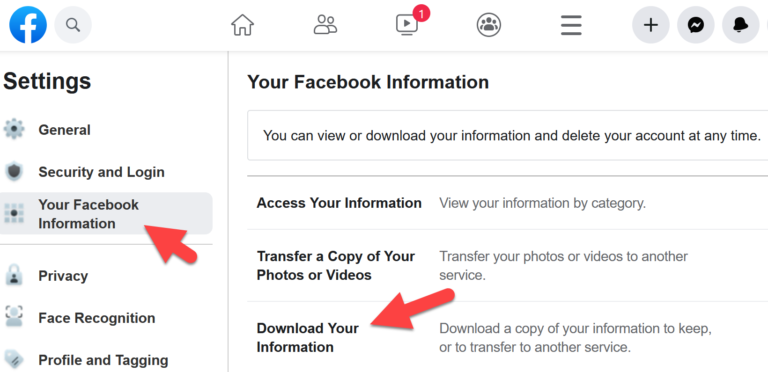
More tips in our guide to secure Facebook browsing, and you can download your Facebook data as a backup.
Is Facebook to blame?
The original guest post argued that most “hacks” were user mistakes, and that still holds. Facebook does share responsibility for scam ads and fake support accounts, but strong passwords, 2FA and care with links stop nearly every takeover.
FAQ
Can I recover a hacked Facebook account without email or phone?
Sometimes. Use facebook.com/hacked and the identity verification option. Recovery is much easier if you set up trusted contacts or a recovery code in advance.
Should I contact “Facebook support” accounts that message me?
No. Meta does not contact you through Messenger, WhatsApp or comments to fix a hacked account. Those are scams. If your WhatsApp was taken over too, follow our steps to recover a hacked WhatsApp account.
Why does my account keep getting hacked?
Usually the hacker still has a session, an app, or your email password. Change your email password too, log out of all sessions and turn on 2FA.
Originally written by guest author Eric Marke of Think Market Act, who teaches small businesses to use websites and social media. Updated for 2026 by QuickOnlineTips.
Subscribe to our weekly tech newsletter
New tech guides, free tools and 2-minute fixes, once a week.
🎁 100 Tech Terms ebook comes free with every subscription.
Unsubscribe anytime. See our privacy policy.


I would just like to say that i happen to love face book. It let’s me connect with old Friends and New ones as well. Same with my family. If you or someone says there getting hacked thats not facebooks fault its your own. This young man created facebook for us to enjoy and some bad apples out there seem to say some bad things about Face book because you were hacked. JUST DON’T EXCEPT ANYTHING FROM ANYONE YOU DON’T KNOW I did and it was my own fault not Face Books. But i learned my lesson. My computer started running real slow again and i am not sure why, But i am sure it’s my OWN Fault NOT FACE BOOKS. I LOVE FACE BOOK. Thak you to who ever created it.
I happen to agree with Paula. Face book is awsome. It’s a great way to stay connected. I am able to find out new things that i may have missed. Me myself, my computer was running slow, But it was my own fault i excepted something that i should not of . This was not Face Book’s fault. I WAS MY OWN Fault.I read everything now and don’t except anything i don’t understand or from anyone i don’t know. Thanks you for creating face book. One day i will get a laptop of my own so i don’t have to use the family computer anymore and keep messing it up. I need one for school. LOL LOL.
And now Facebook says they will be selling phone numbers and address’s I think Facebook is at or near its peak.