
7 Ways to Increase Domain Name Security (and Stop Domain Hijacking)
Your domain name is the foundation of your website and email. If someone steals it, they can take over your site, read your email and even hold the domain to ransom, and getting it back can take weeks. Domain hijacking still happens every day, usually through a hacked registrar account or an expired domain. Here are the steps to increase domain name security, updated for 2026, which take only a few minutes with any registrar.
Quick answer: To protect your domain, turn on registrar lock (transfer lock), secure your registrar account with two-factor authentication, keep your contact email up to date, use WHOIS privacy, turn on auto-renew with a valid payment card, and consider DNSSEC and a registry lock for important domains.
Table of Contents
1. Lock your domain name
Domain locking (also called registrar lock or transfer lock) is the most basic step. A locked domain can’t be transferred to another registrar until you unlock it. Unlock it only when you actually want to move the domain, then lock it again. Some registrars don’t lock domains by default, so check yours.

Make sure the lock shows as On:

You can confirm the lock with a ICANN lookup: the domain status should include clientTransferProhibited.
2. Turn on two-factor authentication at your registrar
Most domain thefts start with a hacked registrar account. Turn on two-factor authentication (2FA) so a stolen password alone isn’t enough. Use an authenticator app or a passkey rather than SMS codes where your registrar allows it. It takes a few minutes, just like setting up Gmail 2-step verification.

Also use a unique, strong password for your registrar account, and don’t use an email address on the same domain as your login email. If the domain goes down, you’d lose access to the recovery emails too.
3. Keep your registrant contact details up to date
Registrars send renewal reminders and transfer approval emails to your contact address. If that email is old or wrong, you won’t hear about a fraudulent transfer or expiry in time. Check the registrant email on every domain you own, especially old ones. See what happened when 9Rules let its domain expire.
4. Use WHOIS domain privacy
Always choose private registration, which hides your name, email, address and phone number from public WHOIS lookups. The less attackers know about you, the harder it is to target your account with phishing or social engineering.
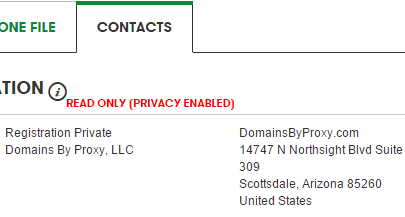
Today most registrars, including Cloudflare Registrar, Namecheap and Porkbun, include privacy free. (We once recommended Google Domains for free privacy, but Google sold that business to Squarespace in 2023.) Some country domains, such as .in, have their own privacy rules.
5. Auto-renew your domain names
Years pass quickly, and an expired domain can be snapped up by someone else within days of its grace period ending. Turn on auto-renew, and keep a valid payment card on file, so you never lose a domain by accident.

For domains you plan to keep, register them for several years at once. We booked this site for 10 years. Even Google once let a domain slip: see when Google.com was briefly bought for $12.
6. Turn on DNSSEC
DNSSEC signs your DNS records so attackers can’t redirect visitors to a fake site with forged DNS answers. Many registrars and DNS hosts, including Cloudflare, let you turn it on with one click.
7. Use registry lock for your most valuable domains
A registry lock goes further than a registrar lock. Changes to the domain need manual verification by the registry itself, so even a hacked registrar account can’t move or change it. It usually costs extra and isn’t available for every domain extension, but it’s worth it for a business-critical domain.
Frequently asked questions
What is domain hijacking?
Domain hijacking is when someone takes control of your domain without permission, usually by breaking into your registrar account or tricking the registrar, then transferring the domain or changing its DNS.
Can a locked domain still be stolen?
It’s much harder. But if attackers get into your registrar account, they can unlock it. That’s why two-factor authentication is just as important as the lock.
What should I do if my domain is stolen?
Contact your registrar’s abuse or security team immediately with proof of ownership, such as invoices and old WHOIS records. ICANN’s transfer dispute process can also help recover domains transferred without authorisation.
Get our free weekly email: new tech guides and tools, no spam.
New and updated tech guides, a free tool worth bookmarking and one useful pick, once a week. No spam, unsubscribe anytime.
One email a week. Unsubscribe anytime. See our privacy policy.
I always use two step verification whenever its available.
Domain Locking is by far the most powerful feature to ensure that no one can make any changes to your domain name without your express approval.Domain locking is better text message by your mobile phone.
Thanks mate! now i got a clear picture how important the domain name security. My domain and hosting with godaddy, Now after leaving this comment am jumping to login to my godaddy account and will lock my domain name mate. Once again thanks.
Wow! great tips to secure the domain. Auto renewal is must I think. Thanks
Hacking is now getting a trend. Thanks for providing the valuable ideas to lock the domain. I will try these tips for my website.
Great, its really nice article to protect our domain some fraud/cheaters who try to use our domain without our permission. This will surely help us by real means.
I had this happen to me a few years ago with a blog i was running, i was gutted! some people are just wrong!
Here you discussed a serious issue.After reading your article i locked my domain and opt Auto renew option.Thank you for valuable information.
Thank you for sharing such an informative article about the domain security. This will help me in protecting domain.
Best article of the day for Me. Surely going to secure my domain today by following your steps. Its been 2 years in blogging, never had a article on securing domain, like that.
Thanks for this post dear, My many websites hacked past few months. this post really usefull for me to secure my hosting and website.
Domain locking is probably the most first primary step to area identify safety. When you lock the domains, they can’t be transferred until you
Hi!! Great article on domain name security. This will help me alot to secure my domain.
Thanks for sharing.
Now you can download Microsoft Office for iPad and open Word, Excel, Powerpoint and Onenote files for free in iPad. This is for the first time …
Securing the domain name is must these days. And the tips shared by you are really good to secure the domain.
Thanks for this share.
Hi P Chandra,
I have a website but i am not aware of domain name security issue, but this information help me a lot to secure my domain name.
Excellent yet effective tips. Security is a very important matter domain name. I’ve been waiting for this kind of tips. Thank you for sharing important tips.
Thank you very much for this post. Go daddy is the best place for booking & get hosting at Reasonable price .
That’s great idea. It will more helpful us at the time of domain name for security purpose. You can explain it with proper snapshot. Great work.
check our websites for current news update
Such an interesting article. It helps me to to get more knowledge about how to secure the domain of my websites. Thank you for sharing.
Thank you for the really quality tips for domain name security. That time security is a serious concern. Your tips really help me.
I say one think you must choose the right top level domain
By sharing, suggestions to ensure tomorrow is my domain locked to ensure safety.
Thank you for such beautiful sharing your point of view regarding domain security.Those who do not have the idea about the domain security this post will be very effective for them.
I have two websites .but i don’t know more about domain security.This post helped me to Secure my domain.Government should give more punishment to IT criminals.
The key in domain name registration privacy is to do it with a reputable company that has a good reputation in keeping registrar’s details private. Do not be fooled by what you read on their advertisement pages or on what these domain registrars are promising. Make a lot of researches before you decide on which company you will register your domain names.
love the way you provide the benefits of better domain name security. Now in future i will always keep in mind use the above mentioned criteria to upheld the level of my website. Its getting more and more impulsive for the website designers like me.
That’s great idea. It will more helpful us at the time of domain name for security purpose. You can explain it with proper snapshot. Great work.
Thank you very much for this post…it is indeed a helpful post. I will use this your tips to lock my domain
Domain name security is actually very important especially if you’re a big business. I didn’t know that there was an auto-renew feature though, so thanks a bunch for pointing that one out.
Thanks for the awesome article. I came to know more about domain locking & Domain security. I have 5 blogs. I will lock domains for all of them. Really appreciate the article.
Goods tips, but you need to keep an eye out for fake emails, they are the sole reason for domain “hacks”.
thanks for open my eyes with your article i will lock up my domain from now and then
thanks for your guidance and valuable tips. I will lock my domain using these tips
Hacking is a serious facing by the modern Business world.Now lot of hacking personalities try to attack many reputed companies websites without any specific reason.So we should take correct steps to eliminate Hacking.Your article helped me to know more about security steps.
Domain Locking is by far the most powerful feature to ensure that no one can make any changes to your domain name without your express approval. Most registrars offer Domain Locking feature to customers whereby you may place a lock on your domain name. Once a domain name is locked, no modifications can be made to the domain by anyone. The domain name may not even be transferred to another registrar. The domain will remain in a locked status until you choose to remove the lock.
The key in domain name registration privacy is to do it with a reputable company that has a good reputation in keeping registrar’s details private. Do not be fooled by what you read on their advertisement pages or on what these domain registrars are promising. Make a lot of researches before you decide on which company you will register your domain names.
Thank you sharing your point of view regarding domain security.Those who do not have the idea about the domain security this post will be very effective for them.
domain locking and Auto renewal is most important for every domain to secure. Thanks for provide this useful information, this will be really helpful for newbie bloggers.
I had a feeling domain names could be stolen, but since each of us is equally vulnerable, figured it didn’t happen. Thank you for your post and helpful advice.
Domain name security is very important. The five tips for domain security is very crucial for saving domain information.
Security is very important for clients, thank you for sharing this advices.
Thank you very much for this helpful post..
Award Winning Website Design and Development services in Pune. Check out our extensive portfolio and contact us today for a free quote.
https://geekyworks.com/web-design.php
I appreciate everything you have added to my knowledge base. Admiring the time and effort you put into your blog and detailed information you offer.
Thank you sharing your point of view regarding domain security.Those who do not have the idea about the domain security this post will be very effective for them.
sir, Thanks for such an in depth article. I have started my first blog and it will definitely useful for me thanks for sharing this kind of blog.
Great Post !
actually domain locking is the best way to safe your domain to be transfered to other account, everyone should lock their domain until you want to move to other account
Thanks
Wow! great tips to secure the domain. Auto renewal is must I think. Thanks
Nice post! Actually we should always lock up our domains for safety. Cause hackers are always trying to get anything they can get their hands on. Also it’s better if we use the whois privacy on so they can’t get the information and use a different email other than the regular one we normally use. Thanks
sir, Thanks for such an in depth article. Recently I have started my first blog and I will definitely use all these tips you mentioned.
Thank you for your blog since it gives me additional guidance and information on how to do in order for us not be cheated by someone who wants to steal our domain without any permission from us.
Hello,
I had this happen to me a few years ago with a blog i was running, i was gutted! some people are just wrong! i always make sure i auto renew all of my domains but i had know idea that i could lock my domain? (pretty stupid of me i know) so many thanks for the tip i will lock them all now!
thanks for the info, Liam