Google Core Update: How to Survive Every Update Without Panic (and Never Get Penalized)
A Google core update is a broad change to how Google ranks pages across the whole web, and another one is always around the corner. Google’s November 2026 core update started rolling out on 10 November, applies to all languages worldwide and can take up to two weeks to finish, so rankings will keep moving for a while. If your traffic just jumped or dipped, this guide shows you how to stay calm, read the data properly, keep your site safe from penalties and come out of every update stronger.

Quick answer: Don’t panic and don’t make big changes while a core update is rolling out. Record where your key pages rank today, wait for the rollout to finish, then compare your movement with the rest of the market before you act. Core updates are not penalties. Sites that publish genuinely helpful content, avoid paid links and spammy shortcuts, and don’t depend on Google alone are the ones that survive update after update.
Table of Contents
What is a Google core update?
Google changes its ranking systems thousands of times a year, mostly in small ways nobody notices. A few times a year it makes a bigger, broader change and announces it on the official Google Search Status Dashboard (external site). That is a core update. It doesn’t target one trick or one type of site. It re-evaluates how well every page answers what people search for, so some pages move up, some move down and many barely move at all.
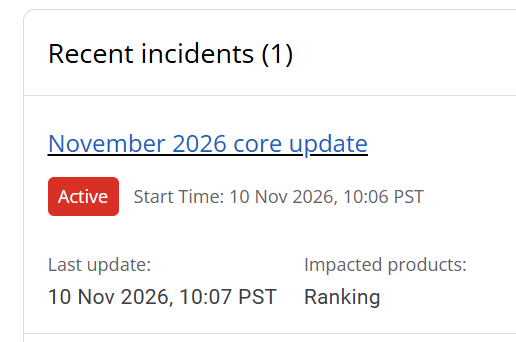
The timing is rarely a surprise any more. In 2026 alone there were core updates in March, May and November, with spam updates in between. If you run a website for long enough, you will live through dozens of them. That is the first thing to accept: updates are the weather of the web, not a one-off disaster.
Core update vs Google penalty: know the difference
Most of the fear around updates comes from mixing up two very different things.
| Core update drop | Google penalty (manual action) | |
|---|---|---|
| What it is | Google re-ranks pages it now finds less helpful than others | A Google reviewer finds your site breaking spam policies |
| How you find out | Rankings and traffic move during an announced rollout | A message in Search Console under Security & Manual actions |
| Common causes | Thin, outdated or unhelpful content; better pages from competitors | Paid or manipulative links, scraped or spammy content, cloaking |
| How to recover | Improve the content over time; changes show in later updates | Fix the problem, then file a reconsideration request |
A core update drop is not a punishment, and there is nothing to “remove”. If you suspect something worse, our guide on checking for a manual action in Search Console shows exactly where to look.
What we learned from 20 years of Google updates
QuickOnlineTips has been publishing since the mid-2000s, and we have been on both sides of Google’s changes. Back in 2007 Google cut our PageRank from PR6 to PR3, and a few weeks later the penalty was removed. During the Panda and Penguin years we deleted URLs with bad backlinks and learned how much damage low-quality links can do. Every time, the fix was the same boring one: better content, cleaner links and patience.
Here is what that experience taught us:
- Shortcuts always get caught eventually. Paid links, link networks, spun articles and keyword stuffing may work for a while, but each spam update makes them riskier.
- Helpful pages recover; thin pages don’t. Pages that genuinely answered a question came back after drops. Pages written only to rank rarely did.
- The worst damage is self-inflicted. Deleting pages, rewriting everything or changing URLs in a panic usually hurts more than the update itself.
What to do during a Google core update rollout
1. Write down your baseline today
Before the rollout settles, note where your most important pages and keywords stand. Export your top pages and queries from Search Console for the last 28 days. If you track keyword positions daily, you will be able to see exactly which pages moved and when.
2. Don’t change anything big until the rollout ends
Early movement can partly reverse before the update finishes. If you rewrite pages, change templates or move URLs mid-rollout, you will never know whether the update or your changes caused what happened next. Check the Search Status Dashboard and wait for Google to mark the update complete.
3. Compare your movement with the whole market
A drop only means something when you compare it with everyone else. If rankings are swinging across your entire industry, you are seeing the update. If the market is calm but your pages fell, look closer at your own site. Check desktop and mobile separately, because they can move differently.
4. Rule out technical problems
Many “update hits” are really broken pages, blocked crawling, a bad redirect or a slow server that happened at the same time. Run a technical check before you blame Google. Our guide on finding pages losing traffic in Search Console shows how to find exactly which URLs dropped.
5. Then improve the pages that lost ground
Once the rollout is over, read your dropped pages as a stranger would. Are they still accurate? Do they answer the question better than the pages now above them? Update facts, add what is missing, remove filler and merge thin pages into stronger ones. Improvements usually show up over the following months and in later updates, not overnight.
How Semrush helps you see what Google doesn’t tell you
Google says very little about what each core update changes, and Search Console only shows your own site. That is the gap a tool like Semrush (external site) fills. We use it on QuickOnlineTips for exactly these three jobs:
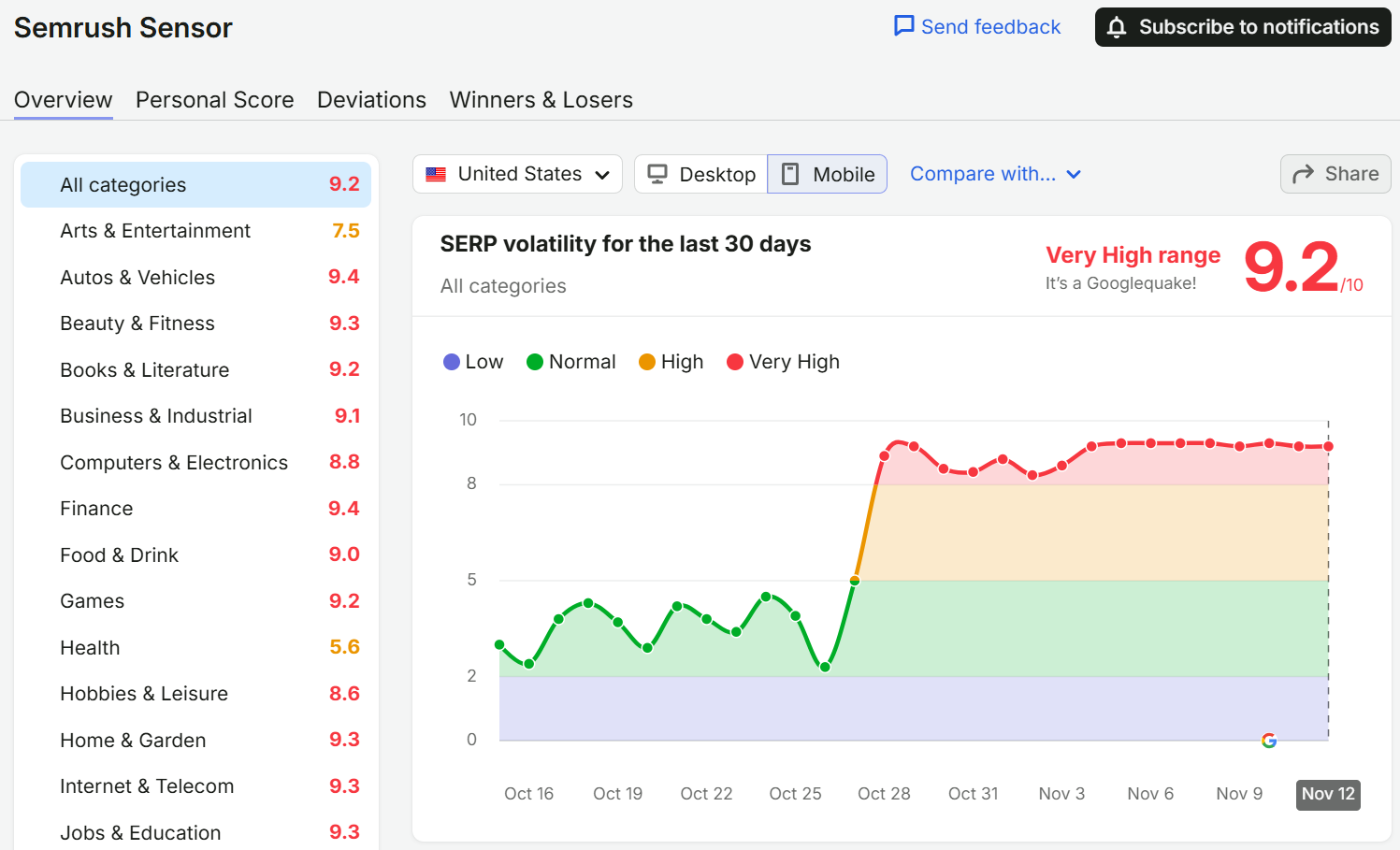
Semrush Sensor showed very high SERP volatility across most categories in late October and November 2026.
- Sensor: tracks how much Google’s results are shaking every day, by country, device and category, on a 0 to 10 scale. When your traffic dips, one look tells you whether the whole web is turbulent or only your site.
- Position Tracking: monitors your keywords and your competitors’ rankings daily, so you have a pre-update baseline and can see which pages gained or lost ground as the rollout progresses.
- Site Audit: crawls your site for errors, blocked pages, broken links and other technical issues, so you can rule those out before you blame the update.
Together they answer the question every site owner asks after an update: is this the update, or is it my site? You can try the Semrush SEO Toolkit here (external site). A free account lets you test some of these tools with limits, which is enough to see whether they fit your workflow.
Disclosure: This section is paid promotional content. The Semrush links above are affiliate links: if you sign up through them, QuickOnlineTips earns a commission at no extra cost to you, and we may also receive a reward from Semrush for this article. Semrush is a trademark of Semrush Inc.
How to protect your site from future updates and penalties
- Write for people first. Answer the real question, show real experience and keep facts current. Google’s own helpful content guidance (external site) is the best checklist there is.
- Never buy or trade links. Earn links with content worth citing. If you inherited bad links, review them calmly before you act; most spammy links simply get ignored by Google.
- Be careful with mass-produced content. AI can help you write, but publishing pages at scale with little value is exactly what Google’s spam policies target. Read what changed for AI-generated content and Google penalties.
- Refresh, don’t abandon. Keep your best old posts accurate and useful. Updated evergreen pages are often the ones that hold steady through updates.
- Fix technical health regularly, not only after a drop. A monthly site audit catches problems before Google does.
Reduce your dependence on Google search
Even a perfect site can lose clicks today, because AI Overviews and AI Mode now answer many questions right on the results page. Rankings also decide whether AI answers cite you, since they draw on the same Google index. The safest business is one Google can’t switch off:
- Build an email list. Subscribers come back no matter what an update does.
- Grow direct and returning visitors with tools, resources and series people bookmark.
- Use social and communities where your readers already spend time.
- Diversify income beyond ads tied to search traffic: affiliate partners, digital products and services.
Search isn’t dying, but it is changing fast. Treat Google as one important channel, not your only one.
Your core update checklist
- Check the Search Status Dashboard to confirm an update is rolling out.
- Save a baseline of your top pages and keywords.
- Make no big changes until the rollout is marked complete.
- Compare your movement with market-wide volatility and competitors.
- Check desktop and mobile separately.
- Run a site audit to rule out technical problems.
- Check Search Console for manual actions.
- Improve the pages that lost ground, then give them time.
- Keep building traffic sources outside Google.
FAQ
How long does a Google core update take?
Google usually says a core update may take up to two weeks to roll out. Rankings can keep shifting during that time, so judge the impact after Google marks it complete on the Search Status Dashboard.
Is a core update a Google penalty?
No. A core update re-ranks pages based on how helpful Google finds them. A penalty is a manual action for breaking spam policies, and it appears as a message in Search Console.
How do I know if a core update hit my site?
Compare traffic and rankings before and after the rollout dates, then check whether the wider market was also volatile. If your drop lines up with the update and the market moved too, the update is the likely cause.
How long does it take to recover from a core update?
There is no fixed timeline. Improvements to content often show in the months after, and sometimes only in a later core update. Focus on making pages genuinely better rather than chasing quick fixes.
Should I delete pages that lost traffic?
Not in a hurry. Improve or merge useful pages first. Remove or redirect only pages that are truly outdated, duplicated or of no use to readers.
Stuck on a gift? Try our free Gift Idea GeneratorIdeas for anyone by age, job, interests and budget, with Amazon.com and Amazon.in linksFind gifts →Get our free weekly email: new tech guides and tools, no spam.
New and updated tech guides, a free tool worth bookmarking and one useful pick, once a week. No spam, unsubscribe anytime.
One email a week. Unsubscribe anytime. See our privacy policy.