CAPTCHA Accessibility: Why CAPTCHAs Block Blind Users (2026)
CAPTCHAs are meant to keep bots out, but they often lock real people out too. CAPTCHA accessibility has been a problem since we first wrote about it in 2005: distorted letters and “click all the traffic lights” puzzles are hard or impossible for people who are blind, have low vision, or have cognitive or motor disabilities. Here’s how CAPTCHAs work, why they fail disabled users, and the more accessible ways websites can stop spam in 2026.

Quick answer: Visual CAPTCHAs block blind and low-vision users because screen readers can’t read distorted text or image puzzles, and audio alternatives are often hard to understand. The W3C recommends avoiding interactive CAPTCHAs where possible. Better options are invisible or score-based checks (reCAPTCHA v3, Cloudflare Turnstile), honeypot fields, spam filtering and rate limiting. If you must use a challenge, always offer more than one type, such as visual, audio and a non-puzzle alternative.
Table of Contents
What is a CAPTCHA?
CAPTCHA stands for “Completely Automated Public Turing test to tell Computers and Humans Apart”. It’s a challenge-response test that tries to prove you’re a person before you can sign up, log in, post a comment or buy tickets. The classic version shows tilted, colored letters and numbers that you must type into a box.
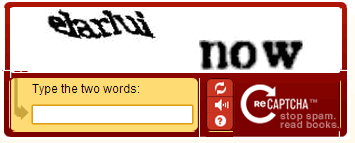
Over the years CAPTCHAs have evolved from distorted text to image grids (“select all squares with buses”), checkbox challenges, slider puzzles and invisible checks that watch how you use the page.
Why CAPTCHAs are an accessibility problem
Blind and low-vision users
CAPTCHAs are designed so machines can’t read them, which means screen readers can’t read them either. A blind user hears “image” and has no way to continue. Low-vision users struggle with tiny, low-contrast, distorted characters even with magnification.
Audio CAPTCHAs aren’t a full fix
Many CAPTCHAs offer an audio version that reads out letters or words. These are often muffled with background noise to defeat bots, which makes them hard for everyone, and they don’t help deafblind users. When we first wrote this post we noted that audio was a step forward, but it’s still only a partial answer.
Cognitive and motor disabilities
Puzzles that require memory, fast reactions, precise dragging or identifying objects can exclude people with dyslexia, cognitive disabilities or limited hand movement.
It costs websites real users
Difficult CAPTCHAs frustrate everyone. We saw this ourselves: complex CAPTCHAs on our Feedburner email signup stopped real readers from subscribing and were one reason we switched email services.
What the accessibility guidelines say
The W3C’s note on the Inaccessibility of CAPTCHA recommends non-interactive approaches such as spam filtering, heuristics and honeypots before resorting to puzzles. WCAG 2.2 adds Accessible Authentication (Minimum), success criterion 3.3.8 at Level AA, which says logins shouldn’t depend on a cognitive test unless an alternative or help is provided. It allows an exception for object-recognition CAPTCHAs at AA, but not at the stricter AAA level.
Accessible CAPTCHA alternatives for websites
- Invisible and score-based checks: Google reCAPTCHA v3 scores visitors in the background without a puzzle, and Cloudflare Turnstile is a free CAPTCHA replacement that usually verifies visitors without asking them to solve anything.
- Privacy-focused challenges: hCaptcha is another widely used bot-detection service; check its accessibility settings before you deploy it.
- Honeypot fields: a hidden form field that people never see but bots fill in. Zero effort for real users.
- Spam filtering: services like Akismet check comments and form entries after submission instead of challenging visitors.
- Rate limiting and login protection: limit repeated attempts from one IP address instead of challenging every visitor.
- Email or passkey verification: confirm a sign-up with a link, or use passkeys for login.
Running WordPress? See our picks of the best WordPress plugins to stop comment spam and how to stop a WordPress brute force attack without annoying real visitors.
Tips if you get stuck on a CAPTCHA
- Look for the audio, refresh or “try another challenge” button.
- Screen reader users can try the accessibility option many CAPTCHA providers offer, or contact the site’s support for another way to complete the form.
- Turn off VPNs or strict tracker blockers temporarily, as they can trigger harder challenges.
FAQ
Can blind people solve CAPTCHAs?
Visual CAPTCHAs can’t be read by screen readers. Blind users depend on audio versions or alternative options, which aren’t always available or easy to use.
Is reCAPTCHA accessible?
reCAPTCHA v3 doesn’t show a challenge at all, which avoids most accessibility issues. The older checkbox and image challenges include an audio option but can still be difficult.
Are CAPTCHAs required for WCAG compliance?
No. WCAG doesn’t require CAPTCHAs. It asks that any CAPTCHA has alternatives so people with different disabilities can complete it.
What is the most accessible way to stop spam?
Invisible methods such as honeypot fields, spam filters and background bot scoring, because they don’t ask users to do anything.
Get our free weekly email: new tech guides and tools, no spam.
New and updated tech guides, a free tool worth bookmarking and one useful pick, once a week. No spam, unsubscribe anytime.
One email a week. Unsubscribe anytime. See our privacy policy.