
How to Create RSS Feed for Any Google+ Profile
Google+ profiles do not have RSS feeds. So how can you create and subscribe RSS feeds for any Google+ profile, which will let you add the feed to your Google reader and track all your Google+ profiles in one RSS reader?
Create Google+ RSS Feeds
Visit the Unofficial Google+ User Feed creator at plusfeed.appspot.com which lets you create the RSS feed for any Google+ Profile. Its very simple to use.
Lets say our Google+ profile url is
https://plus.google.com/110720484075426485909/posts
So we grab the unique long number for our profile
110720484075426485909
and add it to the url plusfeed.appspot.com and we get a url like this
This is a RSS feed url. Simply add this to your Google Reader and you can track all our Google+ updates.
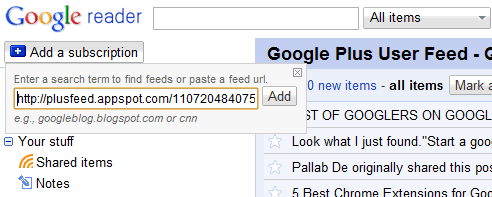
Similarly you can change that with your Google+ number or that of any user and subscribe to the RSS feeds in your favorite RSS reader like Google reader. The titles and content render very well. Since you have a RSS feed, you can also add it to your blog sidebar using RSS widgets. [via NirmalTV].
Get our free weekly email: new tech guides and tools, no spam.
New and updated tech guides, a free tool worth bookmarking and one useful pick, once a week. No spam, unsubscribe anytime.
One email a week. Unsubscribe anytime. See our privacy policy.



Thanks for the good tips. I’m not aware of using the appspot to create a feed for G+!
Checked it
I have use it
Thnks
Yes,it works perfectly!
Thank you
I personally use feeddude which work perfectly. It can create rss for twitter,facebook and G+.
Thanks for the good tips. I’m not aware of using the appspot to create a feed for G+! This is a really handy tool to track the feed we would love to receive!
Cheers,
Ming