
Quick Cache WordPress Plugin: The 2013 Pro Update and What to Use Now
Quick Cache was my favourite WordPress caching plugin for years, and in November 2013 it went Pro and got lighter and faster. This article covers what changed in that 2013 update, what happened to Quick Cache after it, and which WordPress cache plugin to use today.
Quick answer: Quick Cache was a free WordPress page caching plugin that added a paid Pro version in 2013. It was later renamed ZenCache and then Comet Cache, and the original Quick Cache listing on WordPress.org was closed in November 2017. Today, use a maintained plugin such as LiteSpeed Cache (on LiteSpeed hosting) or WP Super Cache.
Table of Contents
Quick Cache goes Pro (2013)
Lead developer Jason Caldwell decided to actively develop and maintain the popular caching plugin, and introduced a Pro version for people who needed extra features to push caching to the limit, and to support development.
I had been using Quick Cache for over 1.5 years after switching from WP Super Cache to Quick Cache, and had never looked back. It was an exceptionally fast caching plugin and made the site faster. My only grudge was that plugin updates were not being pushed, which was a security hazard. A plugin this popular needed active development, and it finally happened.
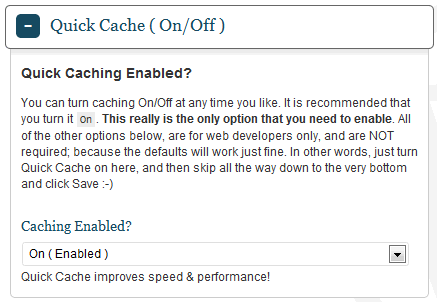
Here is what the old, simple Quick Cache interface looked like before the update:

I upgraded Quick Cache from the WordPress dashboard to the free Quick Cache Lite version. The Pro version was a one-time payment for any number of sites, with free upgrades.
Features removed from the free Lite version
- URI exclusion patterns
- User-Agent exclusion patterns
- HTTP referrer exclusion patterns
- MD5 version salts
I didn’t use many of these anyway. I was disappointed that the handy Clear Cache button in the admin bar was removed, which meant two extra clicks every time.
What was better
The modern interface with bright colours was truly refreshing. Many advanced options that most webmasters didn’t need (and found confusing) went away. You could also hide the green Quick Cache note at the bottom of the page source if you wished.

Should you have bought Pro? It was a fair way to get extra features and support the plugin, but I was happy with Quick Cache Lite, which was free and had everything I needed. The Lite version also updated in one click from the WordPress plugin directory, while Pro users had to watch the developer’s website for updates.
What happened to Quick Cache
In 2015 Quick Cache was renamed ZenCache; we covered that switch in QuickCache to ZenCache. ZenCache was later replaced by Comet Cache, which WordPress.org lists as the successor to ZenCache. The old Quick Cache plugin page on WordPress.org says it was closed on 28 November 2017 and is no longer available for download.
Comet Cache is still listed on WordPress.org, but it has not had a new version in years, so I would not choose it for a new site.
Best Quick Cache alternatives in 2026
- LiteSpeed Cache: free and actively updated. Its page cache needs a LiteSpeed web server or LiteSpeed-powered hosting, while extras like minification and lazy loading work anywhere. QuickOnlineTips uses it today.
- WP Super Cache: a free, simple page cache from Automattic that works on most hosts and is still maintained.
- Your host’s cache: many managed WordPress hosts include server-level caching, so check before adding a plugin. Never run two page cache plugins at once.
Caching is only one part of a fast site. See our guide to make WordPress faster and safer for the other steps.
FAQ
Is Quick Cache still available?
No. The Quick Cache plugin was closed on WordPress.org in November 2017 and can’t be downloaded there any more.
What is Quick Cache called now?
Quick Cache became ZenCache in 2015, and ZenCache was later replaced by Comet Cache, which has not been updated in years.
What should I use instead of Quick Cache?
Use a maintained cache plugin such as LiteSpeed Cache on LiteSpeed hosting, or WP Super Cache on other hosts, or your host’s built-in cache.
Should I keep an old caching plugin installed?
No. Plugins that no longer get updates can be a security risk. Replace them with a maintained plugin and clear the cache after switching.
Get our free weekly email: new tech guides and tools, no spam.
New and updated tech guides, a free tool worth bookmarking and one useful pick, once a week. No spam, unsubscribe anytime.
One email a week. Unsubscribe anytime. See our privacy policy.




it is a great plugin and it works and thanks for your article.
it really work great in our websites.
Great plugin. I use wordpress platform on all my websites and that is verry helpfull for me. Thanks alot.
Hi,
I was not aware the new plugins was out for the Quick Cache. Thank you for sharing the knowledge. I will go ahead and start using the new upgrade. :-)
They are pushing new updates everyday! Good that the plugin is being actively maintained.
It can be a little choosy at times because there are only few web host providers that work with it. However, once you already have the tool with you, you will in yourself that you will never go back. It is just the perfect thing that will fuel your SEO desires.
Hi Chandra, I have applied this Quick Cache plugin after reading this article and it was a smooth transformation without much settings. It is a quick and easy to apply plugin. Thanks for bringing it up over here, I was actually looking for a plugin which can reduce our settings complexity. Before this I was using W3 Total Cache, but I am comfort with this great Quick Cache plugin.
Its really a great plugin. Super caching without all confusing options of W3 Total cache.
I’m using a W3-Total Cache at my new blog. Before I can’t use this plugin, because my hosting provider WP Engine didn’t accept this plugin. Now I try to tune up WP Installation on MT.
Can you tell me please, do you use Quick Cash at your own blog? Do you use Genesis Framework to get this speed?
Do you use special WP Hosting like WP Engine or you tuned up your blog on basic hosting???
Thank you!
We are on Knownhost VPS, QuickCache and TwentyThirteen theme right now.