
Best Free URL Shorteners to Create Short Links (2026)
Long links break in emails, forum signatures and social posts, and they’re hard to remember. In 2005 we recommended TinyURL, Shorl and SnipURL to make short links. TinyURL is still going strong, and today a good URL shortener also tracks clicks, lets you choose a custom ending and can even use your own domain. Here are the best free options in 2026.

Quick answer: The easiest free URL shorteners are TinyURL (no account needed, custom aliases) and Bitly (free plan with click stats). For branded links on your own domain, use Rebrandly, Bitly’s paid plans or a WordPress plugin like Pretty Links. Use short links where space is tight, but avoid them where trust matters, since people can’t see where they lead.
Table of Contents
Why use short URLs?
- Fit links into text messages, social posts, printed materials and QR codes.
- Make links easy to read aloud or type.
- Track how many people clicked and from where.
- Replace long tracking URLs with clean links.
- Hide long affiliate URLs (always with proper disclosure).
Best free URL shorteners
- TinyURL – the original from 2002. Paste a link, optionally choose a custom alias, and get a short URL instantly; accounts add editing and stats.
- Bitly – free plan with a limited number of links per month, click analytics and QR codes.
- Rebrandly – focuses on branded short links using your own domain.
- Pretty Links (WordPress plugin) – short links on your own site, like yoursite.com/go/name, with click tracking. We use it on QuickOnlineTips.
Old services like Shorl and SnipURL have faded, and Google’s goo.gl shortener stopped creating new links in 2019, a reminder that links on a third-party shortener depend on that service surviving.
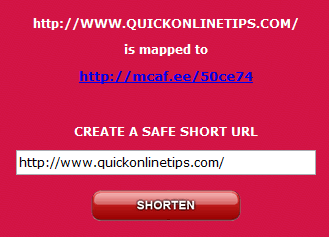
How to create a short link
- Copy the long URL from your browser’s address bar.
- Open TinyURL or Bitly and paste it.
- Optionally enter a custom alias, like tinyurl.com/my-recipe.
- Copy the short link and share it.
Short link safety
Short links hide the destination, so scammers use them too. Before clicking a suspicious one, preview it: add a + to the end of a Bitly link, or use an expander tool. See our guide on how to check short links before you click.
Tips
- Use your own domain for important links, so you control them forever.
- Don’t use short links in places where readers expect to see the full URL, like emails from banks.
- Add UTM tags to the long URL before shortening to track campaigns in Analytics.
FAQ
Is TinyURL still free?
Yes, creating basic short links on TinyURL is free, with paid plans for branded domains and advanced stats.
Do short URLs expire?
Usually not on major services, but they can stop working if the service shuts down.
Do short links hurt SEO?
Major shorteners use 301 redirects, but for links on your own site, use the full URL.
Get our free weekly email: new tech guides and tools, no spam.
New and updated tech guides, a free tool worth bookmarking and one useful pick, once a week. No spam, unsubscribe anytime.
One email a week. Unsubscribe anytime. See our privacy policy.

Try INTURL, it’s redirect faster, no spam.
I found that can unmask these urls and return the final destination url so you see exactly where you are going before you click the link.
Hi, nice list.
There is easy one: http://tubeurl.com – i recommend.
Hi,
I use http://tubeurl.com it have a nice and fast look, The firefox plug-in is very nice
Shlnk.com generate shorter URLs as well. And it has a preview function too.
With URLHawk (http://urlhawk.com) you can track, optionally protect and customise your URL. Also has clocking functions.
Generally I can make my URLs 4-5 letters shorter than TinyURL and have it meaningful.
Hurl it is very small.
http://hurl.it/
http://hurl.it/x
Check out http://traceurl.com
There you can choose the prefix of the generated URL. Thus the short URLs don’t look that cryptic. On top of that you can monitor accesses to the URL, meaning count accesses and see where the visitors come from.
I use qurl.com because it integrates with my del.icio.us bookmarks and I can set it to preview where I’m going before I’m sent there – which kind of addresses Rob’s concerns about security.
An the shortest result is from http://yatuc.com : http://yatuc.com/8o
I very recently made a bookmarklet for shurl.org I call ShurlThis! It makes it easy to make customized short URLs in one click using either highlighted text on a page or text entered into a prompt box. I hope others find it as useful as I do.
I like makeashorterlink.com. While they have the disadvantage of a somewhat longer domain name, I prefer their approach to their URLs: a) URLs are persistent; a given shortening will remain so long as they run the site, and b) they interpose a page showing you where the link ultimately goes, so you can change your mind before, say, goatse ends up on your screen at work (the interposed page can be removed by setting a cookie).
There’s also makeashorterlink.com.
I never click on short/tiny URLs because I don’t know where they lead. They are a big security risk to the user. Perhaps the bad guys haven’t noticed this yet, but it’s only a matter of time.
I like snipurl.com as mentioned in the article…mostly because you can customize it rather than be assigned a random sequence or letters/numbers. More memorable.
Plus you have the choice of using the SNIPURL version:
(using the example for the page above)
or
you can shorten it even more with the SNURL version:
https://www.meltcomics.com/
Both versions of the addys work.
I use lilurl.us you can customize your link name there too.
Oh, how I hate tinyurl. Those of us that pay attention to the urls of where we’re going are driven crazy by tinyurl and similar services. Unless it’s a very very long URL and you can’t make a proper link, or you know it’s going to be written down — use A HREF, people!
For the perfect example of terrible tinyurl usage, see tony’s post above.
Don’t forget other similarly useful services like http://www.tinypic.com and http://www.imageshack.us/. I use them very often.
I use notlong.com since it has the my most useful options.
You might also want to try
Try notlong.com. You can give some meaning to the URL.
I use TinyURL all the time…if you use Firefox (or Mozilla Suite), you *must* install the “TinyURL Creator” extension:
This extension adds a context menu (right-click) item to create a TinyURL for the page you’re visiting. You can also hover over a link, and create a TinyURL for that link. Either way, it puts the resulting TinyURL on the clipboard, ready to paste wherever you need it (like this comment…)
Works anywhere Firefox/Mozilla is supported (I’ve used it on OSX and WinXP.)