
#MyDownloadDay: How to Use All Your Unused Data Before It Expires
How often do you let unused internet data expire? When I was on an expensive high-speed broadband plan, I realized I was wasting money every month by letting gigabytes of paid-for data disappear at the end of the billing cycle. So I started my own #MyDownloadDay: one day a month when I use all the data left in my plan on things I’d download anyway. In 2026 most home broadband is close to unlimited, but mobile plans with daily or monthly data limits make this trick more useful than ever.
Quick answer: Find out when your data resets (the billing date for monthly plans, or midnight for daily data packs). Set a calendar reminder for the day, or the hour, before. Check your remaining balance in your provider’s app, then use it on big downloads you’d do anyway: app and game updates, offline movies and shows, cloud backups and large files.
Table of Contents
Why unused data is wasted money
Most limited plans slow you down to a crawl once your data runs out (512 kbps in my old Airtel plan). To avoid that, many people pay for a bigger plan than they need, and then most months a big chunk of data expires unused. That’s money straight to your internet service provider.

Some providers roll over unused data to the next month, but many don’t. And Indian mobile plans from Jio, Airtel and Vi usually give a daily data allowance, such as 1.5 GB or 2 GB a day, that resets at midnight. Whatever you don’t use today is gone.
Step 1: Check your billing cycle or reset time
Log in to your provider’s app or website to see your plan details. My old broadband billing cycle started on the 23rd of each month, so the 22nd was my download day.

For daily mobile data, the reset is usually at midnight, so the “download hour” is late evening.
Step 2: Set a reminder
I set a repeating Google Calendar reminder, by email and pop-up, for the day before my cycle ends:

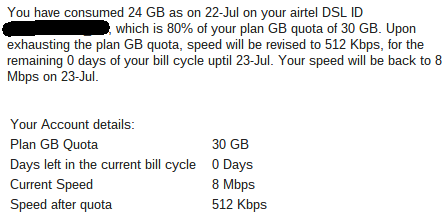
My provider also emailed me when I crossed 80% of my data. If that email hadn’t arrived by the last few days of the cycle, I knew I had a lot of data left to use.
Step 3: Check how much data is left
On one last day of a billing cycle, my account showed over 9 GB unused, 30% of my plan:

With 0 days left, there was nothing to lose: the slow speed would never kick in. Imagine paying for a 100 Mbps plan and letting 100 GB go to waste.
How to use all your unused data on #MyDownloadDay
a) Bulk app and game updates
App updates on several phones and tablets can add up to several gigabytes. I set non-essential app updates to Wi-Fi only and run them all at the end of the cycle. Don’t delay security updates, though; install those as soon as they arrive.
b) Download movies and shows for later
Netflix, Prime Video, Disney+ Hotstar and the Apple TV app all let you download shows and movies to watch offline. An HD movie can use 1–3 GB. I used to rent movies on Apple TV for around ₹150, cheaper than a multiplex ticket, and download a few at the end of the month to watch later. You can also download YouTube videos legally for the week ahead.
c) Big system updates
Major Windows, macOS and Android updates can be several GB per device. Schedule optional feature updates for your download day. Keep installing regular security patches as normal.
d) Cloud backups and large files
Back up photos to Google Photos or iCloud, sync large folders to cloud storage, or download games, offline maps and podcasts you’ll use later.
Tips to avoid wasting data in 2026
- Choose the right plan: if you always have data left, switch to a smaller, cheaper data plan.
- Look for rollover: some plans carry unused data into the next month or weekend.
- Use Wi-Fi at home: unlimited home broadband is cheap in India, so save mobile data for when you’re out.
Frequently asked questions
Does unused mobile data roll over?
Usually not. Most prepaid plans in India give a daily allowance that resets at midnight. A few plans and postpaid packs offer rollover, so check your plan details.
Is it safe to delay app updates?
Delaying feature updates by a few days is fine, but install security updates as soon as possible.
So when is your #MyDownloadDay? Squeeze out the last bits and bytes you’ve already paid for.
Stuck on a gift? Try our free Gift Idea GeneratorIdeas for anyone by age, job, interests and budget, with Amazon.com and Amazon.in linksFind gifts →Get our free weekly email: new tech guides and tools, no spam.
New and updated tech guides, a free tool worth bookmarking and one useful pick, once a week. No spam, unsubscribe anytime.
One email a week. Unsubscribe anytime. See our privacy policy.




Hy!
Very interesting tips to use the whole data package…so that it don’t get wasted…
I was finding the answer and here i got it thanks for sharing..
This is good idea how to use all data internet plan. This technology have change your life.
This is good idea how to use all data internet plan. This technology have change our life.
Thanks for the post. This is very important post, when we not end internet plan. This is good idea how to use all data internet plan.
I never thought this idea can be helpful for me. Well, thank you so, much for this internet plan using idea for Me and all other’s like me.
I do find it hard working on data plans, I pays to work smarter not harder when I am using 3G or 4G data, goes so fast!
it is very helpful. thank u so much for giving this useful idea for internet consumption.