How to Turn off AdSense Shopping Links and Ad Intents (2026)
Want to turn off AdSense shopping links or the newer AdSense “ad intents” links that appear inside your article text? Google keeps testing formats that turn words on your page into dotted, clickable links with a search icon. We tried the original AdSense shopping links on QuickOnlineTips and were disappointed – here is what happened, and how to switch these in-text ad links off in AdSense in 2026.
Table of Contents
What were AdSense shopping links?
AdSense shopping links were a way to earn AdSense income by showing shopping ads from keywords inside your content. I enabled them from AdSense Labs on our website, hoping for extra revenue, and was disappointed both by how the links were displayed and by the ads that were shown.
Here’s a screenshot of one of our articles. You can see multiple new links with dotted underlines and a search icon beside them:
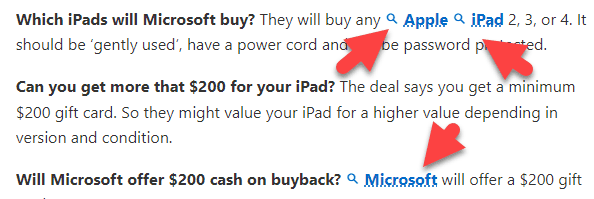
Because these search links looked new, readers were naturally tempted to click them. Clicking opened a large panel that slid in from the right with shopping ads. Even this short paragraph had three such links, and the full article had many more. So I tested what readers would see. (Never make the AdSense mistake of clicking your own ads. Clicking a search link only opens the panel; it is not clicking a paid ad.)
What happened when I clicked the links
1. “Apple”: the shopping panel showed no content and no ads – just a blank, poor experience.

2. “iPad”: it showed iPad shopping links that were basically one text link to a general shopping website.
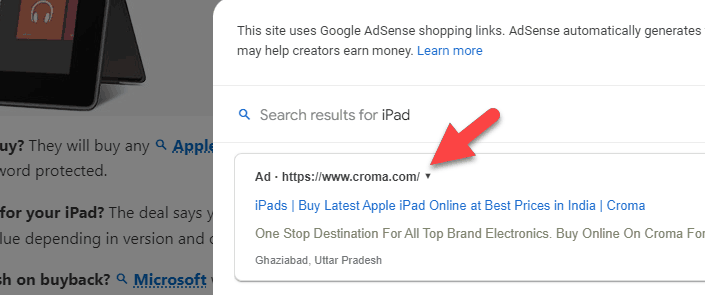
3. “Microsoft”: it showed four image ads with prices, which would take users to a shopping website.

Should you use AdSense shopping links or ad intents?
Unless you run a shopping site, a gadget blog or another affiliate marketing website, you might not have enough ad inventory for these keywords. The engine marks lots of product words as potential links, but clicking them can lead to empty or weak ads (much like old Public Service Ads) and a poor user experience.
Results also depend heavily on the reader’s country. US advertisers may show shopping ads only in the US, so readers in India saw blank panels. Our pages filled up with these links, which hurt the reading experience and took clicks away from internal links and regular display ads. Unless the ads are useful and the format clearly earns more, it is not worth spoiling the experience.
Pros and cons
- Pros: extra revenue without new ad slots; can work on product, review and deal sites; opt-in and easy to switch off.
- Cons: links inside your text can confuse readers; they compete with your own internal links; quality varies by country and topic.
How to turn off AdSense shopping links (old Labs method)
When we tested it, shopping links were an AdSense Labs feature that you could turn on and off from Optimization > Labs:
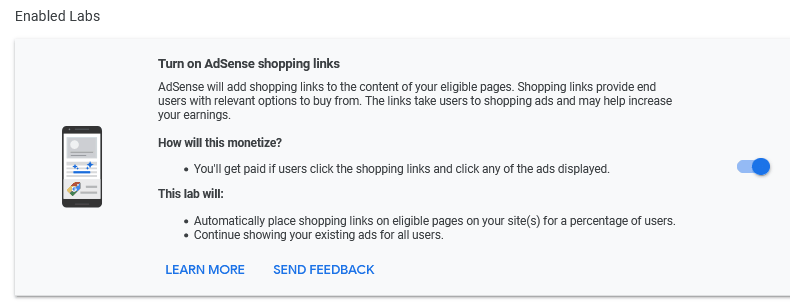
They were not on by default on our site – I had enabled them to experiment. Labs experiments come and go, so if you no longer see this page, the feature has moved or ended. The current equivalent is ad intents.
How to turn off AdSense ad intents (2026)
In 2024 Google launched ad intents, an opt-in Auto ads format that places links in existing text, anchors at the bottom of the page and chips at the end of paragraphs. When readers tap one, a dialog opens with related ads and content. To switch them off:
- Sign in to Google AdSense.
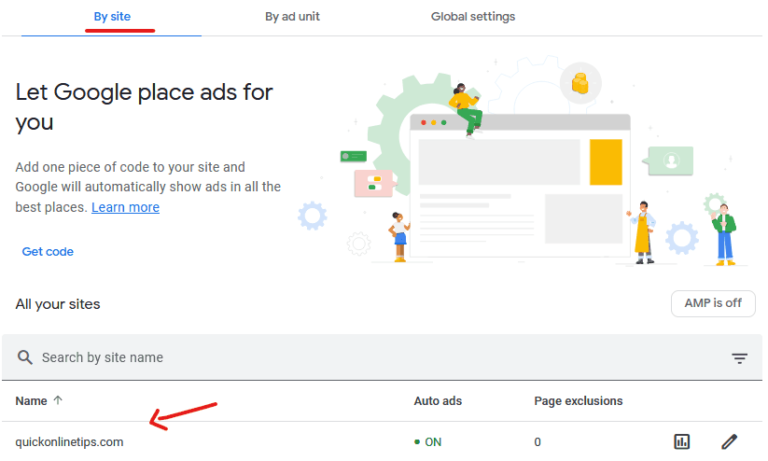
- Click Ads, then By site.
- Click Edit (the pencil) next to your site.
- In the Auto ads settings panel, open Intent-driven formats.
- Uncheck Ad intents, or keep it on and uncheck only the links, anchors or chips you don’t want.
- Click Apply. Changes can take up to an hour to show on your site.
If you use AdSense Auto ads, check these settings after any AdSense update, because new formats are sometimes added to the same panel.
How to judge if in-text ad links earn more
Turn the format on for a few weeks, then compare Page RPM and overall earnings with a similar period without it, using Reports in AdSense. Also watch engagement in your analytics: if pages per visit drop, the format may cost you more than it earns.
FAQ
Are AdSense shopping links still available?
The Labs version we tested is no longer where in-text ad links are managed. Google’s current in-text link format is ad intents, found under Auto ads > Intent-driven formats.
Why do AdSense links with a search icon appear in my posts?
They are created by AdSense ad intents (or, earlier, shopping links). They appear only if the format is enabled for your site in Auto ads.
Will turning off ad intents reduce my AdSense earnings?
Possibly a little, if readers were clicking them. Compare your RPM before and after; many content sites find the impact small and the reading experience better.
Can I turn off only the in-text links?
Yes. In Intent-driven formats you can keep ad intents enabled but disable links, anchors or chips individually.
Get our free weekly email: new tech guides and tools, no spam.
New and updated tech guides, a free tool worth bookmarking and one useful pick, once a week. No spam, unsubscribe anytime.
One email a week. Unsubscribe anytime. See our privacy policy.