
How to Add Facebook Comments to Your Blog (Plugin Retired in 2026)
Want to add Facebook comments to your blog? In 2011 Facebook launched a Comments social plugin that let readers comment on any website with their Facebook account, and we tested it live on QuickOnlineTips. That option is now gone: Meta discontinued its Comments and external Like button plugins for third-party websites on 10 February 2026. Here is what happened, how to clean up old Facebook comments code, and the best alternatives for social, spam-free comments.

Quick answer: You can no longer add Facebook comments to a blog with Meta’s official plugin, because Meta retired it in February 2026. Remove the old plugin code or WordPress plugin, keep or restore native WordPress comments, and add social login or a hosted comment system if you want readers to comment with existing accounts.
Table of Contents
Our experience with Facebook comments
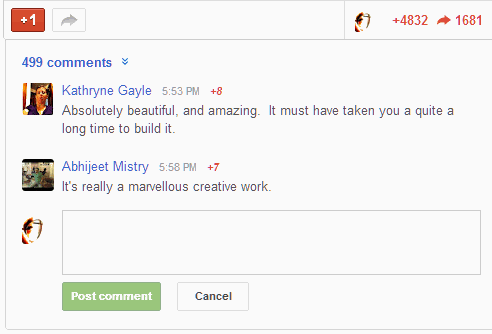
We added the Facebook Comments plugin below every post alongside WordPress comments. Readers could also post their comment to their Facebook profile, which promised more traffic and community. But we soon removed it: early versions had no single place to moderate comments across all posts, so we had to visit each article to find new ones. We reposted some readers’ Facebook comments as WordPress comments by hand. Later versions improved moderation, but we never returned to it.
What Meta’s 2026 change means
- The Facebook Comments plugin and the external Like button no longer work on third-party websites.
- Existing embeds may show nothing or a blank space, and old comments stored by Facebook are no longer displayed on your pages.
- Sharing links to Facebook still works through normal share links.
See Meta’s social plugins documentation for the current list of supported plugins.
How to remove old Facebook comments code
- Deactivate any Facebook comments plugin in WordPress under Plugins.
- Search your theme (single.php, comments.php or footer) and header and footer script boxes for
fb-comments,connect.facebook.netor the Facebook SDK, and delete it. - Remove the fb:app_id meta tag only if no other Facebook feature uses it.
- Clear your cache and check a post to confirm no empty box remains. Removing the SDK also makes pages faster.
Best alternatives to Facebook comments
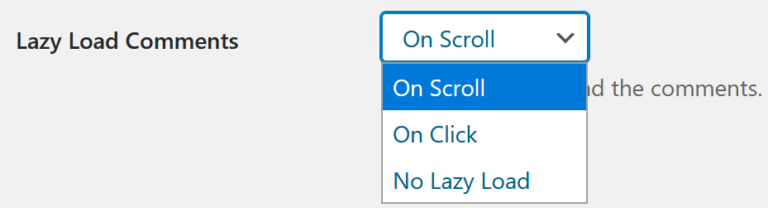
- Native WordPress comments – free, fast and stored on your own site, so you keep them forever. Pair them with Akismet for spam and lazy load comments for speed.
- Social login – plugins like Nextend Social Login let readers sign in with Google or other accounts to comment, keeping comments on your site.
- Hosted comment systems – Disqus is the best known; privacy-focused, self-hosted options like Remark42 avoid ads and tracking. See how to load Disqus comments on click.
- Jetpack Comments – lets readers comment using WordPress.com, Google or other accounts through the Jetpack plugin.
Why own your comments
The Facebook plugin’s shutdown is a reminder that third-party comment systems can disappear and take your community’s history with them. Comments stored in your own WordPress database are searchable, part of your page content for SEO, and safe from policy changes. Moderate them quickly from the dashboard, and hold comments with links for approval to keep spam out.
How to encourage more blog comments
Without Facebook nudging readers, you need to invite conversation yourself. End posts with a specific question rather than “what do you think?”, reply to every early comment so readers see a real person behind the blog, and highlight a good comment in a follow-up post. Keep the comment form short, with no forced sign-up, and make sure it loads quickly on phones. Small, friendly communities often grow faster than big social plugins ever managed.
FAQ
Can I still use Facebook comments on my website?
No. Meta discontinued the Comments plugin for external websites in February 2026.
What happens to old Facebook comments on my posts?
They are no longer shown through the plugin. If they mattered, copy important ones into native comments, as we did when we removed the plugin.
Does the Facebook share button still work?
Share links to Facebook still work. The external Like button was retired along with the Comments plugin.
Stuck on a gift? Try our free Gift Idea GeneratorIdeas for anyone by age, job, interests and budget, with Amazon.com and Amazon.in linksFind gifts →Get our free weekly email: new tech guides and tools, no spam.
New and updated tech guides, a free tool worth bookmarking and one useful pick, once a week. No spam, unsubscribe anytime.
One email a week. Unsubscribe anytime. See our privacy policy.




Nice tool but I am concerned about loading time if I add this to my blog now. Have you ever tested it yet, I mean loading time?
It takes times to load. Usually the page loads and Facebook comments load till the end.
May be in this case… cache plugin helps !
Hi, I installed Facebook comments on my blog, but the same comments appear under each post. I see that you have mentioned this problem above in your article. Is there a workaround? Thanks.
I use THESIS with open hooks and it doesnt seem to allow each comment area to be specific for each post.
The work around I have found is to directly add the facebook app script into each post and then it works. Go see:
I think the question is whether Facebook comments will be as easy to administer. For example, is it easy to reply and mark comments as spam. And what about catching the spam before it even appears in Facebook comments. Askimet is pretty hard to beat on WordPress.
But like you, I need to experiment with it as well because it could drive more traffic if it gets passed around Facebook.
Its easy to make comments as spam and delete them also. We can choose not to allow anonymous comments, so that should take care of most of the spam. The fact that the comments are shared on the FB profiles, gets more traffic. But I see no interface to moderate comments happening throughout the site.
I think implementing Facebook comment box on a blog is more interactive !
It’s a viable addition, but definitely not a replacement of the native comment system, for the following reason:
1. It will discriminate against readers who does not have a Facebook account/does not want to reveal their real identity.
2. The incentive for blog or website owners to leave a comment is now missing, as there is no way for other readers to reach their sites unless they shamelessly plug it in the comment body itself.
3. Lag of customization options. While the interface is pretty standard, it would proof useful if we could customize it to match our blog’s look and feel.
Some very good points Vincent. I guess Facebook wants to keep the standard interface so people recognize it instantly. Of course website backlinks is another good reason gone here.
Hello,
Ah! That’s a great news. Face Book is world renowned social site. I will definitely take the chance.
It does now work on thsis theme :s
Should work on any theme. Insert in single.php
There is no single.php in thesis theme. I put the code on custom_functions.php but no luck :(
Try
thesis_hook_after_post
thesis_hook_after_post_box