
How to Create an Outlook.com Email Account for Free (2026)
Want to create an Outlook.com email account? Microsoft’s free email service gives you an @outlook.com or @hotmail.com address, 15 GB of mailbox storage, a calendar and free Outlook apps for Windows, Mac, iPhone and Android. When Microsoft launched Outlook.com in 2012 to replace Hotmail, we rushed to grab our own address. Millions of names have been taken since, but signing up is still free and takes about five minutes.

Quick answer: Go to outlook.com and choose Create free account. Type the name you want, pick @outlook.com or @hotmail.com, create a strong password, add your name, country and birth date, and complete the verification check. Your new address is also a Microsoft account, so it signs you in to OneDrive, Xbox, Teams and Windows.
Table of Contents
How to create an Outlook.com email account step by step
- Open Microsoft Outlook’s official page (external site) (or go to outlook.com) and select Create free account.
- Type the email name you want, then choose the domain: @outlook.com or @hotmail.com. If the name is taken, Microsoft suggests alternatives.
- Create a password that mixes letters, numbers and symbols, and don’t reuse one from another site.
- Choose whether to receive Microsoft promotional emails.
- Enter your first and last name.
- Select your country or region and your birth date.
- Complete the verification puzzle to prove you’re human, and your inbox opens.
Choosing a good Outlook.com address
- Keep it professional if you’ll use it for job applications: firstname.lastname works best.
- Short names are mostly taken. Try adding a middle initial, a profession or a city rather than random numbers.
- @outlook.com vs @hotmail.com: both work identically in the same Outlook inbox. @outlook.com looks more current; @hotmail.com may have more short names free.
- Want more than one address? You can add an alias in your Microsoft account settings instead of creating a whole new account.
What you get free with Outlook.com
- 15 GB of mailbox storage and 5 GB of OneDrive cloud storage.
- Outlook apps: built into Windows, free on Mac for personal use, and free on iPhone and Android.
- Calendar and contacts that sync across your devices.
- Free web versions of Word, Excel and PowerPoint, so you can open attachments without installing Office.
- Spam and malware filtering, plus focused inbox sorting.
A Microsoft 365 subscription raises mailbox storage to 100 GB, removes ads and adds the desktop Office apps. For most people, the free plan is enough.
Secure your new account straight away
- Add a phone number and a backup email for account recovery.
- Turn on two-step verification in your Microsoft account security settings, ideally with the Microsoft Authenticator app or a passkey.
- Sign in regularly. Microsoft can close accounts that stay unused for a long time, so log in at least once a year.
Use Outlook.com in other email apps
You can read Outlook.com mail in Apple Mail, Thunderbird, Gmail’s app and other clients. Since September 2024, these apps must sign in with Microsoft’s modern sign-in (OAuth2) rather than a plain password. Our separate guide covers the Hotmail and Outlook.com POP, IMAP and SMTP settings step by step.
Prefer Gmail? See how to open mailto links in Gmail by default, and check our email tips for Gmail and Outlook.
What changed since 2012
Our 2012 post celebrated the brand-new Outlook.com preview: a clean, Windows 8-style layout, a fast reading pane, social network integration with Twitter, Facebook and LinkedIn, and the renaming of Windows Live ID to Microsoft account.
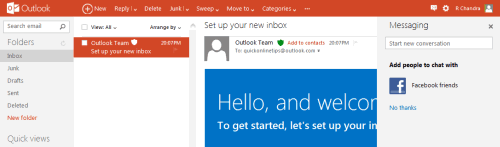

Since then, all Hotmail users were moved to Outlook.com, the social feeds were dropped, SkyDrive became OneDrive, the interface was redesigned several times, and the free Outlook apps arrived on every major platform.
FAQ
Is Outlook.com email free?
Yes. An Outlook.com account is free and includes 15 GB of mailbox storage. Microsoft 365 is optional.
Can I still get a @hotmail.com address?
Yes. When you sign up, you can choose @hotmail.com instead of @outlook.com.
Is Outlook.com the same as Hotmail?
Yes. Hotmail became Outlook.com in 2012-2013. Hotmail addresses still work and use the same Outlook inbox.
Do I need a phone number to sign up?
Microsoft may ask for one to verify you, and adding one is strongly recommended for account recovery.
Can I change my Outlook.com address later?
You can’t rename an address, but you can add a new alias to the same account and make it your primary address.
Stuck on a gift? Try our free Gift Idea GeneratorIdeas for anyone by age, job, interests and budget, with Amazon.com and Amazon.in linksFind gifts →Get our free weekly email: new tech guides and tools, no spam.
New and updated tech guides, a free tool worth bookmarking and one useful pick, once a week. No spam, unsubscribe anytime.
One email a week. Unsubscribe anytime. See our privacy policy.



I am loving the new outlook. I actually got myself 5 accounts in outlook so I can move my entire gmail in outlook. I love that I can actually make alias just like real email address and give it out to people whom I don’t want to give my real address. I love that it works faster than gmail. Gmail interface really sucks. However, I will still keep using gmail for google apps.
Already for one for me and do check out the alias feature which is also very useful…
So far it’s good experience with outlook.com but I wonder if it will become main stream mail service for me..