
How to Find Malware Links on Your Website (and Remove Them) 2026
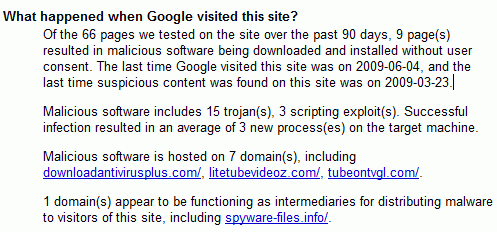
You could be linking to malware without knowing it. A site you linked years ago may now host malicious software, or spammers may have slipped bad links into comments. In 2013 I ran a Wordfence scan and found several such links on QuickOnlineTips, in comments, articles and even old cache files, and deleted them. Here’s how to find malware links on your website in 2026.

Quick answer: Run a full scan with a security plugin like Wordfence, which checks your posts and comments against Google’s list of unsafe sites. Also check your site with Sucuri SiteCheck and Google Search Console’s Security issues report. Delete or unlink anything flagged, clean spam comments, and keep comment links nofollow and moderated.
Table of Contents
Tools to find malware links
- Wordfence: the scan option “Check the safety of your site’s URLs” compares links in posts, pages and comments with Google Safe Browsing.
- Sucuri SiteCheck (external site): free remote scan for malware, blacklisting and suspicious links.
- Google Search Console: the Security issues report flags hacked content and harmful links on your own site.
- Safe Browsing site status: check individual domains you link to; see how to check Google Safe Browsing status.
- Link crawlers: Screaming Frog or Ahrefs Site Audit list every outbound link so you can review old domains.
How to clean up
- Back up the site.
- Run the scans above and export the list of flagged URLs.
- Edit posts to remove or replace bad links; use a search-and-replace plugin for many.
- Delete spam comments and comment author links pointing to bad sites.
- Clear all caches (plugin, server and CDN).
- Rescan to confirm everything is clean.
Prevent new malware links
- Moderate first-time commenters and use anti-spam tools.
- Keep WordPress, plugins and themes updated so hackers can’t inject links.
- Recheck old outbound links once a year; expired domains are often bought by spammers.
Compare protection options in our WordPress security plugins guide.
FAQ
Can linking to a malware site hurt my SEO?
Yes. Browsers may warn visitors and Google can flag your pages if they link to harmful sites.
How do hackers add hidden links?
Through outdated plugins, stolen passwords or vulnerable themes, often hidden with CSS or in the database.
How often should I scan?
Schedule automatic scans at least weekly; Wordfence can do this for free.
Stuck on a gift? Try our free Gift Idea GeneratorIdeas for anyone by age, job, interests and budget, with Amazon.com and Amazon.in linksFind gifts →Get our free weekly email: new tech guides and tools, no spam.
New and updated tech guides, a free tool worth bookmarking and one useful pick, once a week. No spam, unsubscribe anytime.
One email a week. Unsubscribe anytime. See our privacy policy.



It is possible that you could be linking malware sites from your website.
If you are not aware of this can be bad for your site SEO.
With WordFence Security plugin it secures your WordPress. It performs a lot of tests and informs you of the possible links that can be a malware site.
Protect your site from Malware links.
Secure it now!
Thanks for this post! It is really helpful.
Thanks for this information to know malware links in my blog. this plugin is looking good i am using it my blog.
Actually if everyone uses this, they will all find some link or the other which points to a malware site.
Thank you for the great post! I do agree, finding malware in your blog or site is very important for many reasons. Google also penalizes sites with malware.