
How to Use WhatsApp Web on Laptop, Desktop Computers
Did you know you can run WhatsApp Web online (WebWhatsApp) on your laptop, desktop or PC computer web browser and use all the WhatsApp features from anywhere. The feature is live now and you can link your mobile phone to your PC and get started right now.
Use WhatsApp Web for PC
Before you get started, note the WhatsApp Web feature easily work on Android smartphone and Apple iPhones right now. Let’s see how it works for me
WhatsApp Web on Mobile App
Open WhatsApp > Menu > WhatsApp Web and this is what you see
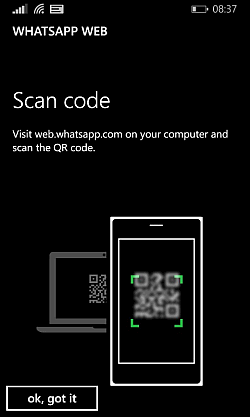
Activate WhatsApp on Web Browser
Then you need to visit the WhatsApp Web page on your computer (on your Chrome Browser) here https://web.whatsapp.com/

The page contains a QR code which you need to scan from inside the WhatsApp Web option in your mobile phone. Here is how it gets activated online in seconds on my Chromebook.

Now the same web page web.whatsapp.com shows all my WhatsApp activity on the computer and the mobile phone as well. As long as both are connected, the WhatsApp application can be run online on any computer which has the Chrome web browser.
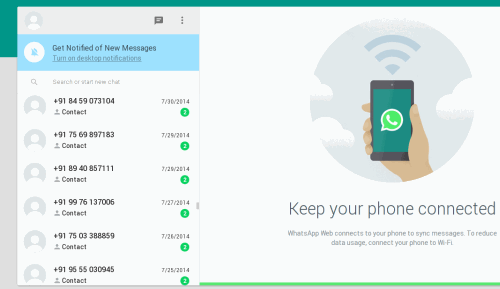
You can log out of all computers in one click from your mobile phone WhatsApp app. You can also easily do Whatsapp Web Logout on your computer with one click.
You can also change your profile photo from WhatsApp Web. See our tips for choosing a great WhatsApp DP.


In Google Play millions applications, thank you for sharing, hope to read more of your posts that you share in the near future!
This is so amazing if we can use whatsapp service on browser.
Great Information.. My friend was were tired of whatsapp from mobile he wanted to use it through PC and now we have got the same
Can i use the whatsapp web, if i rooted my i-phone?
Do you think Watsapp Web Version will be useful for all?
sir but it is only useful for those of mac and windows but android still sufficient technique or special attempts are not made and usign the qr code
I did see the options on the app few days ago. Nice to know the details.
Initially i also searched these term like Whatsapp for PC and whatsapp for desktop . Now i found that we can use whatsapp through . This is good and i have used this, but without having internet in our mobile we can’t log in.
This is Good and nice way to type.
Rip the keywords like Whatsapp for pc, Whatsapp for pc download …lol
I am waiting for when i can connect my whatsapp on iphone with my laptop.
Yeah i used it but it think for that we should have to active our mobile phone internet without that we can’t log in on desktop.
WOW…..Didnt know of whatsapp can be used on pc too. This one will help me alot as i am abig fan of whatsapp currently on android :)
i have already used whatapps. its best application for mobile to mobile talking free.
Very useful app, thank you. In Google Play millions applications, but really useful not so much.
Thanks for sharing your post on How to Use WhatsApp Online in Your Web Browser. Its worked. Thanks again.
we use whatsapp in our system but your trick help us to use in our web browser. thanks for sharing some great and interesting stuff.
I use mightytext so I can text on my computer, but I’ve heard a lot about whatsapp so this could be a nice alternative. Thanks!
Ok Whatsapp online on web is great but it has many security bug so be careful
Im a big fan of whats app, very useful and handy, Thanks for the tips