
Weather on Google Maps: How to See the Forecast in 2026
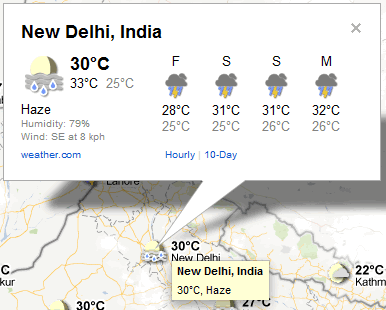
Can you see weather on Google Maps and get a forecast? In 2011, Google Maps added a Weather layer that showed the weather and cloud cover for every city on the map, with a click-through forecast for the next few days. That layer was later removed, but weather has come back to Google Maps in a different form. Here is how to check weather on Google Maps in 2026, and the fastest ways to get a full forecast from Google.
Quick answer: In the Google Maps app on Android and iPhone, the current temperature and conditions for the area you are viewing appear near the top of the map, and in supported countries the Layers button includes Weather and Air quality. For a 10-day forecast, search “weather” plus the city name on Google, or ask Google Assistant or Gemini.
Table of Contents
How to see weather on Google Maps (2026)
On Android and iPhone
- Open the Google Maps app and move the map to the place you want.
- Look near the top left, below the search bar, for a small weather badge with the temperature and a weather icon.
- Tap the Layers button and choose Weather (where available) to see temperatures across the map.
- Choose Air quality in Layers to see the air quality index (AQI) in supported regions.
On a computer
Google Maps on the web does not have a weather layer. Search for “weather in [city]” on Google instead, which shows the current conditions, hourly forecast and 10-day forecast.
Other quick ways to get a Google weather forecast
- Google Search: type “weather” for your location, or “weather Mumbai” for any city.
- Google app: on Android, the Google app and the At a Glance widget show the weather on your home screen.
- Voice: ask “Will it rain tomorrow?” to Google Assistant or Gemini.
- Before a trip: check the weather for your destination and along the route, then plan stops in Google Maps.
The 2011 Google Maps weather layer
When we covered it in 2011, you chose the Weather layer from the Maps menu at the top right, and every city in view showed its current weather. Cloud cover was visible, with an option to hide clouds. Clicking a city opened a forecast with maximum and minimum temperatures, humidity, cloud cover and rain for the next few days, and the sidebar listed every visible city.

Google removed the layer during the Google Maps redesign. Weather returned to the mobile app years later as a small badge and optional layers, rather than a full forecast map.
Want a full weather map?
For radar, wind and rain maps, use a dedicated weather service such as your national weather service, or apps like Windy. In India, the IMD website has official forecasts and warnings.
More Google Maps tips: see how to send Google Maps directions to your car.
FAQ
Why can’t I see weather on Google Maps?
The weather badge and layers appear in the mobile app and may not be available in every country. Update the app, and use Google Search on a computer.
Does Google Maps show rain radar?
No. Google Maps shows current conditions, not a radar map. Use a weather app for radar.
How do I see the weather along my route?
Check the weather for your destination and main stops on Google Search, or use a weather app with route forecasts.
Is the Google weather forecast accurate?
Google shows forecasts from weather data providers. For warnings, rely on your national weather service.
Get our free weekly email: new tech guides and tools, no spam.
New and updated tech guides, a free tool worth bookmarking and one useful pick, once a week. No spam, unsubscribe anytime.
One email a week. Unsubscribe anytime. See our privacy policy.



This is really helpful for people who like travelling to different countries like me. I will be able to easily know what the weather looks like in my next destination.
Thank you for sharing this.