
Kids Search Terms: What Children Search Online and How to Keep Them Safe
What do children actually type into search boxes? Looking at kids search terms is an eye opener for any parent. Back in 2009 Symantec released its Kids’ Top 100 Searches list from OnlineFamily.Norton, and the results surprised many families. This updated guide shows what that study found, what it still teaches us, and the parental control tools that help keep kids safe online today.
Quick answer: Symantec’s 2009 study of 14.6 million searches found that kids searched most for YouTube, Google and Facebook, but adult terms also appeared high on the list. The lesson still holds: children search for the same big sites as adults and can easily stumble on unsuitable content. Turn on SafeSearch, use YouTube’s restrictions and set up a parental control app such as Google Family Link, Apple Screen Time, Microsoft Family Safety or Norton Family.
Table of Contents
Top kids search terms from the 2009 study
Symantec tracked 14.6 million searches run by users of its OnlineFamily.Norton service (now Norton Family) and ranked the terms. According to CNET’s report at the time, the terms were collected anonymously, so none could be linked to a specific child or family. The top three top search terms kids searched for were:
- YouTube
Do boys and girls search for different things?
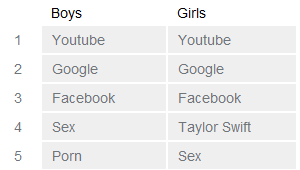
The study also split the results by gender. Here is how boys and girls searched online:
Teens, tweens and under 7s
Results also differed by age group, from teens and tweens to children under 7:
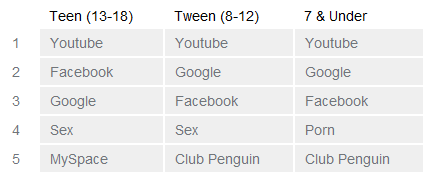
It is no surprise that kids searched for YouTube, Google and Facebook. What shocked parents was that adult terms showed up among the most searched words too.
What kids search terms teach parents today
The sites have changed, but the pattern is the same. Children type the names of popular apps and sites, games, music and video creators, and sometimes things they are curious about but should not see. A child searching for an innocent word can still land on unsuitable results. That is why a mix of settings and conversation works better than any single filter.
Parental control tools to use now
- Google Family Link (external site, opens in new tab): free controls for Android phones and Google accounts, including app approvals and screen time.
- Apple Screen Time (external site, opens in new tab): built into iPhone, iPad and Mac. See how to block adult content on iPhone.
- Microsoft Family Safety (external site, opens in new tab): family settings for Windows, Xbox and Microsoft Edge.
- Norton Family (external site, opens in new tab): the successor to OnlineFamily.Norton, the service behind the original study.
Quick settings to turn on
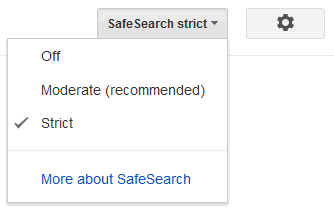
- Turn on Google SafeSearch: see how to change Google SafeSearch settings.
- Use Restricted Mode or a supervised account on YouTube: block adult content on YouTube.
- Block specific sites in the browser: how to block websites on Chrome.
Most importantly, talk to your kids about what they search for and keep devices in shared family spaces for younger children.
FAQ
What did kids search for most in the Symantec study?
YouTube, Google and Facebook were the top three kids search terms in the 2009 Kids’ Top 100 Searches list.
Is OnlineFamily.Norton still available?
The service is now called Norton Family and is still offered by Norton as a parental control product.
Can I see what my child searches for?
Some parental control apps show activity reports, depending on the app and device. Check the features of the tool you choose and tell your child you are using it.
Is SafeSearch enough on its own?
No. SafeSearch filters explicit search results, but it does not cover apps or other sites, so combine it with device-level parental controls.

Subscribe to our weekly tech newsletter
Free: 100 Tech Terms ebook (worth $2.99)
Unsubscribe anytime. Privacy






“The terms were collected anonymously, so none could be associated with any specific children or families.”
Then how do they know the users’ gender or age?
By taking up the Age/Gender but not any Names/Addresses/Family Names/Other information of the sort?
I thought that most anonymous surveys/tests did at least that, or something… You know, to make their tests valid.
with free wifi everywhere, how to stop them? unless the gov steps in.
Use OpenDNS’s web content filter and install a web filtering software too. double the filter!
All the more reason that you should get kids to sign my pledge! The Social Pledge is a voluntary commitment to avoid profanity on social networking sites such as Facebook, My Space, and Twitter and encourage your “friends” and “followers” to do the same. visit my site – http://www.thesocialpledge.com
Bill Frank,
HS Senior, Class of 2010
I was really shocked that the Tween between 8 – 12 years old start to search for p0rn online. What can we do to prevent this happen? I think the guidance of parents is important. Thanks for sharing!
Worldwide statistics aren’t like that. Because they can’t determine who is boy/girl and age of the person who is searching at Google.