
How to Get Your Videos Indexed by Google (2026 Video SEO Guide)
Want your videos indexed by Google? A video thumbnail next to your result, or a spot in the Videos tab, can bring far more clicks than a plain blue link. But Google is much stricter about video results than it was when this guide was first written in 2010. Here is how to get your videos indexed by Google in 2026, step by step.
Quick answer: Make the video the main content of a public page, use a supported video file or a YouTube embed, add a clear thumbnail and VideoObject structured data, list the page in a video sitemap, and submit it in Google Search Console. Then check the Video pages report to see which videos Google indexed and why others were not.
Table of Contents
Why get your videos indexed by Google?
Video results stand out on the search page with a thumbnail, duration and sometimes “key moments” that jump to parts of the video. A page in position five with a video thumbnail can get more clicks than the plain result above it. Your video can also appear in the Videos tab, Google Images and Discover.
Step 1: Make the video the main content of the page
Since 2023 Google shows video thumbnails mainly for pages where the video is the main thing, not a small extra clip at the bottom of an article. Put the video near the top, give the page a title that matches the video, and add a short description or transcript below it.
Step 2: Host or embed the video correctly
- Self-hosted: use a supported format such as MP4 or WebM in an HTML
<video>tag. Make sure Googlebot can fetch the file and it is not blocked in robots.txt. - YouTube or Vimeo embeds: these work too. Google can index the page that embeds the video as well as the original YouTube page.
- Avoid: videos that only load after a click, need a login, or are hidden in a pop-up.
Step 3: Add a good thumbnail
Google needs a valid thumbnail image of at least 60 x 30 pixels, though a sharp 1280 x 720 image works much better. It is the picture people see in search results, so make it clear and relevant.
Step 4: Add VideoObject structured data
Structured data tells Google the video’s name, description, thumbnail, upload date, duration and file URL. If you use WordPress, SEO plugins such as Rank Math or Yoast can add VideoObject schema automatically when you embed a video. Add Clip or SeekToAction markup if you want key moments. Google’s video SEO best practices page lists every property.
Step 5: Create a video sitemap
A video sitemap helps Google find videos it might miss. It is an XML file like a normal sitemap with extra video tags:
<urlset xmlns="http://www.sitemaps.org/schemas/sitemap/0.9"
 xmlns:video="http://www.google.com/schemas/sitemap-video/1.1">
 <url>
  <loc>https://example.com/videos/how-to-bake-bread/</loc>
  <video:video>
   <video:thumbnail_loc>https://example.com/thumbs/bread.jpg</video:thumbnail_loc>
   <video:title>How to Bake Bread at Home</video:title>
   <video:description>A simple bread recipe in 5 minutes.</video:description>
   <video:content_loc>https://example.com/video/bread.mp4</video:content_loc>
  </video:video>
 </url>
</urlset>
Many SEO plugins can generate this for you. See Google’s guide to video sitemaps.
Step 6: Submit and check in Search Console
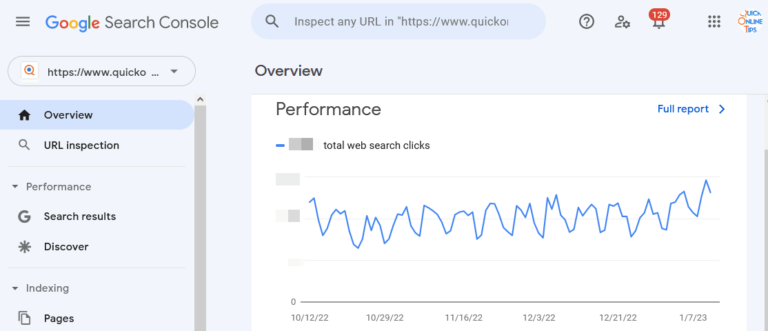
- Add your site to Google Search Console if you have not already. It is one of the best free Google SEO tools.
- Submit your video sitemap under Sitemaps.
- Open Indexing > Videos to see which video pages are indexed. Common reasons for “Video isn’t on a watch page” or “Cannot determine video” are listed there, so fix them and click Validate fix.
Tip: target searches that already show videos
The original idea from this post still works. Find searches where your page ranks on page two and Google already shows a video block on page one. A well-optimized video for that topic can help you reach the first page.
FAQ
How long does it take Google to index a video?
Usually from a few days to a few weeks after Google crawls the page. A video sitemap and good internal links speed it up.
Is it better to host videos on YouTube or my own site?
YouTube is easier and brings its own audience. Self-hosting can send more search clicks to your site. Many sites embed YouTube videos on dedicated pages to get both.
Why does Google not show my video thumbnail?
Most often the video is not the main content of the page, the thumbnail is missing or blocked, or the video loads only after user action.
Originally written by guest author Keiros, an outsourcing and infrastructure management consultant and SEOChat forum contributor. Updated for 2026 by QuickOnlineTips.
Get our free weekly email: new tech guides and tools, no spam.
New and updated tech guides, a free tool worth bookmarking and one useful pick, once a week. No spam, unsubscribe anytime.
One email a week. Unsubscribe anytime. See our privacy policy.



Videos are really generates more leads
Video content is a pretty big deal these days. This article was very useful, thank you.
I understand that there is also a way of adding tags to a video from you tube by adding it at the end of the code. I will try and report.
Hello. Awesome article! Can you please tell me how to create a thumbnail of the video and where to put it in code? I am new to this.
Nice. It seems Google will not only index everyone else video content, deliver a great user experience but also then profit from all the free content it will be able to index and play back through a Google player? I suspect at some point with their own advertising, placements and monetization strategies.
Why would Google not advocate alt tags for videos also? Wouldn’t that seem like a good way to sort and define the actual content of a video?
thanks for the info.
Great post – really useful information on how to create an XML sitemap and get videos indexed quickly. With blended search results seemingly becoming more and more prevelant in Google’s Universal search this has to be a process worth following more closely.
Video sitemaps look like they are going to be key to getting content found , and video is seemingly going to become more and more important for all publishers. But some might still not have the technical skills required to generate a sitemap or perhaps they have lots of video and need a sitemap generated automatically. What is the best solution for non techies who just want their videos to index and rank well to drive traffic to their sites?
Useful site, where did you come up with the info in this blog post? Im happy I found it though, ill be checking back soon to see what other articles you have.
Well, if you read carefully, there are some prerequisites to get to the top. That’s not magic and requires some investigation before finding a search request meeting all the prerequisites.
Actually, the bandwidth can be an issue, depending on the quality of the video. I’ve a 30 seconds .flv file which weight some 2.8Mb megs and a 2 minutes .flv file which weights only 1.5Mb and looks fine on my page. But if you have a very popular website and a limited bandwidth, forget it or upgrade your hosting plan.
Well that really cool.
Never knew that you could create Sitemap for Videos. I have always embedded youtube videos (created by me) since that saves bandwidth. However now I will embed them from files hosted on my server.
Thanks a ton!!