
How to Add the Rupee Symbol (₹) in Blog Posts and Websites
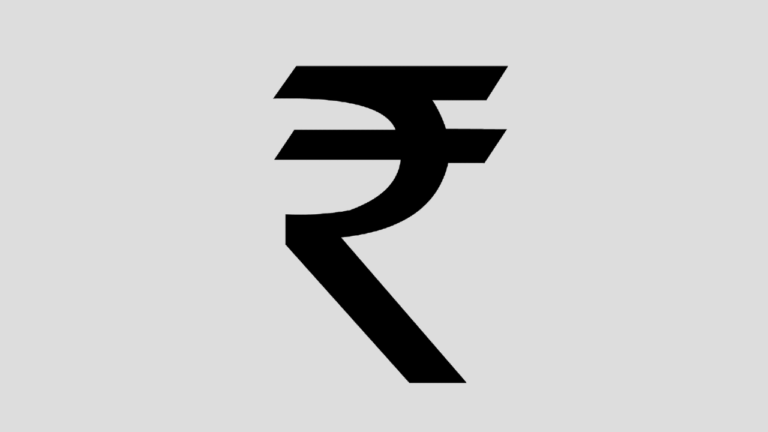
Want to show prices like ₹499 on your website? When the Indian Rupee symbol was approved in 2010, it was not yet part of standard fonts, so bloggers needed tricks like the WebRupee font API to add the rupee symbol in blog posts. Today ₹ is a standard Unicode character supported by every modern browser, phone and font. You can type it, paste it or use a simple HTML code. Here is how.

Quick answer: Type or paste the ₹ character directly into your post, or use the HTML code ₹ (Unicode U+20B9). On Windows with the English (India) keyboard, press Ctrl + Alt + 4 or AltGr + 4. On a Mac, use the Character Viewer (Ctrl + Cmd + Space) and search “rupee”. On phones, long-press the currency key on the symbols keyboard.
Table of Contents
HTML codes for the rupee symbol
| Method | Code | Result |
|---|---|---|
| Decimal HTML entity | ₹ | ₹ |
| Hex HTML entity | ₹ | ₹ |
| CSS content | content: "\20B9"; | ₹ |
| Unicode | U+20B9 | ₹ |
Make sure your site uses UTF-8 encoding (WordPress does by default), and the character will display correctly for everyone.
How to add the rupee symbol in blog posts on WordPress
- Block editor: type or paste ₹ directly into a paragraph. For prices in a table, the same works in table cells.
- Classic editor: paste ₹ in the Visual tab, or switch to the Text tab and type
₹. - WooCommerce: set the store currency to Indian rupee in WooCommerce, Settings, General, and the ₹ symbol appears automatically on all prices.
- Theme or plugin code: use
₹in PHP templates to avoid encoding problems in older files.
How to type the rupee symbol on your keyboard
- Windows: add the English (India) keyboard in Settings, then Time and language, then Language and region. Then press Ctrl + Alt + 4 or AltGr + 4. Our full guide shows how to type the Indian rupee symbol with a keyboard.
- Mac: open the Character Viewer with Ctrl + Cmd + Space and search “rupee”, or add the Indian keyboard layout.
- Android and iPhone: switch to the symbols keyboard and long-press the $ key to choose ₹. Gboard set to English (India) often shows ₹ directly.
- Microsoft Word: type
20B9then press Alt + X.
Rs. or ₹: which should you use?
Use ₹ for prices on websites, apps and invoices; it is short, official and instantly recognised. “Rs.” or “INR” is still useful in plain-text emails, SMS and places where special characters might break. For international readers, “INR” is clearest, for example “INR 1,999 (about US$24)”. Whatever you choose, be consistent across your site.
What happened to WebRupee and Rupee fonts?
In 2010 we added the WebRupee JavaScript and CSS API to QOT so “Rs.” showed as the new symbol, and shared ways to download a free Indian Rupee font. These were stopgaps before the symbol joined Unicode 6.0 in late 2010. The WebRupee service no longer works, so remove any old webrupee scripts or stylesheets from your theme; they slow pages and can cause errors. Read the story of the new Indian Rupee symbol.
Formatting Indian prices correctly
Put the ₹ symbol before the number with no space, as in ₹1,499. Indian websites often use the lakh and crore grouping, such as ₹1,50,000 for one and a half lakh, while international audiences expect ₹150,000. Pick the style your readers know best. Avoid writing both “Rs.” and ₹ together, and do not add a trailing “/-” on websites; it is a habit from handwritten cheques that looks dated online. When you add a rupee symbol in blog posts about deals or product reviews, also mention the date, since prices change quickly.
FAQ
Why does the rupee symbol show as a box?
The device’s font lacks the character, which only happens on very old systems. Updating the operating system fixes it.
What is the Unicode for the rupee symbol?
U+20B9, written in HTML as ₹ or ₹.
Is ₹ good for SEO?
Yes. Search engines understand ₹ as the Indian rupee, so prices are read correctly.
Stuck on a gift? Try our free Gift Idea GeneratorIdeas for anyone by age, job, interests and budget, with Amazon.com and Amazon.in linksFind gifts →Get our free weekly email: new tech guides and tools, no spam.
New and updated tech guides, a free tool worth bookmarking and one useful pick, once a week. No spam, unsubscribe anytime.
One email a week. Unsubscribe anytime. See our privacy policy.




The India Rupee symbol is now part of the official Unicode standard.Our Indian currency Rupee got its own symbol which gives it a unique identity and differentiate it from other countries.In this post, I will learn how to easily use the Rupee symbol in your blog posts.Thanks for sharing such a wonderful blog.
I have tried it on my tech blog which is on blogger platform but not working .please help me
Thank you so much it works perfectly from ie 6 to latest and firefox, chrome too. :)
That very Great advice .. I had download its Font pack and now I am using with using ` button …