
Best Smartphone Travel Apps in 2026 (and the 2010 Classics)
The best smartphone travel apps replace a bag full of guidebooks, maps, phrasebooks and printouts. In this digital age, what traveller wants to lug around 5 kilograms of guidebooks when a phone can do the job? This guide lists the travel apps worth installing today and looks back at the apps travellers used in 2010.
Quick answer: For most trips, install Google Maps for navigation and offline maps, Google Translate for signs and conversations, TripIt to keep your bookings in one itinerary, Flightradar24 to follow flights, and XE Currency for exchange rates. Add Citymapper for public transport in big cities and Tripadvisor for places to eat and visit.
Table of Contents
Why use travel apps on your phone
There is an app for almost everything, from translating foreign languages to finding the nearest public toilet in a strange city. With Wi-Fi in hotels and cafes, and mobile data or eSIMs widely available, you no longer need to look like a lost tourist struggling with a paper map or thumbing through a dog-eared guidebook. Open your app and find everything from the nearest snack to a bed for the night.
Many travel apps are free, while some charge for premium features, so it is worth knowing which ones earn their place on your phone.
Best smartphone travel apps today
All of these run on both Android and iPhone:
- Google Maps (external site) – Directions for driving, walking and public transport, plus nearby restaurants, hotels and attractions. Download an area as an offline map before you leave so navigation works without data.
- Google Translate (external site) – Type, speak or point your camera at a sign or menu to translate it. Download languages in advance to translate offline.
- TripIt (external site) – Forward your flight, hotel and car booking emails and it builds a single itinerary you can check anytime.
- Flightradar24 (external site) – Follow flights live on a map, handy for checking whether the plane you or a friend is waiting for is on its way.
- XE Currency (external site) – Quick currency conversion so you know what you are really paying.
- Citymapper (external site) – Step-by-step public transport directions in the large cities it covers.
- Tripadvisor (external site) – Reviews of restaurants, hotels and things to do, written by other travellers.
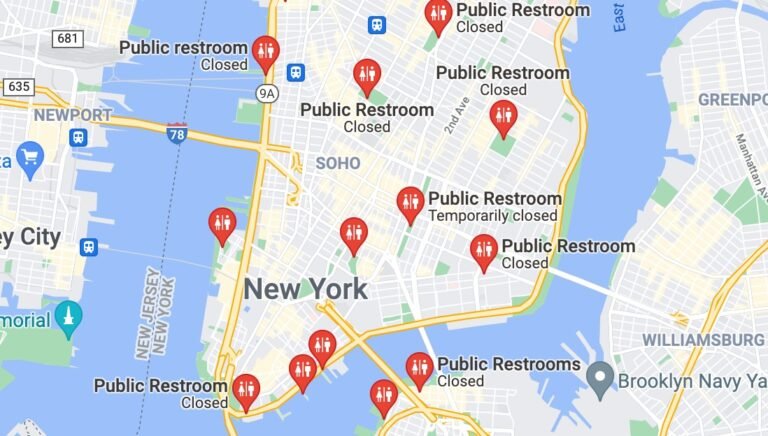
Also install your airline’s own app for boarding passes and gate changes, and your hotel or booking app for reservations. Looking for a restroom? See our guide to finding public restrooms near you. Want to speak a little of the local language before you go? Try these online language learning resources.
Smartphone travel apps in 2010: what travellers used
When this article was first written in 2010, guest author Christian Arno picked ten apps for iPhones and BlackBerry phones:
- iPhone: FlightTrack (live flight status), Babelingo (phrasebook with 300 phrases in 11 languages), Where (nearby places using your location), CurCon Currency Converter and LocoTrivia (location-based trivia quizzes).
- BlackBerry: WorldMate (itineraries with flight and weather alerts), Navita Translator (spoken translation), Urbanspoon (restaurant finder), TripCase (flight and hotel itineraries) and SitOrSquat (a public toilet finder).
The ideas behind those apps were spot on: flight tracking, translation, currency conversion, itineraries, restaurant and toilet finders. But the original BlackBerry phone software is no longer supported, and many of those 2010 apps have since closed, changed names or been replaced (Urbanspoon, for example, became Zomato). The apps above cover the same jobs today.
Tips for using travel apps abroad
- Prepare offline: download offline maps and translation languages on Wi-Fi before you travel.
- Sort out data: check roaming charges with your carrier or buy a local SIM or eSIM.
- Carry a power bank: maps and the camera drain the battery fast.
- Keep backups: save tickets and bookings offline, and keep a copy of important documents somewhere safe.
So dump the guidebook library and set up a few handy travel apps before your next trip. If nothing else, they give you something to do while you wait for the plane, bus, train or taxi.
FAQ
What are the most useful smartphone travel apps?
A maps app, a translator, an itinerary organiser, a flight tracker and a currency converter cover most needs on a trip.
Can travel apps work without internet?
Some can. Google Maps lets you download offline areas and Google Translate lets you download languages, so both work without data.
Are free travel apps good enough?
For most travellers, yes. Paid tiers usually add extras such as alerts or advanced features rather than the basics.
Do the 2010 travel apps still work?
Many do not. BlackBerry’s old phone software is no longer supported, and many of those apps have closed or been replaced.
Originally written by guest author Christian Arno, founder and managing director of Lingo24, a global translation service launched in 2001. Updated for 2026 by QuickOnlineTips. You can also guest post here.

$4.99Free when you subscribe
Get 100 tech terms explained in plain English
8-page PDF on AI, coding, slang and SEO + one tech email a week.
Sent by email. Unsubscribe anytime. See our privacy policy.


Very Nice Post. I’m glad after reading this and get the more idea about the Travelling Apps. Sometimes it is very easy for us to find our destination and distance of it with the help of this type of Travelling Apps which guide us to move on a proper way.
Traveling with a smart phone and the right apps makes a lot more sense than lugging around heavy guidebooks, oversized maps, and confusion. I look forward to the development of more apps for this sector.
all are great application although its not free ;)
Really terrific applications.These application helps traveler in traveling overseas.These application are really efficient and reliable to use .I implemented some of the applications and get benefit of them.Thanks for this post.
I look forward to the development of more apps for this sector.
Traveling with a smart phone and the right apps makes a lot more sense than lugging around heavy guidebooks, oversized maps, and confusion. I look forward to the development of more apps for this sector.
Thanks for the info.
This is a very good article. I have heard that there is an app for everything and I guess this is true. I know that I will be getting a few new apps for Christmas.
Hey , Thank you very good.
Great List. I always travel for different research. I think these will help me and specially Where application.
First off nice list!
Jumping off topic a bit — why is Blackberry so far behind? The apps are decent, but they’re still much slower and less fluid like than iPhone or Droid apps. So many salespeople/business folk are either required to have a blackberry, or have had one for so long they are too used to the interface. BB needs to step it up somewhere.