
Caching Plugins Can Delay RSS Feed Updates: How to Fix It (2026)
Are your RSS feed updates late, so new posts reach feed readers, email newsletters and social auto-posting tools an hour after you publish? A WordPress caching plugin may be serving an old copy of your feed. That’s exactly what happened to us in 2013: our feed stayed stale for over an hour after each post, so FeedBurner and our Twitter auto-posts showed nothing new. Here’s why caching delays RSS feed updates and how to fix it with today’s caching plugins.

Quick answer: To fix delayed RSS feed updates, exclude your feed URLs (/feed/) from page caching in your caching plugin, or make sure the plugin purges feeds when you publish. Also check any CDN cache rules for /feed/. After that, your feed updates within seconds of publishing, and services that read it pick up new posts on their next check.
Table of Contents
Why caching plugins delay RSS feed updates
Caching plugins save a static copy of each page so your server doesn’t rebuild it for every visitor. If the plugin also caches /feed/ and doesn’t clear it when you publish, feed readers keep getting the old version until the cache expires. In our case the cache lifetime was one hour, so every tool that read our feed was up to an hour behind.
How to fix RSS feed updates in popular caching plugins
- LiteSpeed Cache: it purges related pages and feeds on publish by default. If feeds stay stale, go to Cache > Excludes and add
/feedunder Do Not Cache URIs. - WP Super Cache: in Settings > WP Super Cache > Advanced, add
feedto Rejected URL Strings, and tick Clear all cache files when a post or page is published. - W3 Total Cache: in Performance > Page Cache, untick Cache feeds, or add
/feed/to Never cache the following pages. - WP Rocket: feeds aren’t cached by default. If you added them, remove
/feed/from cached URLs. - Other plugins: look for a “never cache” or “exclude URLs” setting and add
/feed/.
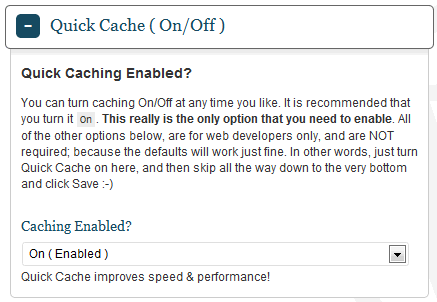
In 2013 we used Quick Cache (shown above) and fixed it by adding feed to its No-Cache URI patterns. The idea is the same in every plugin.
Check your CDN too
If you use Cloudflare or a host CDN, a “cache everything” rule can also cache your feed. Add a rule to bypass the cache for /feed/*, or purge the CDN when you publish. Feeds are small, so skipping the cache costs very little server load.
Push updates faster after you fix the cache
- Update Services: under Settings > Writing, WordPress pings services such as Ping-o-Matic when you publish.
- WebSub: a WebSub (PubSubHubbub) plugin notifies feed readers like Feedly and Inoreader instantly instead of waiting for them to check.
- IndexNow: Rank Math and other SEO plugins can notify Bing and other search engines of new URLs immediately.
What about FeedBurner?
We used FeedBurner as our main feed in 2013 and wrote how to fix FeedBurner feeds not updating. Google has since frozen FeedBurner: it still serves feeds, but email subscriptions ended in 2021 and features like Socialize are gone. If you still use it, the same rule applies: FeedBurner can only show new posts once your WordPress feed is fresh. For more caching tips, see why WP Super Cache may not delete expired pages and our earlier switch from WP Super Cache to Quick Cache.
Frequently asked questions
How do I check if my RSS feed is cached?
Publish a test post, then open yoursite.com/feed/ in a private window. If the new post is missing, the feed is cached. Some plugins also add an HTML comment or header showing the cache status.
Will excluding the feed from cache slow my site?
No. Feeds are requested far less than pages, and WordPress generates them quickly.
How often do feed readers check my RSS feed?
Anything from every few minutes to a few hours. WebSub makes supported readers update instantly.
Why are my social auto-posts late?
Most auto-posting tools read your RSS feed. If the feed is cached, they post late or skip posts.
Stuck on a gift? Try our free Gift Idea GeneratorIdeas for anyone by age, job, interests and budget, with Amazon.com and Amazon.in linksFind gifts →Get our free weekly email: new tech guides and tools, no spam.
New and updated tech guides, a free tool worth bookmarking and one useful pick, once a week. No spam, unsubscribe anytime.
One email a week. Unsubscribe anytime. See our privacy policy.



I’ve just updated Quick Cache and it’s blocking my feed from updating. Unfortunately, in the newest version I don’t see any settings for “No-Cache URl patterns” :/
I am just hearing of this information. So is it good or bad to use this WordPress caching plugin. I am already using it. Anyways thanks for this valuable information.
Quickcahe automatically clear the cache every time we publish a new post. Do we still need to configure it not to cache the feed?
It depends if you clear your cache completely every time you publish. Why would you want to do that? We only clear the single page and front page, when we publish a new post.
Connecting via ftp and trying to import folders. Let u all know when it works.
Unable to install.. Installation fails… and when i try again it says already present..shhh.. Help plz.