
7 Ways to Increase Domain Name Security (and Stop Domain Hijacking)
Your domain name is the foundation of your website and email. If someone steals it, they can take over your site, read your email and even hold the domain to ransom, and getting it back can take weeks. Domain hijacking still happens every day, usually through a hacked registrar account or an expired domain. Here are the steps to increase domain name security, updated for 2026, which take only a few minutes with any registrar.
Quick answer: To protect your domain, turn on registrar lock (transfer lock), secure your registrar account with two-factor authentication, keep your contact email up to date, use WHOIS privacy, turn on auto-renew with a valid payment card, and consider DNSSEC and a registry lock for important domains.
Table of Contents
1. Lock your domain name
Domain locking (also called registrar lock or transfer lock) is the most basic step. A locked domain can’t be transferred to another registrar until you unlock it. Unlock it only when you actually want to move the domain, then lock it again. Some registrars don’t lock domains by default, so check yours.

Make sure the lock shows as On:

You can confirm the lock with a ICANN lookup: the domain status should include clientTransferProhibited.
2. Turn on two-factor authentication at your registrar
Most domain thefts start with a hacked registrar account. Turn on two-factor authentication (2FA) so a stolen password alone isn’t enough. Use an authenticator app or a passkey rather than SMS codes where your registrar allows it. It takes a few minutes, just like setting up Gmail 2-step verification.

Also use a unique, strong password for your registrar account, and don’t use an email address on the same domain as your login email. If the domain goes down, you’d lose access to the recovery emails too.
3. Keep your registrant contact details up to date
Registrars send renewal reminders and transfer approval emails to your contact address. If that email is old or wrong, you won’t hear about a fraudulent transfer or expiry in time. Check the registrant email on every domain you own, especially old ones. See what happened when 9Rules let its domain expire.
4. Use WHOIS domain privacy
Always choose private registration, which hides your name, email, address and phone number from public WHOIS lookups. The less attackers know about you, the harder it is to target your account with phishing or social engineering.
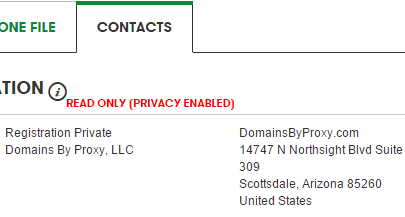
Today most registrars, including Cloudflare Registrar, Namecheap and Porkbun, include privacy free. (We once recommended Google Domains for free privacy, but Google sold that business to Squarespace in 2023.) Some country domains, such as .in, have their own privacy rules.
5. Auto-renew your domain names
Years pass quickly, and an expired domain can be snapped up by someone else within days of its grace period ending. Turn on auto-renew, and keep a valid payment card on file, so you never lose a domain by accident.

For domains you plan to keep, register them for several years at once. We booked this site for 10 years. Even Google once let a domain slip: see when Google.com was briefly bought for $12.
6. Turn on DNSSEC
DNSSEC signs your DNS records so attackers can’t redirect visitors to a fake site with forged DNS answers. Many registrars and DNS hosts, including Cloudflare, let you turn it on with one click.
7. Use registry lock for your most valuable domains
A registry lock goes further than a registrar lock. Changes to the domain need manual verification by the registry itself, so even a hacked registrar account can’t move or change it. It usually costs extra and isn’t available for every domain extension, but it’s worth it for a business-critical domain.
Frequently asked questions
What is domain hijacking?
Domain hijacking is when someone takes control of your domain without permission, usually by breaking into your registrar account or tricking the registrar, then transferring the domain or changing its DNS.
Can a locked domain still be stolen?
It’s much harder. But if attackers get into your registrar account, they can unlock it. That’s why two-factor authentication is just as important as the lock.
What should I do if my domain is stolen?
Contact your registrar’s abuse or security team immediately with proof of ownership, such as invoices and old WHOIS records. ICANN’s transfer dispute process can also help recover domains transferred without authorisation.
Get our free weekly email: new tech guides and tools, no spam.
New and updated tech guides, a free tool worth bookmarking and one useful pick, once a week. No spam, unsubscribe anytime.
One email a week. Unsubscribe anytime. See our privacy policy.
It is even better to register domain for many years (we booked this site for 10 years!) if you really want to keep the domain name.
Hello,
I really enjoyed this article.
Domain stealing can seriously hinder your pogress. Signing up for auto renew domain yearly and whois privacy are both great tips to securing your domain name.
Nice post sir,
I have daily visited your website and I love your website because of all type info available on your site and this post is very useful for me and all website maker friend and can read this post and stop to hacking and build a secure website.
Thank you.
To avoid hacking from hackers domains security is a key factor. Thanks for sharing the domain security information.
Domain security is actual quite important thing which we all neglect, spammers buy our similar domain name using(-,s..etc). It is very helpful blog for us to protect from stealing domain name.Keep posting!!
nice post domain security is very important nowadays to save yourself from hackers
These are great tips about keeping your domain secure especially these days when hacking is pretty common. I think it’s always a must to setup a 2-step verification in all of your online accounts.
Thanks a lot for sharing this post. It is a really helpful post to enhance domain security.
This is very helpful information. Many people don’t know about this and they confused for better domain name security for that people this information very helpful. I like this post.
This is the article I am looking for. Security is really a big issue in this modern technology. Sometimes we get hacked by the hackers. I lost my domain. I was not careful about domain name security.
This article protects our domain names. Thank you for sharing.
Actually we should always lock up our domains for safety. Cause hackers are always trying to get anything they can get their hands on. Also it’s better if we use the whois privacy on so they can’t get the information.
Thanks for the article. Its good. Can you tell me the best domain security tools?
Very nice post and useful information are provided here. I have just started a new blog and this article help me to secure my domain name.
Thank you.
I was wondering how to lock up a domain related to my business and this post really helped me out thanks for sharing.
Thanks mate!
For sharing this important information..I will surely follow and make my domain more secure.
keep it up!!
Nice post, Chandra. You’ve compiled key points on protecting domain names. I’m not a fan of the 2-step verification, though.
For a website domain name is very essential part and its protection is always must. We should make sure always that no one can steal it without your permission. So thanks for post a very important blog here.
It’s happened to me! I forgot to renew the domain of a project and it ended up expiring. I was lucky enough to notice a few days later and managed to retrieve it, after many emails and conversation with the registrar. After that I called the automatic renewal and I do not worry about it anymore.
Security of domain names are very important for every business. Thanks to share these useful steps.
That the domain name is important. it includes at key words the seo process can be fulfil of your own business. thus the site should be improve it