10 Best Free AI Art Generators in 2026 (Including No-Login Options)
AI art generators turn a simple text description into an image in seconds, with no drawing or design skills needed. In 2026 the best ones are built right into apps you already use, like ChatGPT, Gemini, WhatsApp and Canva, and most of them have a free tier. Here are the best free AI art generators we’ve tested, what each is good at, and how to get great results.

Quick answer: For the best free results, use ChatGPT or Google Gemini. For text inside images (posters, logos, thumbnails) use Ideogram. For quick social media designs use Canva. If you don’t want to sign up at all, Craiyon still works without a login.
Table of Contents
Best free AI art generators at a glance
| Tool | Best for | Login needed? |
|---|---|---|
| ChatGPT | Following detailed prompts, editing images by chat | Yes |
| Google Gemini | Photo-realistic images, editing your own photos | Yes (Google account) |
| Microsoft Copilot | Free images with a Microsoft account | Yes |
| Meta AI | Quick images inside WhatsApp and Instagram | Yes (your Meta app) |
| Ideogram | Readable text in images, logos, posters | Yes |
| Canva | Social posts and designs using AI images | Yes |
| Leonardo AI | Game art, characters, many styles | Yes |
| Craiyon | Fun, simple images with no account | No |
| NightCafe | Artistic styles and an active community | Yes |
| Stable Diffusion | Unlimited images on your own PC | No (runs locally) |
1. ChatGPT
ChatGPT can create images right inside the chat. Its biggest strength is understanding long, detailed prompts, and you can ask for changes in plain words (“make the background blue”, “add a cat on the sofa”). Free accounts get a limited number of images per day, and OpenAI doesn’t publish the exact figure, which can drop when demand is high. The paid plans raise the limits a lot.
2. Google Gemini
Gemini’s image models, nicknamed Nano Banana, are excellent at realistic photos and at editing a photo you upload, for example changing the outfit or background while keeping the face the same. It’s free with a Google account. The top “Pro” image model is tightly limited for free users (just a couple of images a day as of late 2025), but the standard model is far more generous.
3. Microsoft Copilot
Microsoft’s Copilot (which absorbed the old Bing Image Creator) generates images free with a Microsoft account. You get a small number of fast generations each day, after which images still come, just more slowly. It also works inside Microsoft Designer for making social media graphics.
4. Meta AI on WhatsApp and Instagram
If you’re in India, you probably already have an AI image generator on your phone. Open a chat with Meta AI in WhatsApp (or tap the Meta AI icon in Instagram) and type “imagine” followed by your description. It’s free and quick, though you get less control over style than with the dedicated tools.
5. Ideogram
Most AI generators mangle words, but Ideogram is known for putting clean, readable text into images. That makes it the best free choice for posters, YouTube thumbnails, logos and greeting cards. Free users get a small daily allowance of slower generations.
6. Canva AI image generator
Canva has AI image generation built into the editor we already use for blog graphics. The advantage is that the image goes straight into your design, so you can add text, resize for Instagram or WhatsApp status, and download in one place. Free accounts get a limited number of AI credits each month, with many more on Canva Pro.
7. Leonardo AI
Leonardo AI is popular with gamers and creators for characters, concept art and consistent styles. The free plan gives you a daily token allowance that resets every day, which is enough for a good number of images.
8. Craiyon (no login needed)
Craiyon, originally called DALL-E Mini, is still one of the few AI art generators you can use without creating an account. Type a prompt and it shows you a grid of images. The quality is below the big names and there are ads, but it’s handy for a quick, no-strings try.
9. NightCafe
NightCafe Studio lets you pick from several AI models and dozens of art styles, such as oil painting, anime, pop art and dark fantasy. It runs on credits, and you earn free credits regularly by logging in and taking part in its community challenges.
10. Stable Diffusion (free and unlimited on your PC)
Stable Diffusion is open-source, so you can download it and run it on your own computer with no limits, no watermarks and no account. You’ll need a gaming PC or laptop with a decent graphics card, and free apps like ComfyUI or Fooocus make it easier to set up. There are also many websites that let you try Stable Diffusion online.
How to get better results from AI art generators
Short, vague prompts give generic or weird images, especially strange faces and hands. Describe what you want in detail:
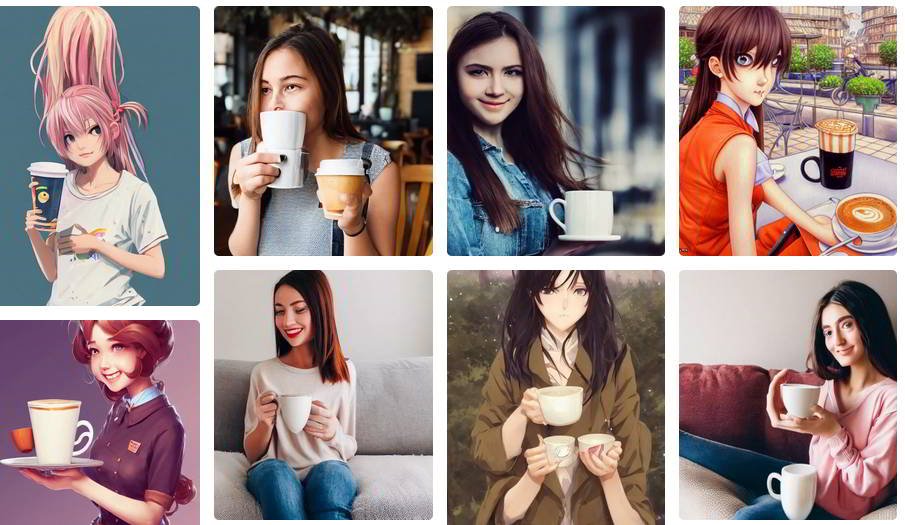
- Subject: who or what is in the picture (“a happy girl drinking coffee”).
- Setting: where it is and what’s around it (“in a sunny Mumbai cafe, rain outside the window”).
- Style: photo, watercolour, 3D, anime, oil painting, flat illustration.
- Lighting and mood: golden hour, soft studio light, cinematic, cosy.
- Shape: square for Instagram, wide (16:9) for YouTube, tall (9:16) for Stories.
Then refine. Change one thing at a time, or in ChatGPT and Gemini simply ask for edits in a follow-up message. Here’s the kind of result you can get from a detailed prompt:
Things to know before you use AI images
- Commercial use: each tool has its own terms. Most allow you to use images you create, but check before using them in ads or products, and avoid copying real brands, logos or famous characters.
- Real people: don’t create fake images of real people. Most tools block it, and it can be illegal.
- Labels: some tools add a visible or invisible watermark showing the image is AI-made. Be honest about AI images when you share them; AI detector tools are getting better at spotting them.
- Kids: the big tools now filter adult content, but smaller sites may not. If children are using AI art apps, stick to the major ones and supervise.
- Need a real photo? For genuine photos of real places and products, free stock photo sites are still a better choice.
Frequently asked questions
Which is the best free AI art generator?
For most people, ChatGPT or Google Gemini give the best results for free. Ideogram is best when you need text in the image.
Is there an AI image generator with no login?
Yes. Craiyon works without an account, and Stable Diffusion runs on your own PC without one. Almost every other quality tool now needs a free sign-up.
Is it worth paying for an AI image generator?
Only if you make lots of images. Paid plans mainly give you more images, faster speed and higher resolution. If you already pay for ChatGPT Plus, its image limits are much higher than the free plan.